RAG Pipeline Architecture
Slides + PowerPoint5 slides
Free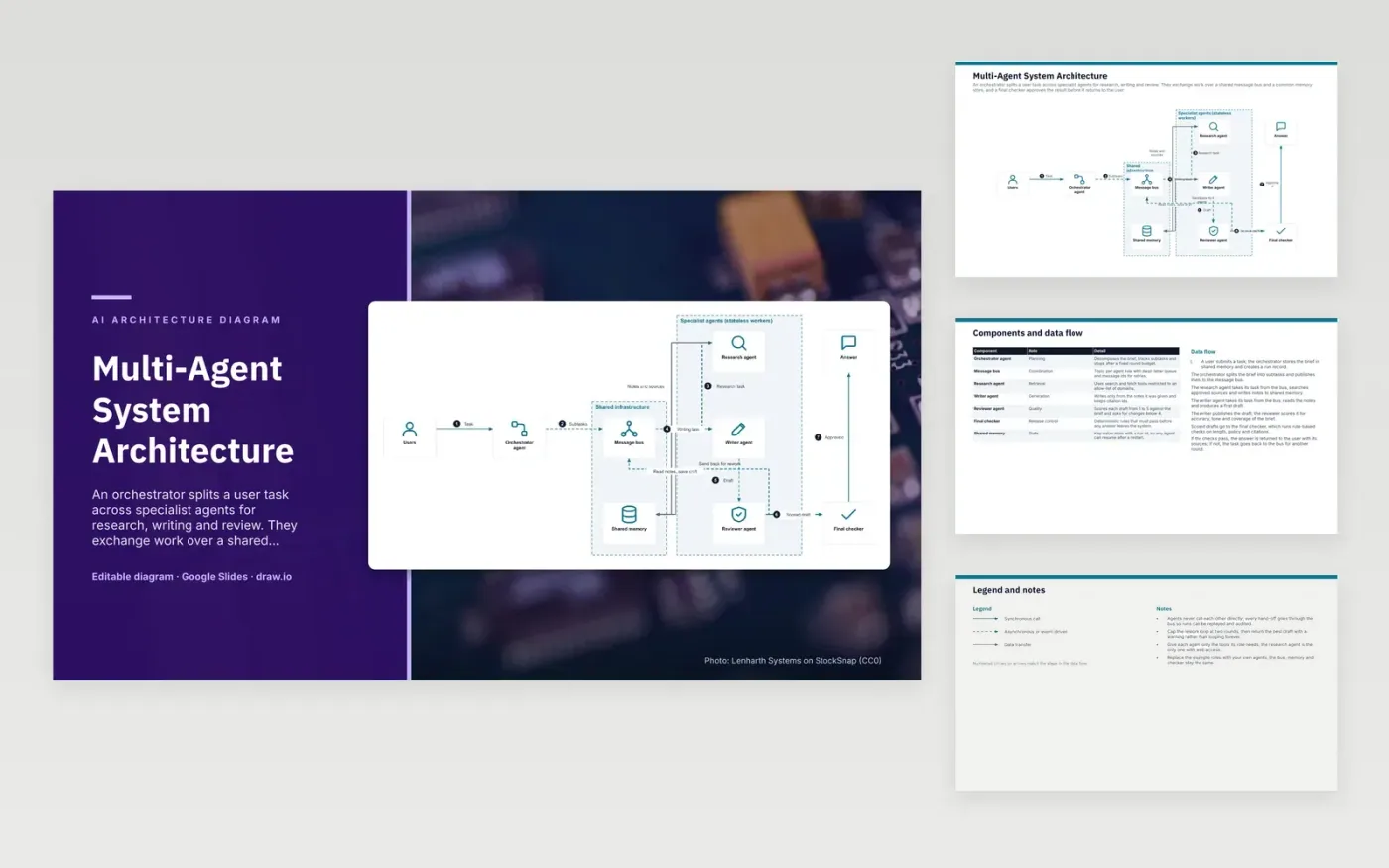
A user's task reaches the orchestrator, which stores the brief in shared memory and splits it into subtasks on the message bus. The research agent takes its task from the bus, searches approved sources and writes notes to memory. The writer agent reads those notes and publishes a draft. The reviewer scores the draft against the brief, and the final checker runs rule-based checks on length, policy and citations. Approved answers return to the user with their sources.
Agents never call each other directly, so every hand-off goes through the bus and can be replayed and audited. The rework loop is capped at two rounds, after which the best draft returns with a warning instead of looping forever. Only the research agent has web access, which limits how much untrusted content reaches the other agents. To adapt it, rename the roles to match your own agents and keep the bus, memory and checker.
Click Make a copy in Google Slides, then confirm on the Google page. The copy is saved to your own Google Drive.
Rename Users, Orchestrator agent, Message bus and the other boxes inside Specialist agents (stateless workers) to your own components, and delete the ones your system does not have.
Rewrite the 7-step data flow and the 7-row components table so they match the arrows you keep.
For the draw.io version, download multi-agent-system-architecture-diagram.drawio and open it at app.diagrams.net.
A bus stores each message with an id, so a lost message can be retried and a finished run can be replayed. It also gives you one log of every hand-off for audit. Direct calls leave no shared record and stop the run if one agent is down.
The reviewer rates each draft from 1 to 5 against the brief. A score below 4 sends the draft back for changes, so the writer gets another round. The score measures fit to the brief, and the final checker still applies its own rules.
Two agents can keep sending a draft back and forth without reaching a result, which uses tokens and time. A fixed limit ends the loop. The run then returns the best draft with a warning, so the user knows it was not fully approved.
More Google Slides templatesMore developer workflows templates
Slides + PowerPoint5 slides
Free
Slides + PowerPoint5 slides
Free
Slides + PowerPoint5 slides
Free
Slides + PowerPoint5 slides
Free
Slides + PowerPoint5 slides
Free
Slides + PowerPoint5 slides
Free
Slides + PowerPoint5 slides
Free
Slides + PowerPoint5 slides
Free
Slides + PowerPoint5 slides
Free
Slides + PowerPoint5 slides
Free
Slides + PowerPoint5 slides
Free










