RAG Pipeline Architecture
Slides + PowerPoint5 slides
Free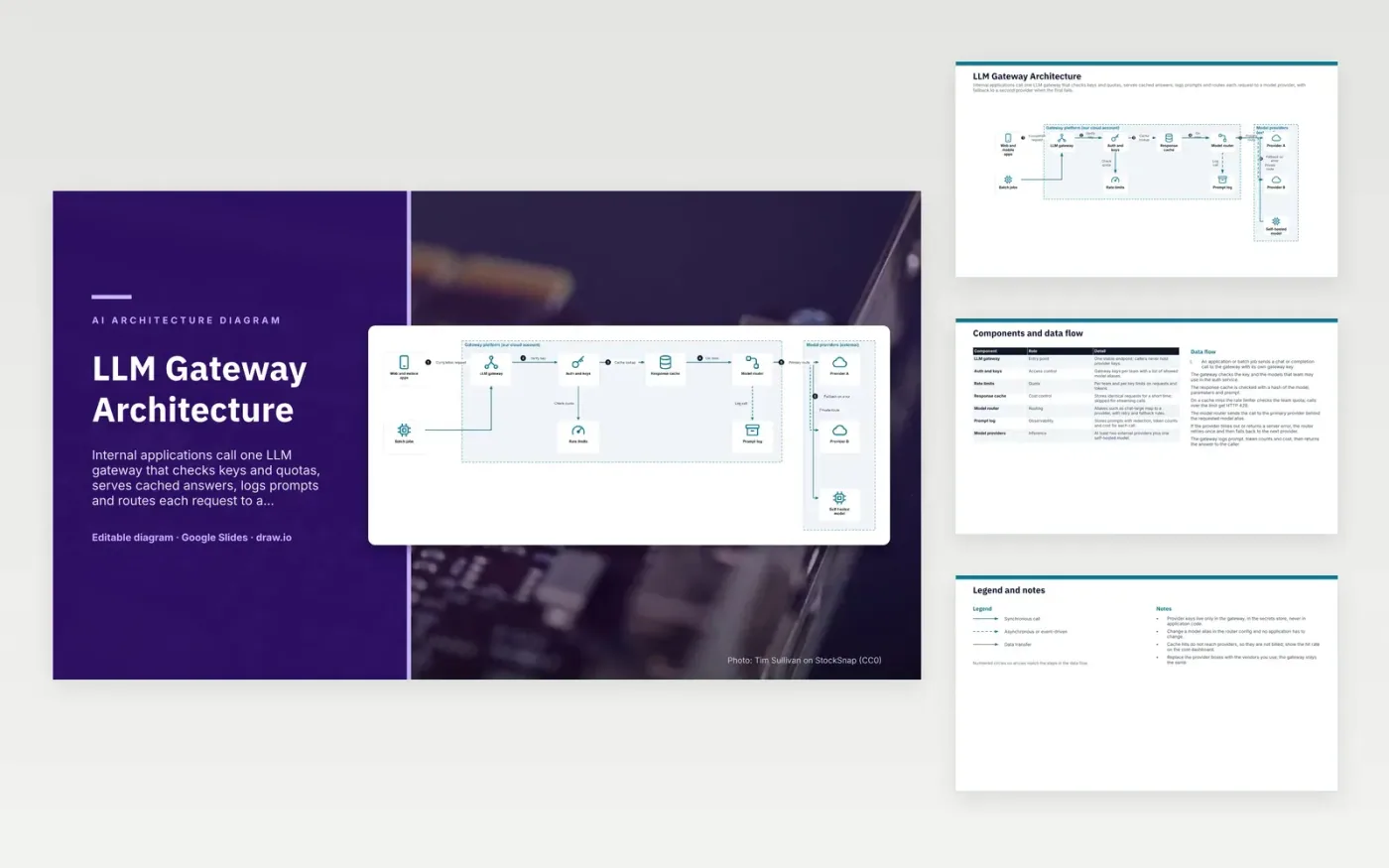
An application or batch job sends a chat or completion call to the gateway with its own gateway key. It checks the key and the team's model aliases, then looks up the response cache. On a miss, the rate limiter checks the team quota and returns HTTP 429 over the limit. The model router sends the call to the primary provider behind the alias. If it times out, the router retries once, then falls back. The gateway logs the prompt, token counts and cost, then returns the answer.
Provider keys stay inside the gateway, so application code never holds them. Changing a model alias is a router config change rather than an application release. Cache hits never reach a provider, which keeps repeated calls cheap, but streaming calls skip the cache. The self-hosted model gives sensitive data a route that stays on the company network. A single-provider deployment would drop the fallback rules and keep the key checks, quotas and prompt logging.
Click Make a copy in Google Slides, then confirm on the Google page. The copy is saved to your own Google Drive.
Rename Web and mobile apps, Batch jobs, LLM gateway and the other boxes inside Gateway platform (our cloud account) to your own components, and delete the ones your system does not have.
Rewrite the 7-step data flow and the 7-row components table so they match the arrows you keep.
For the draw.io version, download llm-gateway-architecture-diagram.drawio and open it at app.diagrams.net.
A cache hit returns a stored answer without calling a model provider, so no provider charge is made for that request. The gateway still records the call in its logs. An exact-match cache only helps when prompts repeat exactly, so the hit rate is worth tracking on the cost dashboard.
Fallback sends a request to a second provider when the first one fails or times out. Routing rules set the order and how many retries happen first. The caller gets an answer from the backup without changing its code, though the wording may differ.
Prompts often contain personal data, customer details or secrets pasted by users. Redaction removes or masks those values before the log is stored. Without it, the log becomes a sensitive data store that needs the same protection as the source systems.
More Google Slides templatesMore developer workflows templates
Slides + PowerPoint5 slides
Free
Slides + PowerPoint5 slides
Free
Slides + PowerPoint5 slides
Free
Slides + PowerPoint5 slides
Free
Slides + PowerPoint5 slides
Free
Slides + PowerPoint5 slides
Free
Slides + PowerPoint5 slides
Free
Slides + PowerPoint5 slides
Free
Slides + PowerPoint5 slides
Free
Slides + PowerPoint5 slides
Free
Slides + PowerPoint5 slides
Free










