RAG Pipeline Architecture
Slides + PowerPoint5 slides
Free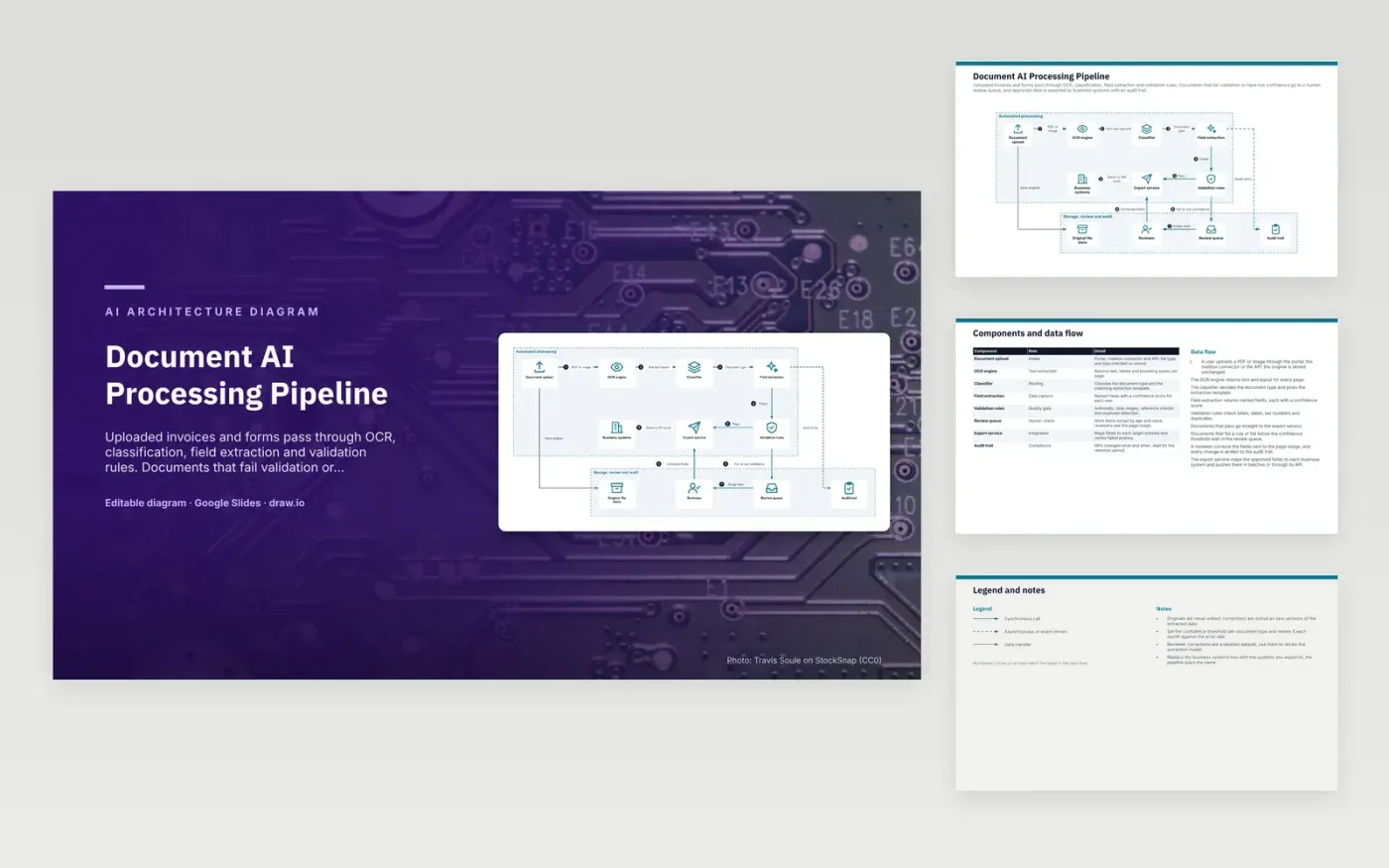
A user uploads a PDF or image through the portal, the mailbox connector or the API, and the original is saved unchanged. The OCR engine returns text and layout for each page. The classifier picks the document type and its extraction template, and field extraction returns named fields with confidence scores. Validation rules check totals, dates, tax numbers and duplicates. Documents that pass go to the export service.
Documents that fail a rule or fall below the confidence threshold wait in the review queue, where a reviewer corrects fields beside the page image. Every change is written to the audit trail, and corrections are stored as new versions, so originals are never edited. Reviewer corrections also make a labelled dataset for retraining. Set the threshold per document type and check it monthly against the error rate.
Click Make a copy in Google Slides, then confirm on the Google page. The copy is saved to your own Google Drive.
Rename Document upload, Original file store, OCR engine and the other boxes inside Automated processing to your own components, and delete the ones your system does not have.
Rewrite the 9-step data flow and the 8-row components table so they match the arrows you keep.
For the draw.io version, download document-ai-processing-pipeline-diagram.drawio and open it at app.diagrams.net.
It is the model's estimate of how sure it is that the value it found is correct. Fields below the threshold go to a reviewer rather than straight to export. The threshold is a setting you tune against your real error rate.
The original is the evidence for every extracted value. If a field is wrong, a reviewer or auditor can check it against the source page. Unchanged originals also let you run OCR again with a better engine later.
Rules catch arithmetic errors, impossible dates, invalid tax numbers and duplicate invoices before they reach the ledger. Fixing a bad value in the queue is cheaper than reversing a posted entry. Documents that fail go to review instead of export.
More Google Slides templatesMore developer workflows templates
Slides + PowerPoint5 slides
Free
Slides + PowerPoint5 slides
Free
Slides + PowerPoint5 slides
Free
Slides + PowerPoint5 slides
Free
Slides + PowerPoint5 slides
Free
Slides + PowerPoint5 slides
Free
Slides + PowerPoint5 slides
Free
Slides + PowerPoint5 slides
Free
Slides + PowerPoint5 slides
Free
Slides + PowerPoint5 slides
Free
Slides + PowerPoint5 slides
Free










