
Market Research Report
Docs + Word6 pages
Free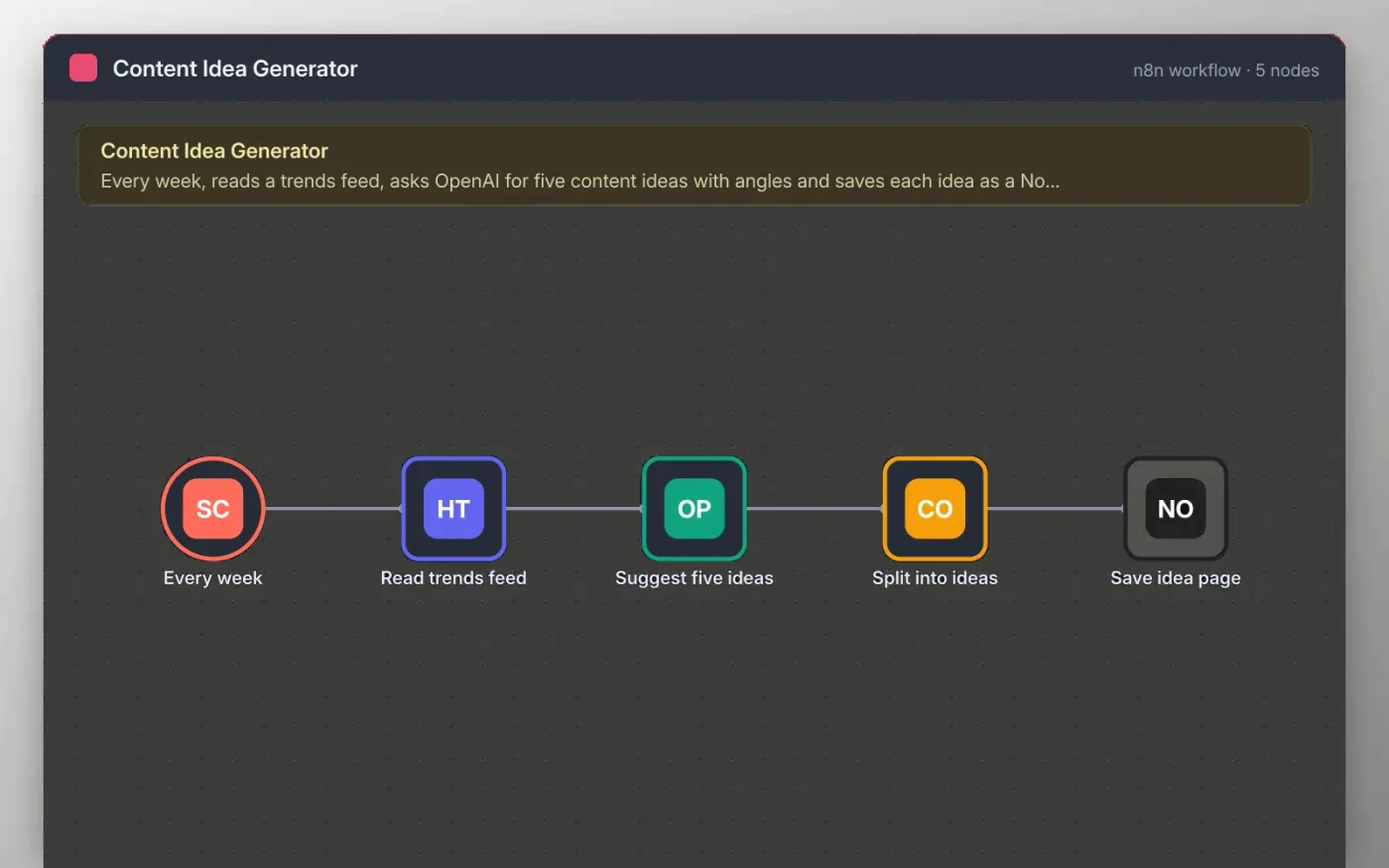
This workflow runs once a week and fetches a trends or news RSS feed over HTTP. The first part of the feed goes to OpenAI, which proposes five ideas, each with a headline, an angle and a target keyword.
A Code node splits the reply into five items, and Notion creates one page per idea in your content database, with the angle and keyword in the body. You decide which ideas to write.
Download the workflow JSON.
In n8n, create a workflow, open the … menu, choose Import from File and select the JSON.
Replace the feed URL on Read trends feed with a feed you are allowed to use and connect OpenAI on Suggest five ideas.
Connect Notion on Save idea page and pick your content database, which needs title and text columns.
Run the workflow once, check the new pages, then activate.
The workflow is free. OpenAI and Notion usage follow their own plans in your accounts.
No. The file has no keys or tokens. You connect your own OpenAI and Notion accounts after importing.
It keeps the prompt short and the cost low. Raise the number in the expression if you want more context.
Docs + Word6 pages
Free
Google Sheets
Free
n8n
Free
n8n
Free
n8n
Free
n8n
Free
n8n
Free
n8n
Free








