
Project Proposal
Docs + Word5 pages
Free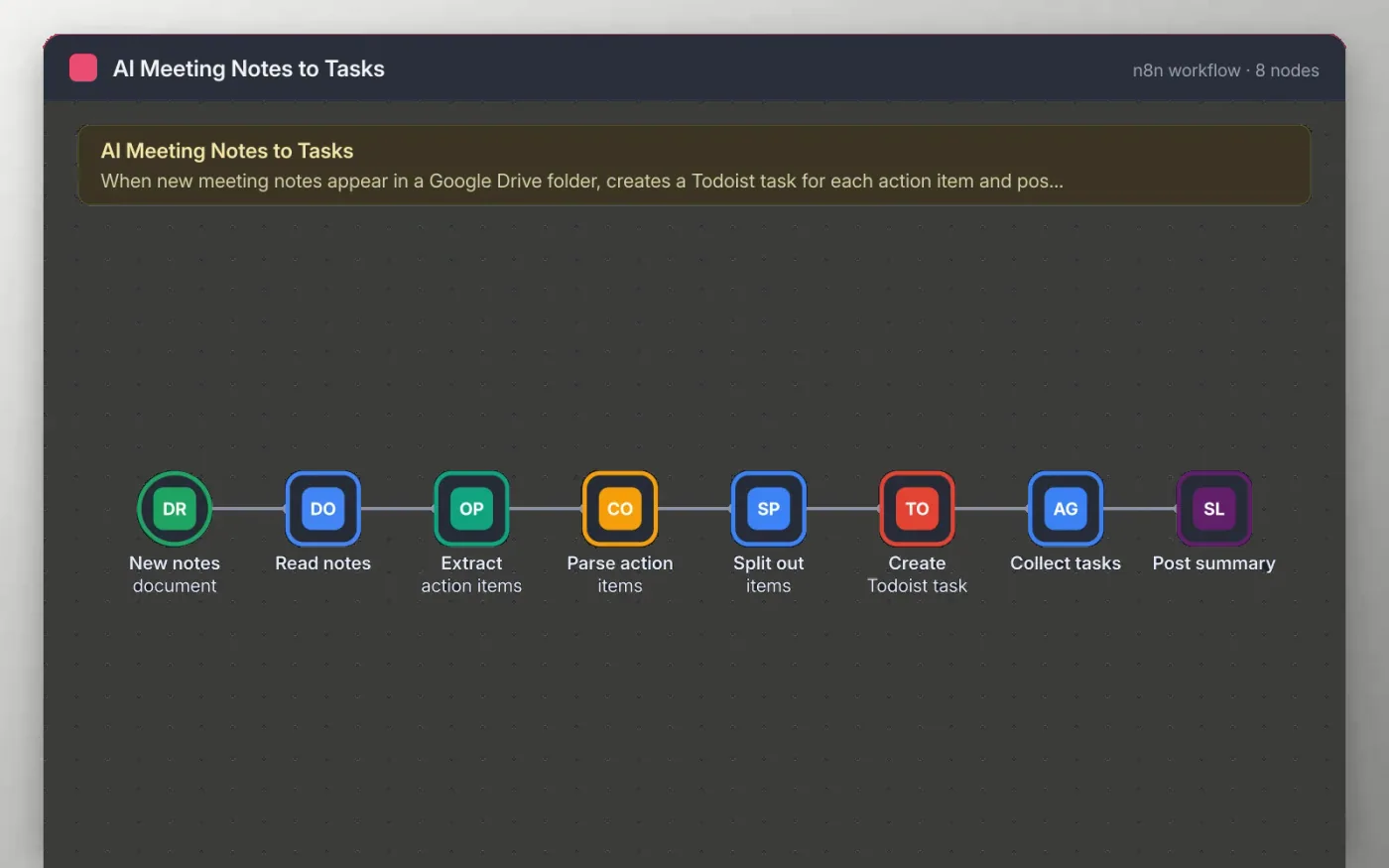
This workflow watches a Google Drive folder for new notes documents. It reads the text with Google Docs and asks OpenAI to list the action items, each with a task, an owner and a due date when the notes give one.
A Code node checks the reply and turns it into one item per task. Each task becomes a Todoist task, and a single Slack message at the end says how many were created and from which notes.
Download the workflow JSON.
In n8n, create a workflow, open the … menu, choose Import from File and select the JSON.
Connect Google Drive on the trigger and pick the notes folder, then connect Google Docs and OpenAI.
Connect Todoist and choose the project, then connect Slack and pick the channel.
Save a test notes document in the folder, check the tasks and the Slack message, then activate.
The workflow is free. OpenAI usage is billed by OpenAI to your own account.
No. The file has no keys or tokens. You connect your own Google, OpenAI, Todoist and Slack accounts after importing.
The model returns an empty list, no tasks are created and the Slack message is not sent.
Docs + Word5 pages
Free
Slides + PowerPoint11 slides
Free
Docs + Word6 pages
Free
n8n
Free
n8n
Free
n8n
Free
n8n
Free
n8n
Free









