
Market Research Report
Docs + Word6 pages
Free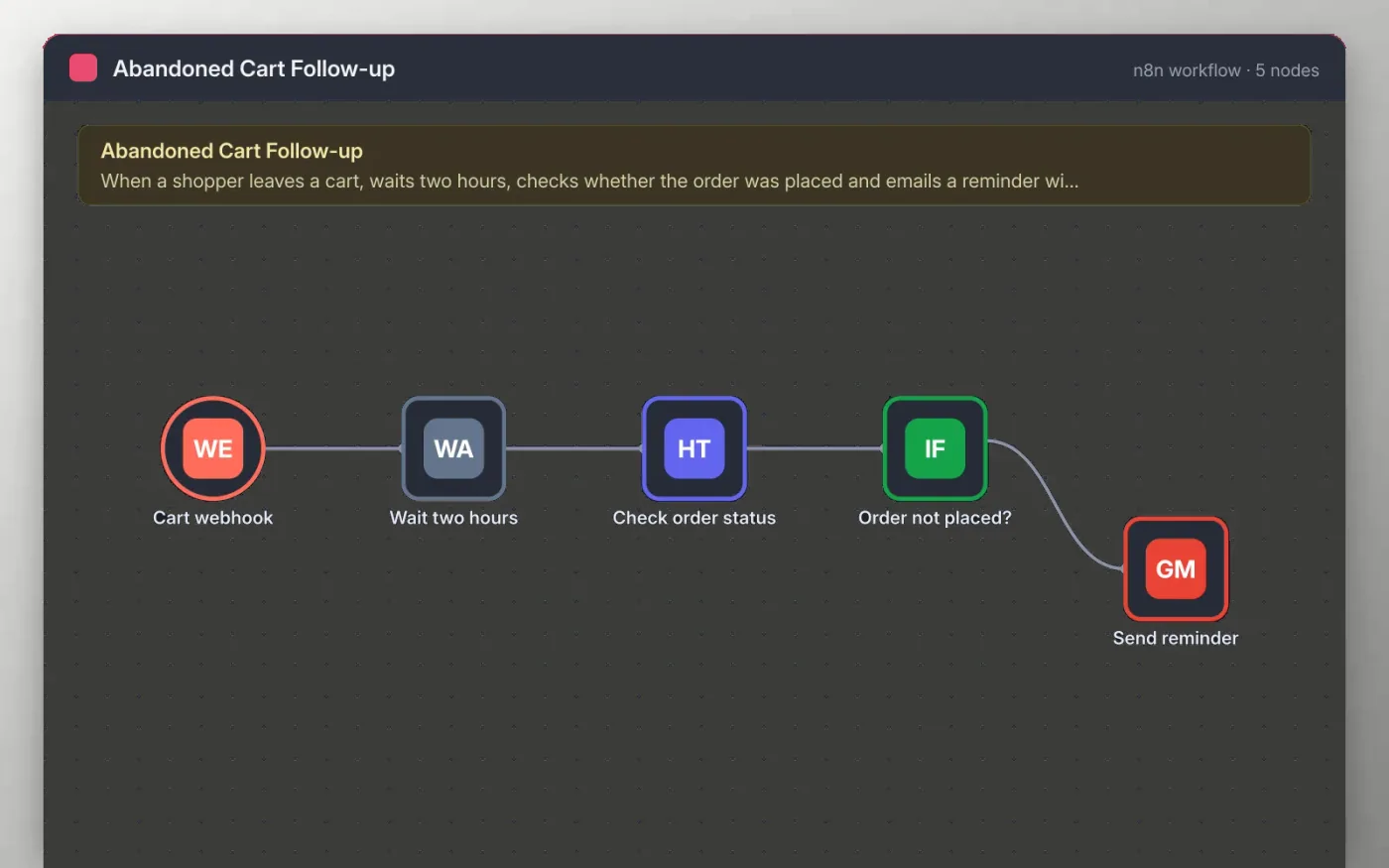
Your store posts to a webhook when a cart is abandoned, with the customer's email, the cart ID and a link back to the cart. The workflow waits two hours, giving the shopper time to finish on their own.
After the wait, it asks your store whether an order exists for that cart. If none does, Gmail sends a short reminder with the cart link. Shoppers who already ordered get nothing, so the reminder never reaches a finished sale.
Download the workflow JSON.
In n8n, create a workflow, open the … menu, choose Import from File and select the JSON.
Replace the example order lookup URL on Check order status with your store's endpoint and add its authentication.
Connect Gmail on Send reminder and check the wording.
Send a test cart, check the reminder, then activate and paste the production webhook URL into your store.
Yes. Download the JSON and import it into your own n8n. There is no sign-up and no cost.
No. The file has no keys or tokens. Add your own store endpoint and Gmail account after importing.
Yes. Add a second Wait node after Send reminder, then another check of the order status before the final email.
Docs + Word6 pages
Free
Google Sheets
Free
Slides + PowerPoint10 slides
Free
n8n
Free
n8n
Free
n8n
Free








