Acceptable Use Policy
Docs + Word7 pages
Free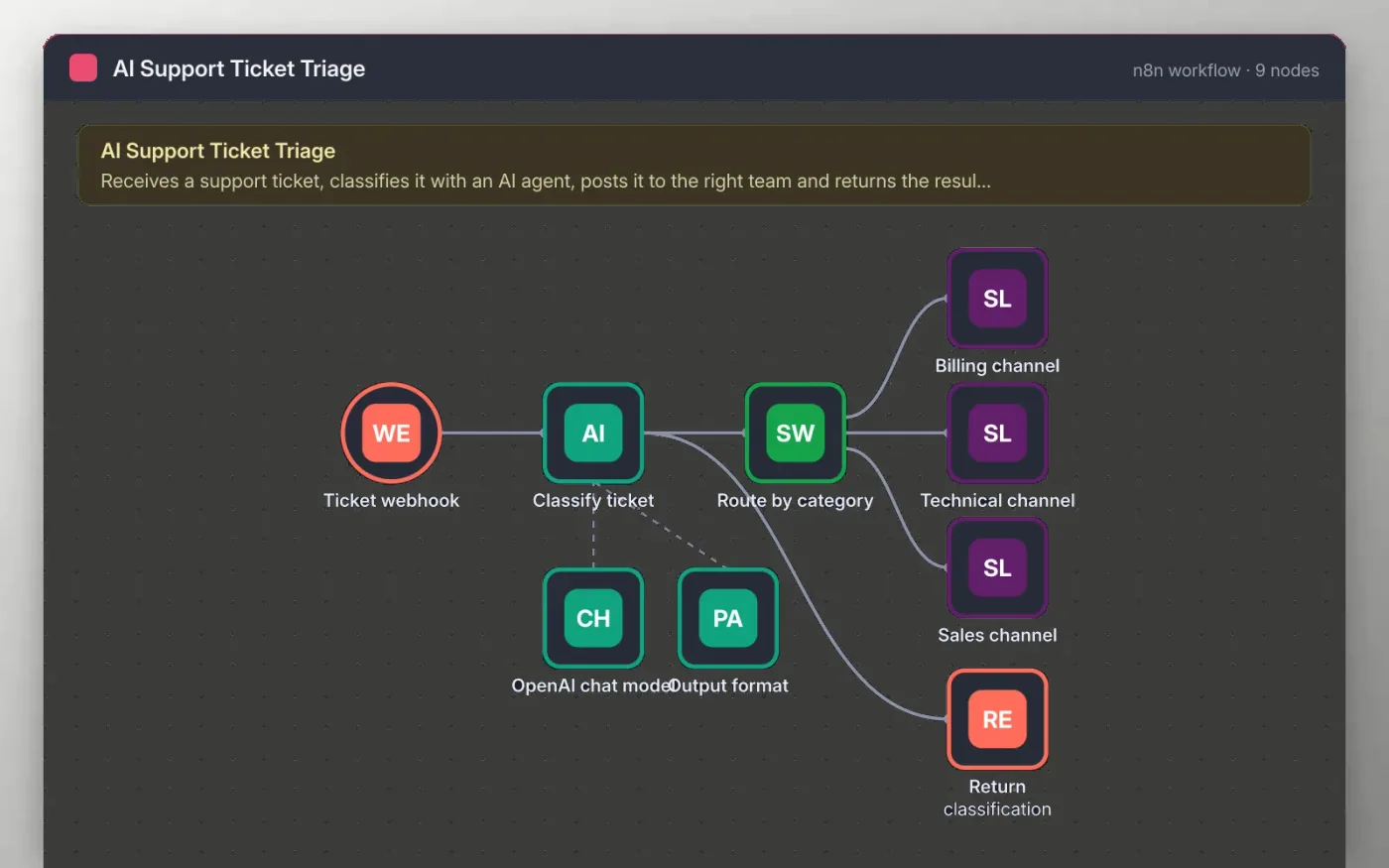
This workflow starts with a webhook that accepts a ticket with a subject and message. An AI agent reads the ticket and, through a structured output format, returns one category, one priority and a one-sentence summary every time.
A Switch node posts the ticket to the billing, technical or sales Slack channel. The same classification is returned to the caller through a Respond to Webhook node, so your help form can show it or store it.
Download the workflow JSON.
In n8n, create a workflow, open the … menu, choose Import from File and select the JSON.
Connect OpenAI on the chat model node and choose a model.
Connect Slack on the three channel nodes and pick a channel for each team.
Send a test ticket to the webhook test URL, check the Slack message and the response, then activate.
The workflow is free. OpenAI usage is billed by OpenAI to your own account.
No. The file has no keys or tokens. You connect your own OpenAI and Slack accounts after importing.
It still gets a response from the webhook, but no Slack message is posted. Add a fourth Switch output if you need one.
Docs + Word7 pages
Free
Docs + Word8 pages
Free
n8n
Free
n8n
Free
n8n
Free
n8n
Free
n8n
Free