Acceptable Use Policy
Docs + Word7 pages
Free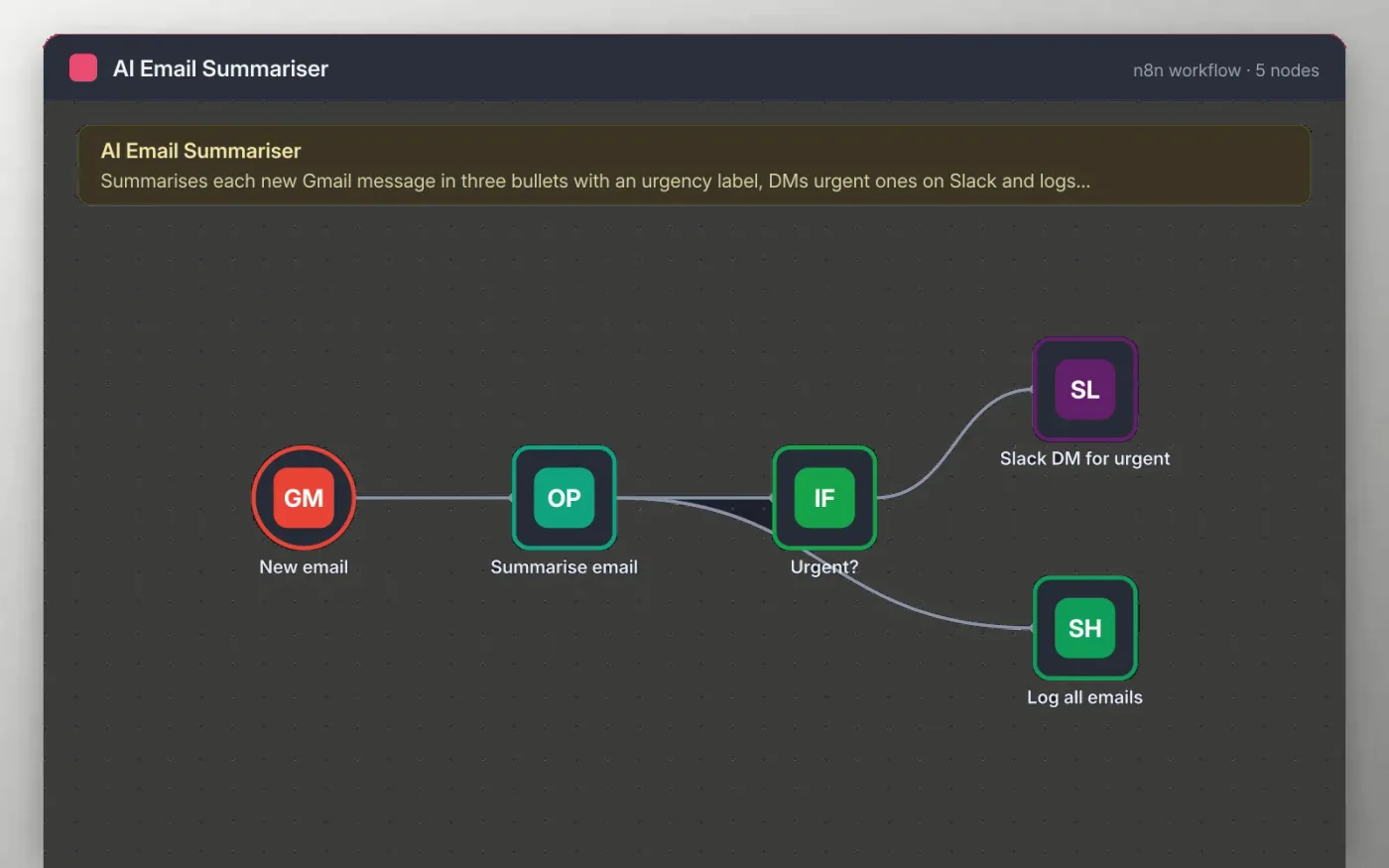
This workflow checks your inbox for new messages. OpenAI reads the sender, subject and opening text, then writes three bullets and one urgency line: high, normal or low.
Messages marked high are sent to you as a Slack direct message. Every email, urgent or not, is also written to a Google Sheet, so you have a searchable log of what came in and what it was about.
Download the workflow JSON.
In n8n, create a workflow, open the … menu, choose Import from File and select the JSON.
Connect Gmail on New email, OpenAI on Summarise email, Slack on Slack DM for urgent and Google Sheets on Log all emails.
Pick the Slack user to receive urgent messages and the sheet for the log.
Send yourself a test email, check the summary and the sheet row, then activate.
The workflow is free. OpenAI usage is billed by OpenAI to your own account, usually a few cents for hundreds of emails.
No. The file has no keys or tokens. You connect your own OpenAI, Gmail, Slack and Google accounts after importing.
It reads new messages that arrive in the INBOX label after the workflow is active. Change the filter on New email to narrow it.
Docs + Word7 pages
Free
Docs + Word8 pages
Free
n8n
Free
n8n
Free
n8n
Free
n8n
Free
n8n
Free