AWS Three-Tier Web Architecture
Slides + PowerPoint5 slides
Free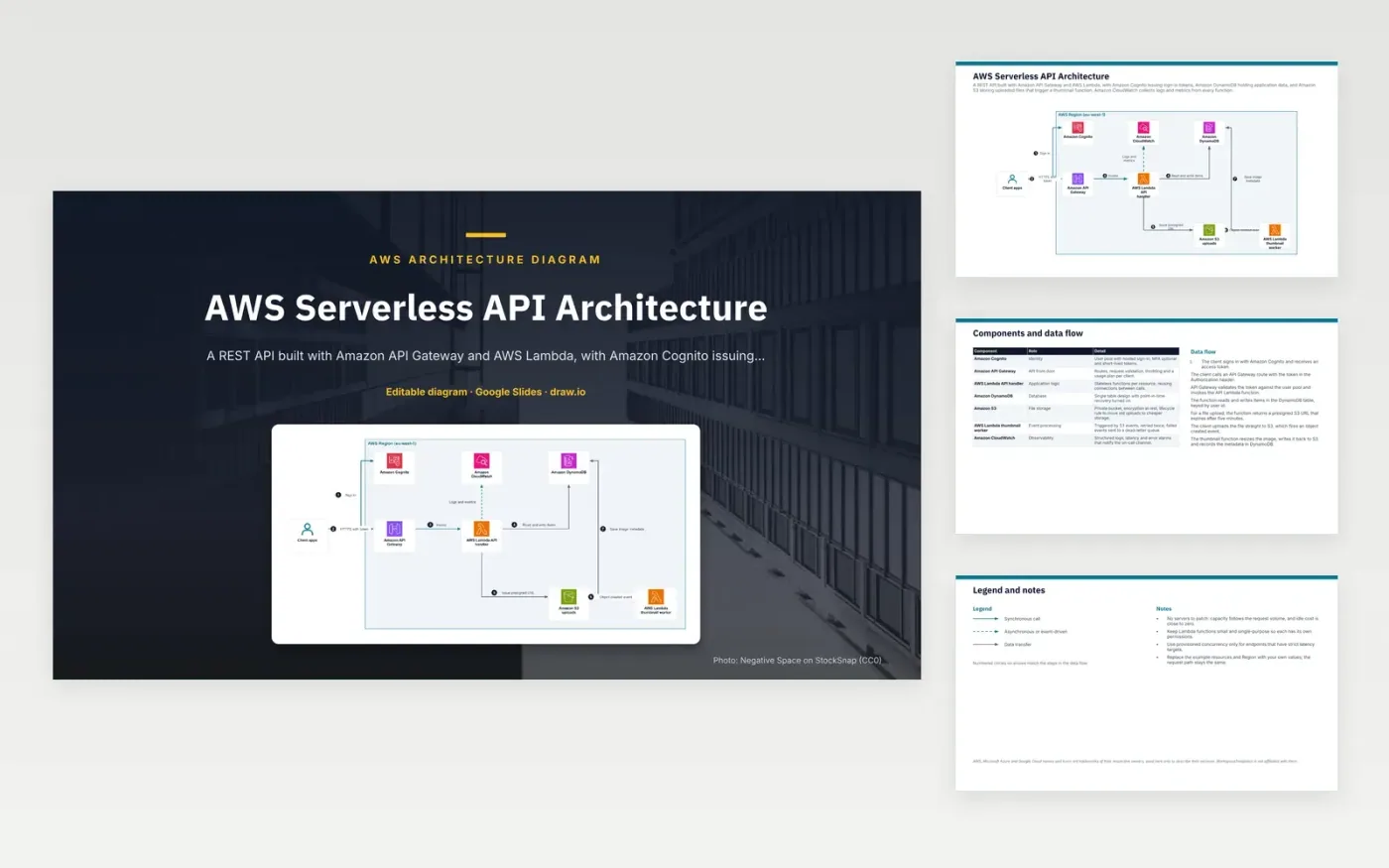
A client signs in with Amazon Cognito and calls an API Gateway route with the token. API Gateway checks the token against the user pool and invokes the API Lambda function. The function reads and writes items in DynamoDB, keyed by user id. For a file upload, it returns a presigned S3 URL that expires after five minutes. The client sends the file straight to S3, and the object created event starts the thumbnail function, which saves the image metadata to DynamoDB.
The design point is that file bytes never pass through the API. The function only issues a short-lived URL, so large uploads do not use function time or hit API payload limits. Each function has small, separate permissions, and the thumbnail worker retries twice before sending failed events to a dead-letter queue. To adapt it, swap in your own resources and Region, and add provisioned concurrency only on endpoints with strict latency targets.
The diagram uses the official AWS architecture icons, each labelled with its service name. AWS, Microsoft Azure and Google Cloud names and icons are trademarks of their respective owners, used here only to describe their services. WorkspaceTemplates is not affiliated with them.
Click Make a copy in Google Slides, then confirm on the Google page. The copy is saved to your own Google Drive.
Rename Client apps, Amazon Cognito, Amazon API Gateway and the other boxes inside AWS Region (eu-west-1) to your own components, and delete the ones your system does not have.
Rewrite the 7-step data flow and the 7-row components table so they match the arrows you keep.
For the draw.io version, download aws-serverless-api-architecture-diagram.drawio and open it at app.diagrams.net.
A presigned URL lets the client send the file directly to S3 for a limited time. The file never passes through API Gateway or Lambda, so large uploads do not add to function run time or hit API payload limits. The example URL expires after five minutes.
The thumbnail worker retries twice. If the event still fails, it goes to a dead-letter queue, where it is kept for inspection instead of being dropped. The cause can then be fixed and the events reprocessed.
In this design, API Gateway checks the Cognito token against the user pool before it invokes the function. The handler therefore only receives requests that already carry a valid token.
More Google Slides templatesMore developer workflows templates
Slides + PowerPoint5 slides
Free
Slides + PowerPoint5 slides
Free
Slides + PowerPoint5 slides
Free
Slides + PowerPoint5 slides
Free
Slides + PowerPoint5 slides
Free
Slides + PowerPoint5 slides
Free
Slides + PowerPoint5 slides
Free
Slides + PowerPoint5 slides
Free
Slides + PowerPoint5 slides
Free










