AWS Three-Tier Web Architecture
Slides + PowerPoint5 slides
Free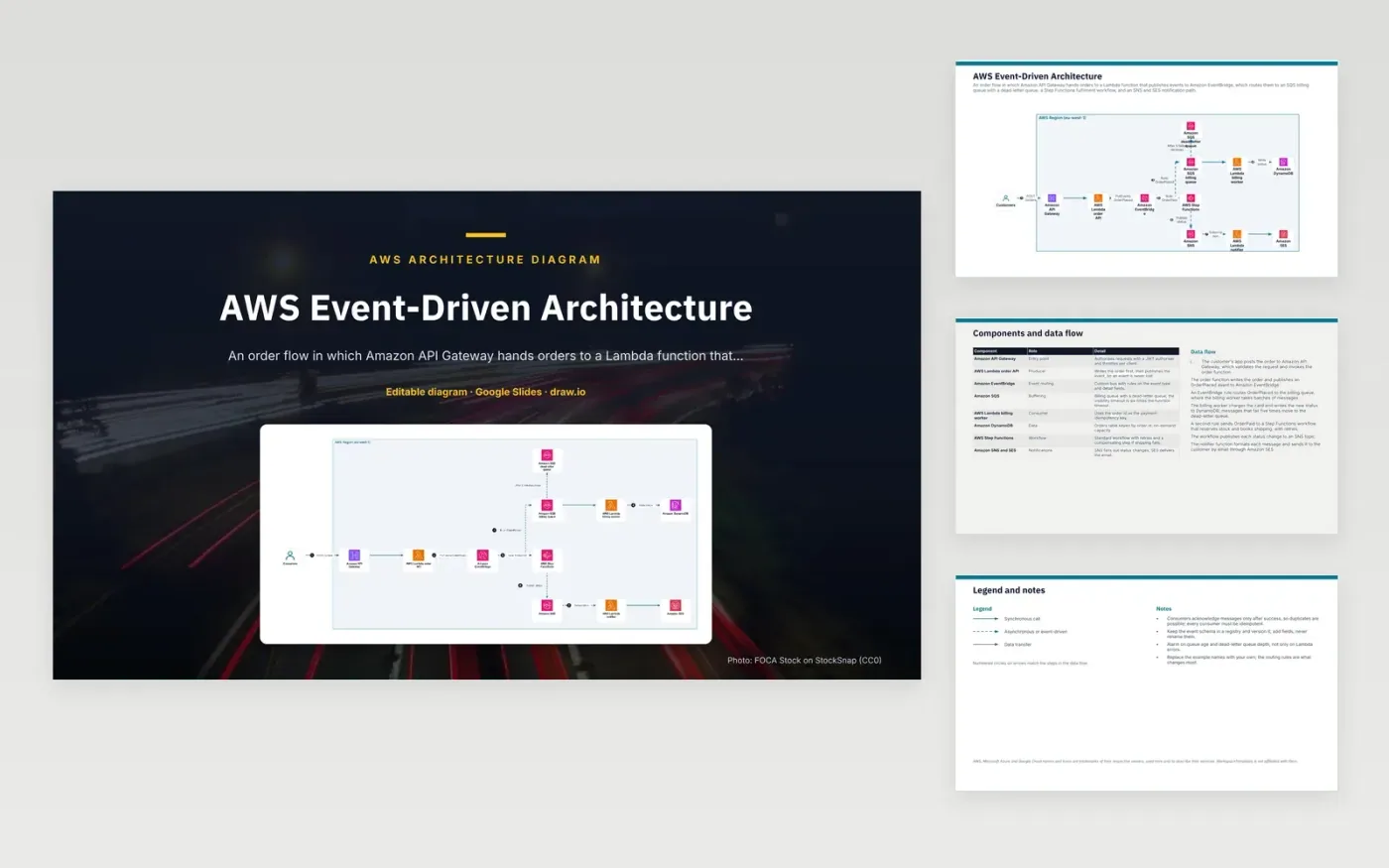
A customer's app posts an order to Amazon API Gateway, which validates the request and invokes the order Lambda function. That function writes the order and publishes an OrderPlaced event to a custom EventBridge bus. A rule sends the event to an SQS billing queue, where the billing worker charges the card and writes the status to DynamoDB. A second rule sends OrderPaid to a Step Functions workflow, which publishes status changes to SNS, and a notifier sends the email through SES.
The order function writes the order before it publishes OrderPlaced, so the database holds every order that an event describes. Consumers can receive a message more than once after a failure, so the billing worker uses the order id as its payment idempotency key. Messages that fail five times move to a dead-letter queue. Teams extending this should version the event schema, add fields rather than rename them, and alarm on queue age and dead-letter depth.
The diagram uses the official AWS architecture icons, each labelled with its service name. AWS, Microsoft Azure and Google Cloud names and icons are trademarks of their respective owners, used here only to describe their services. WorkspaceTemplates is not affiliated with them.
Click Make a copy in Google Slides, then confirm on the Google page. The copy is saved to your own Google Drive.
Rename Customers, Amazon API Gateway, AWS Lambda order API and the other boxes inside AWS Region (eu-west-1) to your own components, and delete the ones your system does not have.
Rewrite the 7-step data flow and the 8-row components table so they match the arrows you keep.
For the draw.io version, download aws-event-driven-architecture-diagram.drawio and open it at app.diagrams.net.
A message that fails five receives moves to the dead-letter queue, so a poison message does not keep returning to the billing queue. Engineers can inspect those messages, fix the cause and replay them. Alarm on the dead-letter depth so failures do not go unnoticed.
Consumers acknowledge a message only after it succeeds, so a retry can deliver the same event twice. An idempotent consumer, such as the billing worker keyed on order id, gives the same result on a repeat.
It provides retries, tracked state and a compensating step, such as undoing a stock reservation if shipping fails. Each run's history is visible, which makes failures easier to diagnose than a chain of functions calling one another.
More Google Slides templatesMore developer workflows templates
Slides + PowerPoint5 slides
Free
Slides + PowerPoint5 slides
Free
Slides + PowerPoint5 slides
Free
Slides + PowerPoint5 slides
Free
Slides + PowerPoint5 slides
Free
Slides + PowerPoint5 slides
Free
Slides + PowerPoint5 slides
Free
Slides + PowerPoint5 slides
Free
Slides + PowerPoint5 slides
Free










