AWS Three-Tier Web Architecture
Slides + PowerPoint5 slides
Free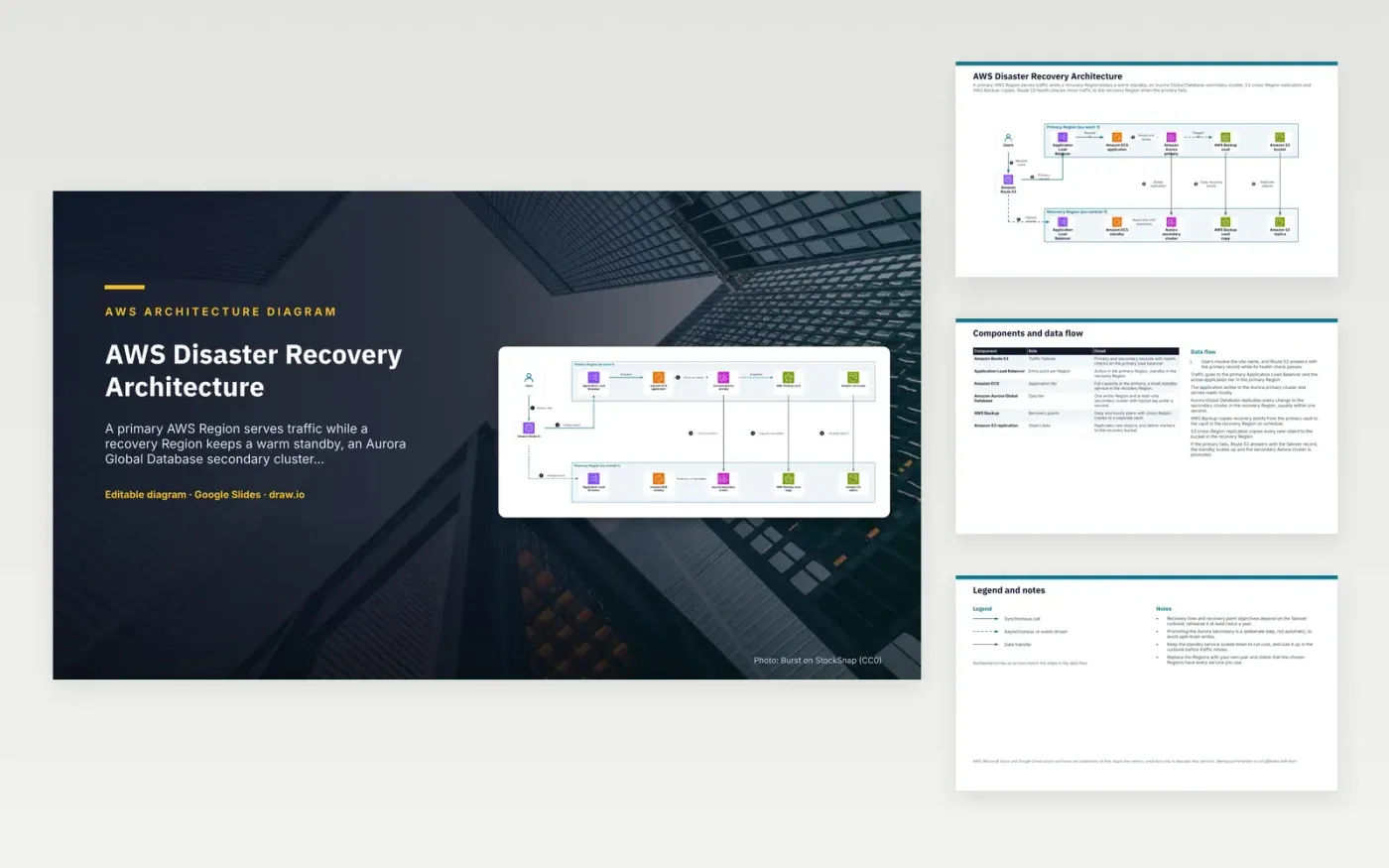
Users resolve the site name through Amazon Route 53, which answers with the primary record while its health check passes. Requests reach the Application Load Balancer and the active ECS service in the primary Region. The application writes to the Aurora writer cluster and reads locally. Aurora Global Database copies each change to a read-only secondary cluster in the recovery Region, usually within a second. AWS Backup and S3 cross-Region replication copy recovery points and new objects on their own schedules.
The recovery Region is a deliberate design choice. The Aurora secondary stays read-only until someone promotes it, which stops two Regions accepting writes at once. The standby ECS service runs small to limit cost and is scaled up in the runbook before traffic moves. A team with a tighter recovery point target would shorten the backup plans and rehearse the runbook at least twice a year.
The diagram uses the official AWS architecture icons, each labelled with its service name. AWS, Microsoft Azure and Google Cloud names and icons are trademarks of their respective owners, used here only to describe their services. WorkspaceTemplates is not affiliated with them.
Click Make a copy in Google Slides, then confirm on the Google page. The copy is saved to your own Google Drive.
Rename Users, Amazon Route 53, Application Load Balancer and the other boxes inside Primary Region (eu-west-1) to your own components, and delete the ones your system does not have.
Rewrite the 7-step data flow and the 6-row components table so they match the arrows you keep.
For the draw.io version, download aws-disaster-recovery-architecture-diagram.drawio and open it at app.diagrams.net.
An Aurora Global Database secondary serves reads only while the primary Region is healthy. Promoting it is a deliberate step, so two Regions do not take writes at the same time. The trade-off is a short, planned pause before writes resume after a failover.
S3 replication copies each new object to the recovery bucket soon after it is written. AWS Backup copies recovery points on a schedule, so you can restore an earlier version. Replication also copies deletes and overwrites, so it does not protect against them alone.
Route 53 checks the health of the primary endpoint at set intervals. When the check fails, it stops answering with the primary record and returns the secondary failover record. Users reach the recovery Region once their DNS caches expire.
More Google Slides templatesMore developer workflows templates
Slides + PowerPoint5 slides
Free
Slides + PowerPoint5 slides
Free
Slides + PowerPoint5 slides
Free
Slides + PowerPoint5 slides
Free
Slides + PowerPoint5 slides
Free
Slides + PowerPoint5 slides
Free
Slides + PowerPoint5 slides
Free
Slides + PowerPoint5 slides
Free
Slides + PowerPoint5 slides
Free










