AWS Three-Tier Web Architecture
Slides + PowerPoint5 slides
Free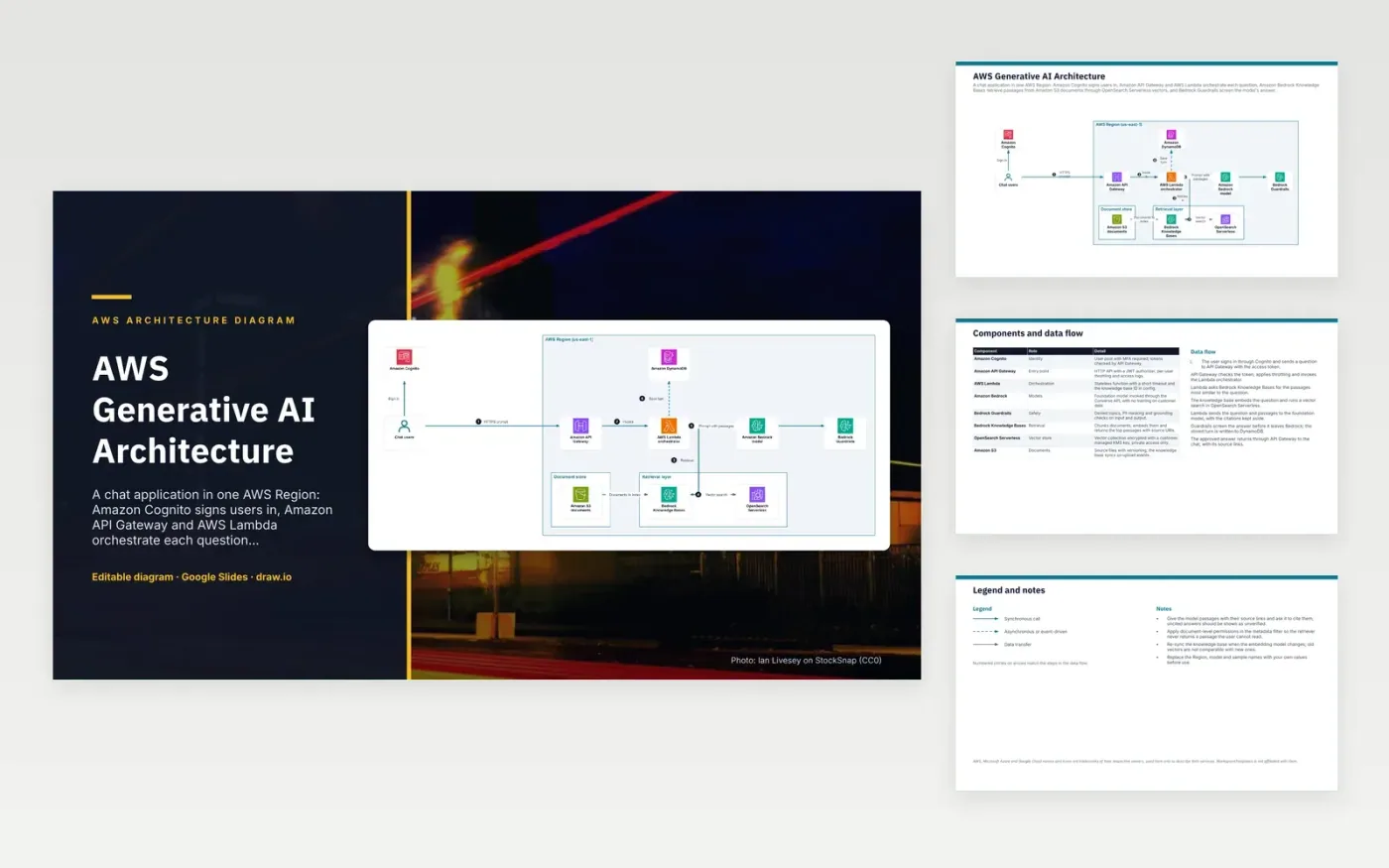
A user signs in with Amazon Cognito and sends a question through Amazon API Gateway, which checks the token and invokes an AWS Lambda orchestrator. The orchestrator asks Bedrock Knowledge Bases for matching passages. The knowledge base runs a vector search in OpenSearch Serverless over documents indexed from Amazon S3. Lambda sends the question and passages to the Bedrock model, Guardrails screen the answer, and it returns with its source links. The turn is saved to DynamoDB.
Retrieval is where access control matters. The retriever applies document-level permissions as a metadata filter, so it never returns a passage the user cannot read. Source links make answers checkable, and an answer without citations should be shown as unverified. Re-sync the index when the embedding model changes, because old vectors cannot be compared with new ones. To adapt it, use your own Region, model and document sources, and keep the permission filter in the retrieval step.
The diagram uses the official AWS architecture icons, each labelled with its service name. AWS, Microsoft Azure and Google Cloud names and icons are trademarks of their respective owners, used here only to describe their services. WorkspaceTemplates is not affiliated with them.
Click Make a copy in Google Slides, then confirm on the Google page. The copy is saved to your own Google Drive.
Rename Chat users, Amazon Cognito, Amazon API Gateway and the other boxes inside AWS Region (us-east-1) to your own components, and delete the ones your system does not have.
Rewrite the 7-step data flow and the 8-row components table so they match the arrows you keep.
For the draw.io version, download aws-generative-ai-architecture-diagram.drawio and open it at app.diagrams.net.
It chunks and embeds your documents, then returns the most similar passages for each question. The model answers from those passages rather than only its training data, which makes answers easier to check against sources.
If permissions are checked only after retrieval, the model may already have seen text the user should not read. Filtering on document permissions at query time keeps those passages out of the prompt.
Vectors from different embedding models are not comparable, so similarity scores would be wrong. Re-embedding all documents with the new model keeps retrieval consistent.
More Google Slides templatesMore developer workflows templates
Slides + PowerPoint5 slides
Free
Slides + PowerPoint5 slides
Free
Slides + PowerPoint5 slides
Free
Slides + PowerPoint5 slides
Free
Slides + PowerPoint5 slides
Free
Slides + PowerPoint5 slides
Free
Slides + PowerPoint5 slides
Free
Slides + PowerPoint5 slides
Free
Slides + PowerPoint5 slides
Free










