
Market Research Report
Docs + Word6 pages
Free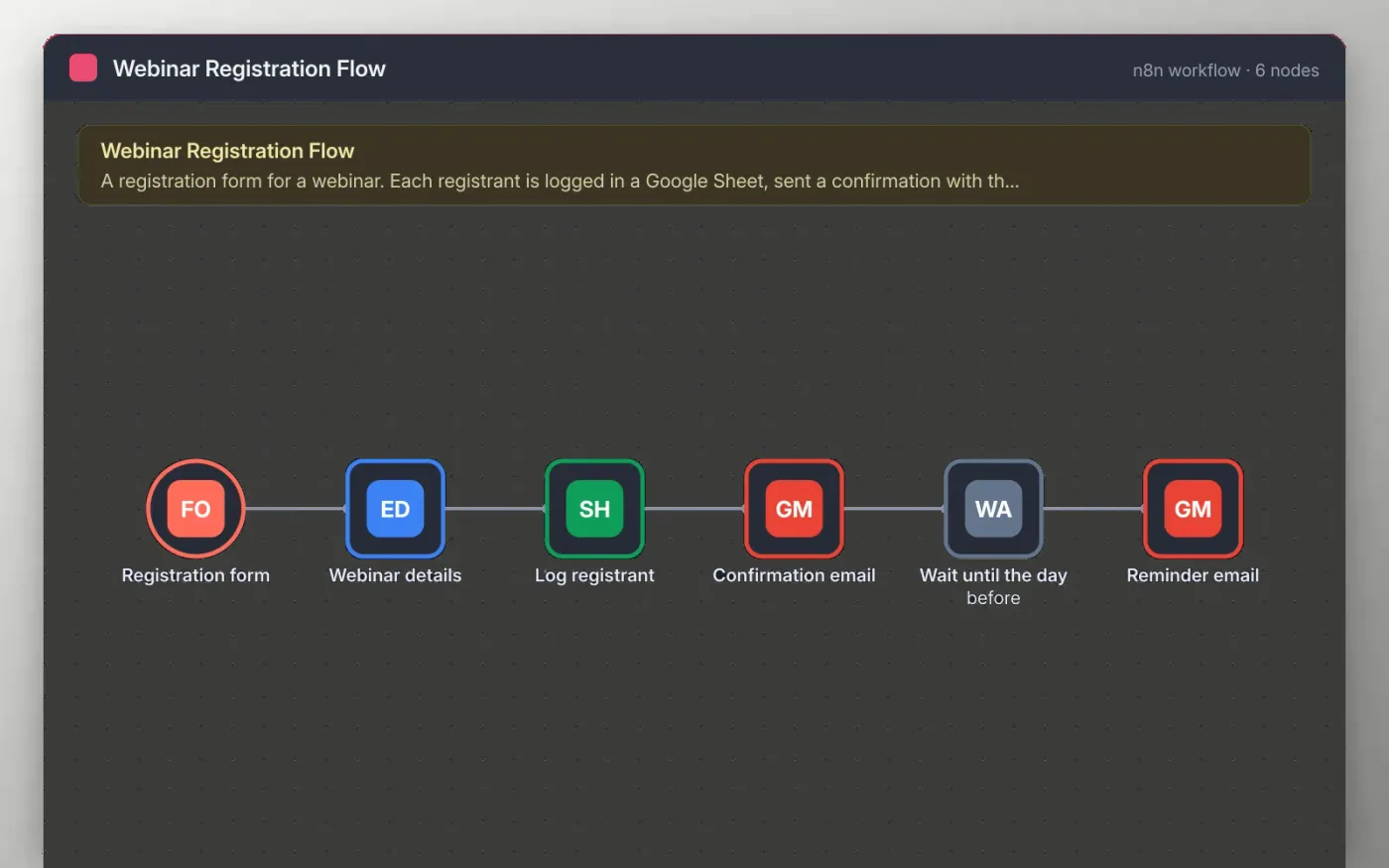
A registration form collects name, email and company. The details are cleaned and the webinar title, date and join link are added from the Webinar details node, so you change them in one place.
The registrant is logged in a Google Sheet and sent a confirmation email. The workflow then waits until the day before the webinar and sends a reminder with the same join link.
Download the workflow JSON.
In n8n, create a workflow, open the … menu, choose Import from File and select the JSON.
Set the webinar date, title and join link on the Webinar details node.
Connect Google Sheets and Gmail, and pick your registrant sheet.
Register with an address you own, check both emails, then activate and share the production form URL.
Yes. Download the JSON and import it into your own n8n. There is no sign-up and no cost.
No. The file has no keys or tokens. Connect your own Google Sheets and Gmail accounts after importing.
Yes, but it holds one date at a time. Change the Webinar details node before each event, or copy the workflow for each series.
Docs + Word6 pages
Free
Google Sheets
Free
n8n
Free
n8n
Free
n8n
Free
n8n
Free








