
Market Research Report
Docs + Word6 pages
Free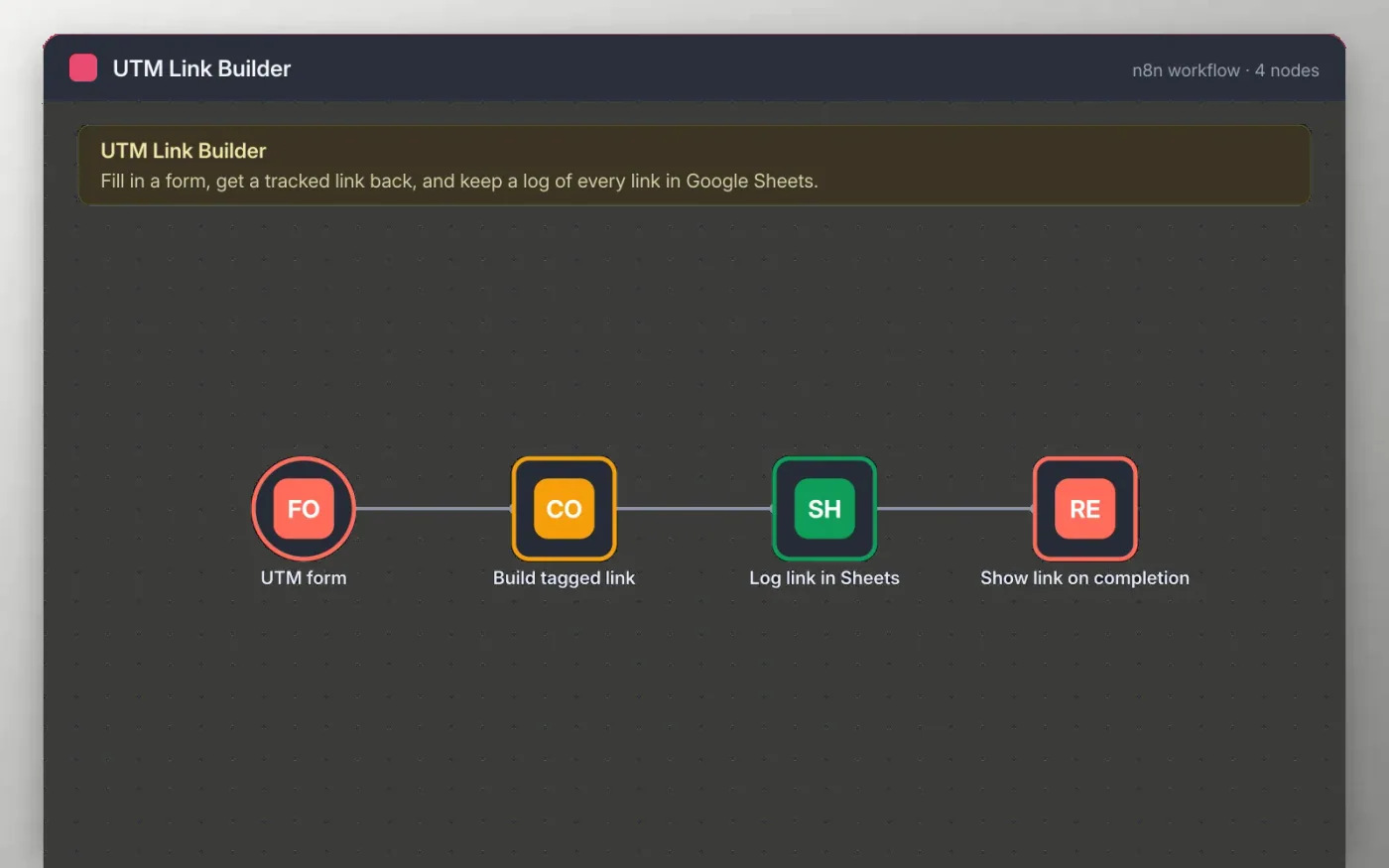
This workflow gives you a small form hosted by n8n. You paste a page link and fill in the source, medium and campaign. A Code step checks the link, lowercases the tags and adds them as utm_source, utm_medium and utm_campaign, keeping any query string the page already has.
Each tagged link is appended to a Google Sheet so the team can see which campaigns were built and when. The form then shows the finished link, so it can be copied straight into an email or post.
Download the workflow JSON.
In n8n, create a workflow, open the … menu, choose Import from File and select the JSON.
Connect Google Sheets on the Log link in Sheets node and pick the sheet that has the headers.
Open the UTM form node, copy the test URL and submit a test link.
Check the sheet row and the link on the completion page, then activate the workflow.
Yes. Download the JSON and import it into your own n8n. There is no sign-up and no cost.
No. The file has no keys or tokens. You connect your own Google account after importing.
Yes. Add a field on the UTM form node, then add a utm_content line in the Build tagged link code and a matching column in the sheet.
Docs + Word6 pages
Free
Google Sheets
Free
n8n
Free
n8n
Free
n8n
Free
n8n
Free








