
Market Research Report
Docs + Word6 pages
Free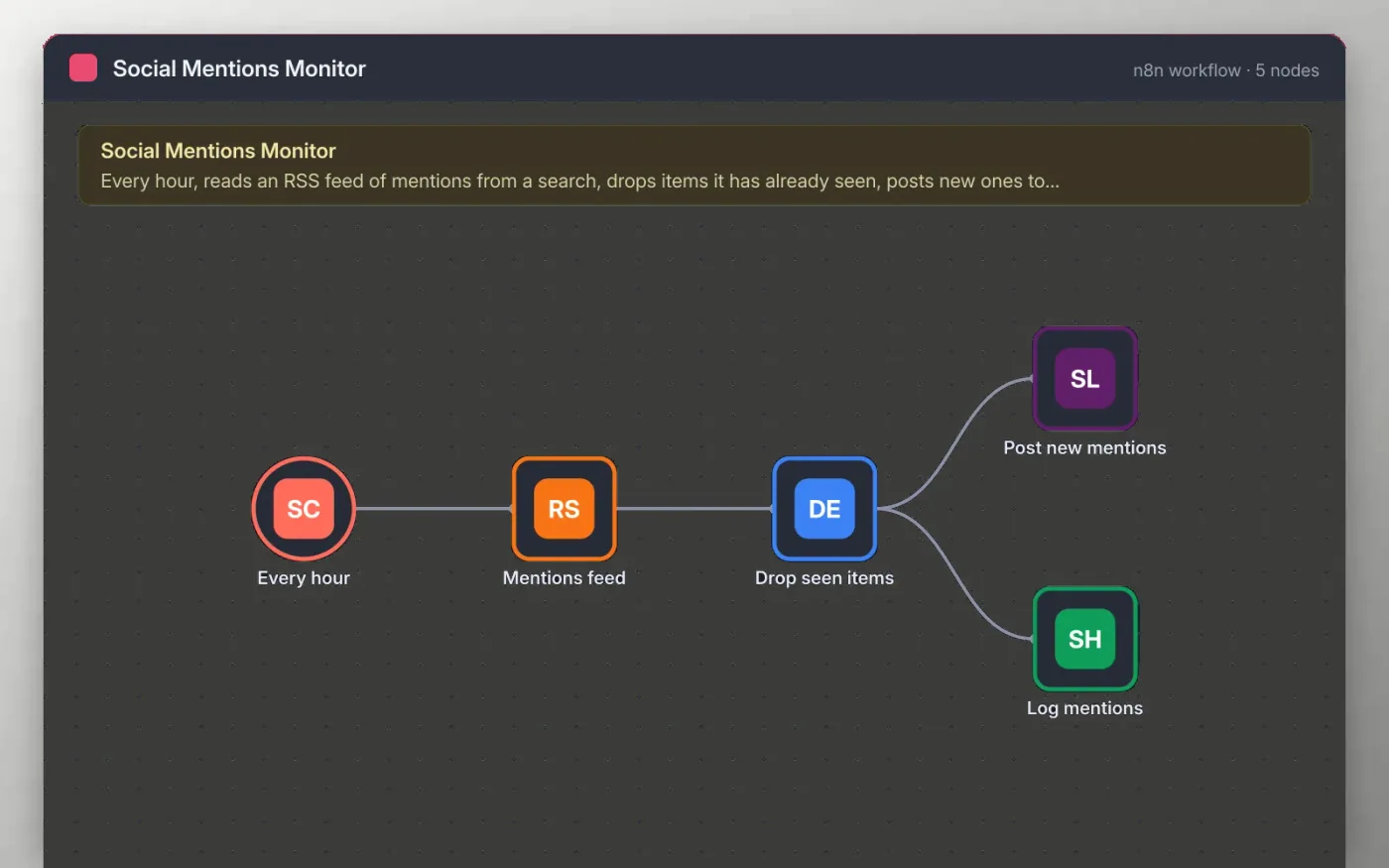
Every hour the workflow reads an RSS feed, such as the feed from a mentions search. Each item's link is checked against the items seen on earlier runs, so repeats are dropped.
New items are posted to a Slack channel with their title and link, and written to a Google Sheet with the publish date. The sheet gives you a record you can sort and review later.
Download the workflow JSON.
In n8n, create a workflow, open the … menu, choose Import from File and select the JSON.
Replace the example feed URL on Mentions feed with your own RSS feed.
Connect Slack and Google Sheets, and pick your channel and sheet.
Click Execute workflow twice to test (the second run should post nothing new), then activate.
Yes. Download the JSON and import it into your own n8n. There is no sign-up and no cost.
No. The file has no keys or tokens. Connect your own Slack and Google Sheets accounts after importing.
Yes. Change the Every hour node to minutes, but check how often your feed updates first.
Docs + Word6 pages
Free
Google Sheets
Free
n8n
Free
n8n
Free
n8n
Free
n8n
Free








