
Market Research Report
Docs + Word6 pages
Free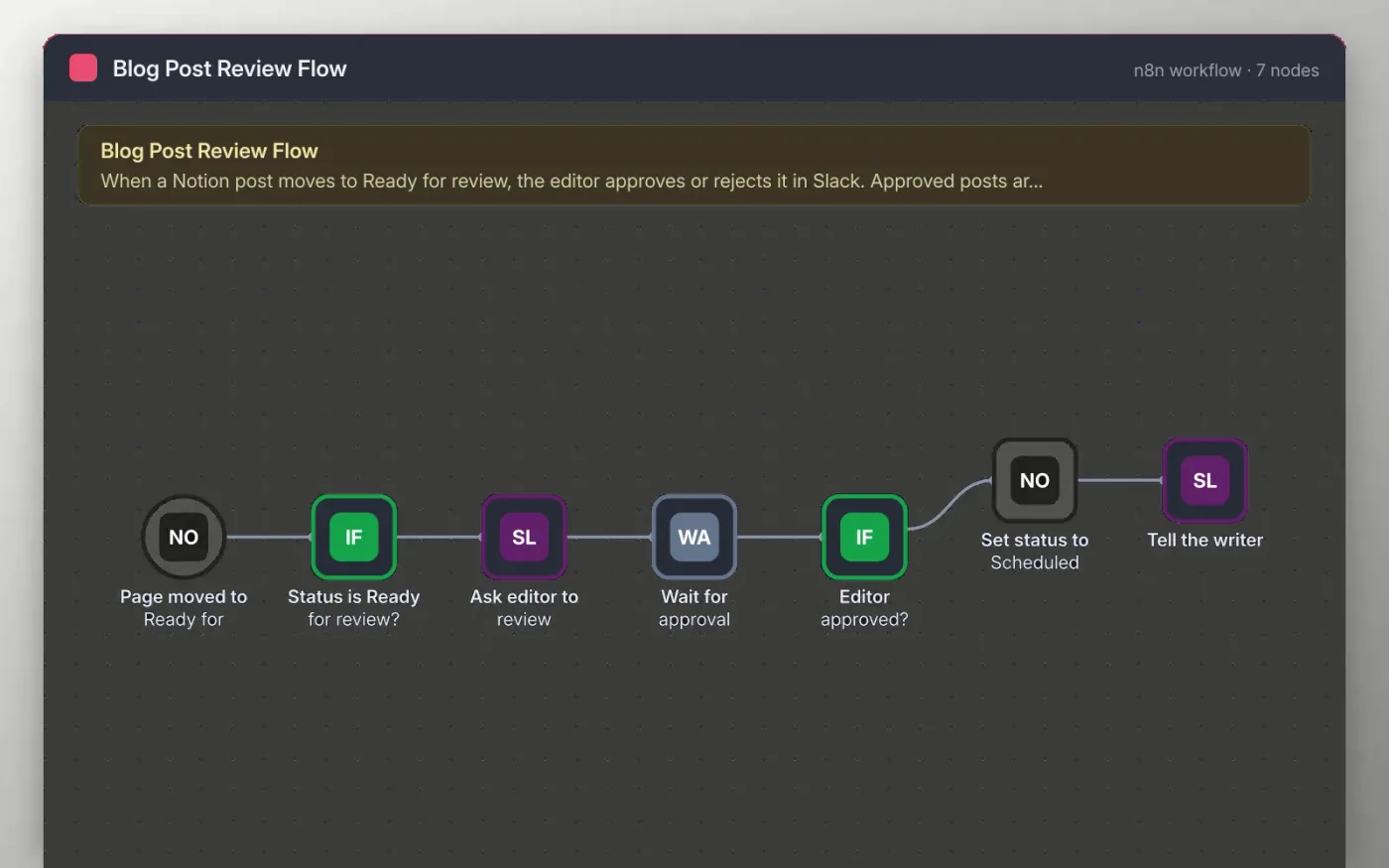
When a post in your Notion blog database is moved to Ready for review, the workflow checks the status and posts the title to the editorial channel in Slack. The message has two links, one to approve and one to send the post back. The workflow then waits until the editor clicks one of them.
An approved post is set to Scheduled in Notion and the content channel is told. A post sent back is left as it is, so the writer can keep working on it in Notion.
Download the workflow JSON.
In n8n, create a workflow, open the … menu, choose Import from File and select the JSON.
Connect Notion on the trigger and the Set status node and pick the blog database. The Status property must be a status type.
Connect Slack on the Ask editor and Tell the writer nodes and pick the two channels.
Move a test post to Ready for review, click the approve link in Slack, then activate the workflow.
Yes. Download the JSON and import it into your own n8n. There is no sign-up and no cost.
No. The file has no keys or tokens. You connect your own Notion and Slack accounts after importing.
The workflow keeps waiting at the Wait node. You can add a time limit to that node so it stops after a set number of days.
Docs + Word6 pages
Free
Google Sheets
Free
n8n
Free
n8n
Free
n8n
Free
n8n
Free








