Network Topology Diagram
Slides + PowerPoint5 slides
Free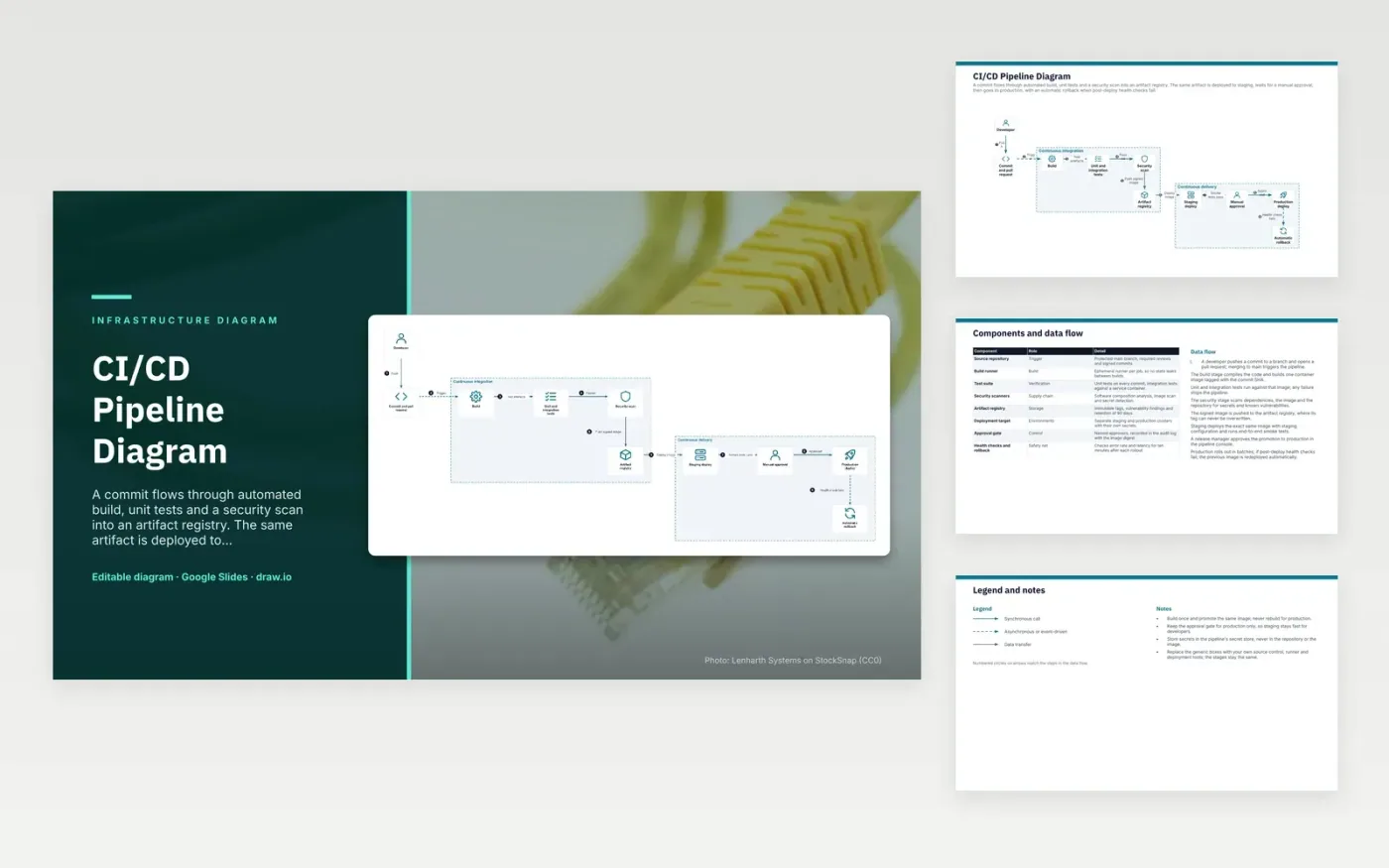
A developer pushes to a branch and opens a pull request, and merging to main starts the pipeline. The build stage creates one container image tagged with the commit SHA. Unit and integration tests run against that image, and the security stage scans dependencies, the image and the repository for secrets. The signed image is pushed to the artifact registry, where its tag cannot be overwritten. Staging then deploys that same image, and production follows only after a release manager approves it.
Build once and promote the same image, so production runs exactly what staging tested. Keep the approval gate on production only, which keeps staging fast for developers. Production rolls out in batches of 25 percent, and the health checks watch error rate and latency for ten minutes. Swap the generic boxes for your own source control, runner and deploy tools, and the stage order can stay as it is.
Click Make a copy in Google Slides, then confirm on the Google page. The copy is saved to your own Google Drive.
Rename Developer, Commit and pull request, Build and the other boxes inside Continuous integration to your own components, and delete the ones your system does not have.
Rewrite the 8-step data flow and the 8-row components table so they match the arrows you keep.
For the draw.io version, download ci-cd-pipeline-diagram.drawio and open it at app.diagrams.net.
Rebuilding can pull in different dependencies or base image versions, so production would run code that was never tested. Promoting the same signed image keeps the artefact identical from staging to production. The image digest is also recorded in the approval log.
An immutable tag cannot be re-pointed to a different image once it is pushed. A rebuild that tries to reuse the tag is rejected when immutability is enabled, so each tag always refers to the same build. Pin deployments to tags or digests to keep that guarantee.
A rolling update replaces instances a few at a time, so most capacity keeps serving while new ones start. If health checks fail, the rollout stops and the previous image can be redeployed. Updating everything at once removes that safety margin.
More Google Slides templatesMore developer workflows templates
Slides + PowerPoint5 slides
Free
Slides + PowerPoint5 slides
Free
Slides + PowerPoint5 slides
Free
Slides + PowerPoint5 slides
Free
Slides + PowerPoint5 slides
Free
Slides + PowerPoint5 slides
Free
Slides + PowerPoint5 slides
Free
Slides + PowerPoint5 slides
Free










