
Access Card Request Letter
Docs + Word2 pages
Free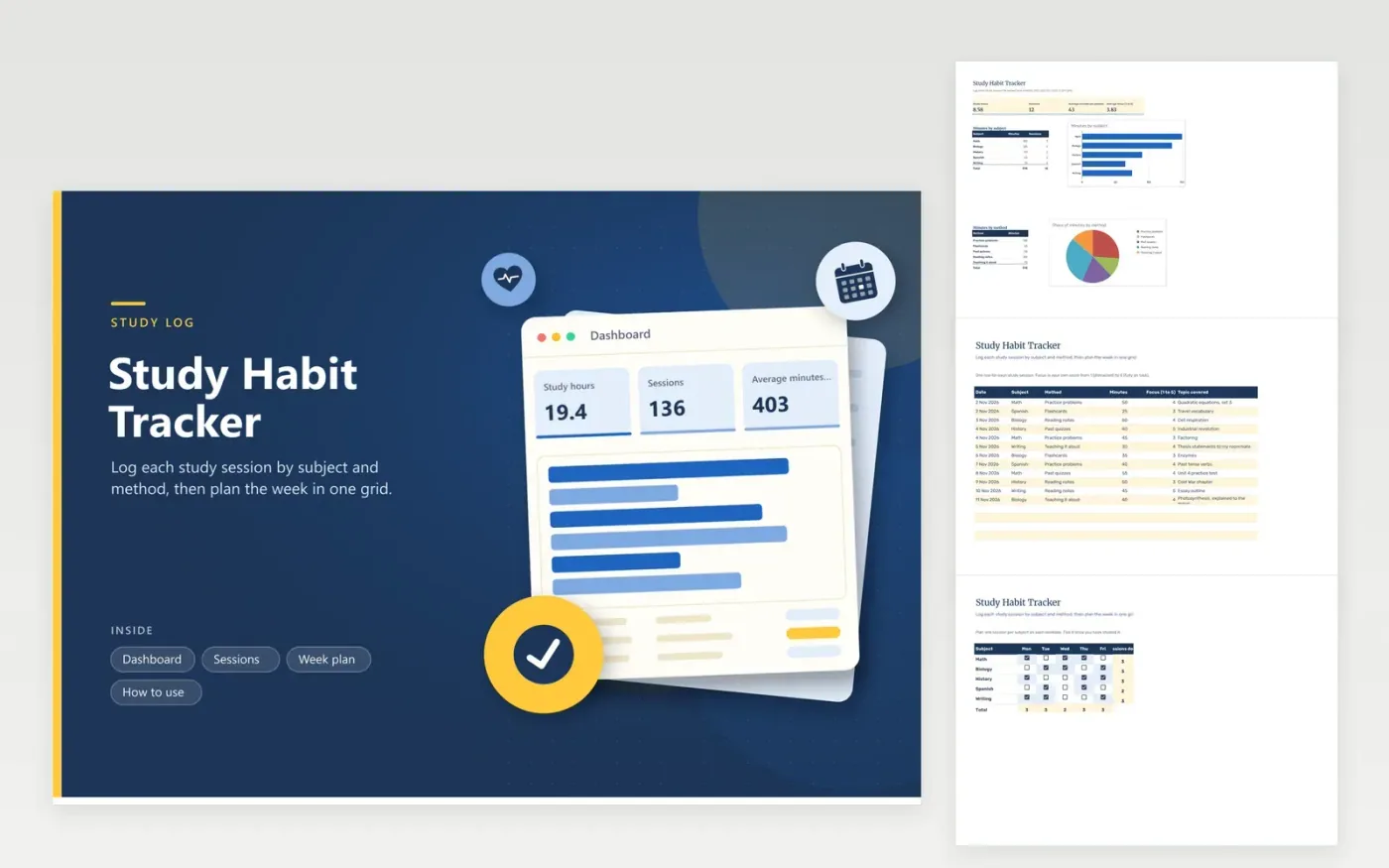
This tracker is for students who want to see where their study time really goes. The Sessions tab logs each session on its own row, with the date, subject, method (practice problems, flashcards, past quizzes, reading notes or teaching it aloud), minutes, a focus score rated 1 to 5 and the topic covered. The Dashboard totals study hours, averages session length and focus, and charts minutes by subject and by method. The Week plan grid marks one planned session per subject on each weekday.
Score your focus straight after each session, while you still remember how it went. Check the method chart before a test, and if most minutes went to reading, add quizzes and practice problems. Adjust the week plan each Sunday so every subject gets a session, even a short one, before the next exam.
Click Make a copy in Google Sheets, then confirm on the Google page. The copy is saved to your own Google Drive.
Start on the Sessions tab: replace the sample rows with your own.
Keep the formula columns as they are; they fill in as you type.
Read the How to use tab for tips. For Excel, download the .xlsx file instead.
There is no fixed answer. Many students work well in blocks of 25 to 50 minutes with a short break, but pick a length you can keep up. The Dashboard shows your average minutes per session, so you can see whether you are staying with the work.
Give a 5 only when you stayed on task for the whole session. A 3 means the session drifted at times, and a 1 means mostly distraction. Use the same standard every time, so the average focus figure means something.
Yes. Log your own minutes and methods, and note the group session in the Topic covered column. The totals then reflect your study time, not the whole group's. Ask one person to keep the shared copy tidy.
More Google Sheets templatesMore business operations templates
Docs + Word2 pages
Free
Docs + Word2 pages
Free
Docs + Word2 pages
Free
Sheets + Excel4 tabs
Free
Sheets + Excel5 tabs
Free
Sheets + Excel5 tabs
Free
Sheets + Excel4 tabs
Free
Sheets + Excel4 tabs
Free
Sheets + Excel5 tabs
Free
Sheets + Excel4 tabs
Free
Sheets + Excel4 tabs
Free
Sheets + Excel5 tabs
Free
Sheets + Excel5 tabs
Free
Sheets + Excel5 tabs
Free
Sheets + Excel4 tabs
Free










