Customer Bug Report Form
Docs + Word7 pages
Free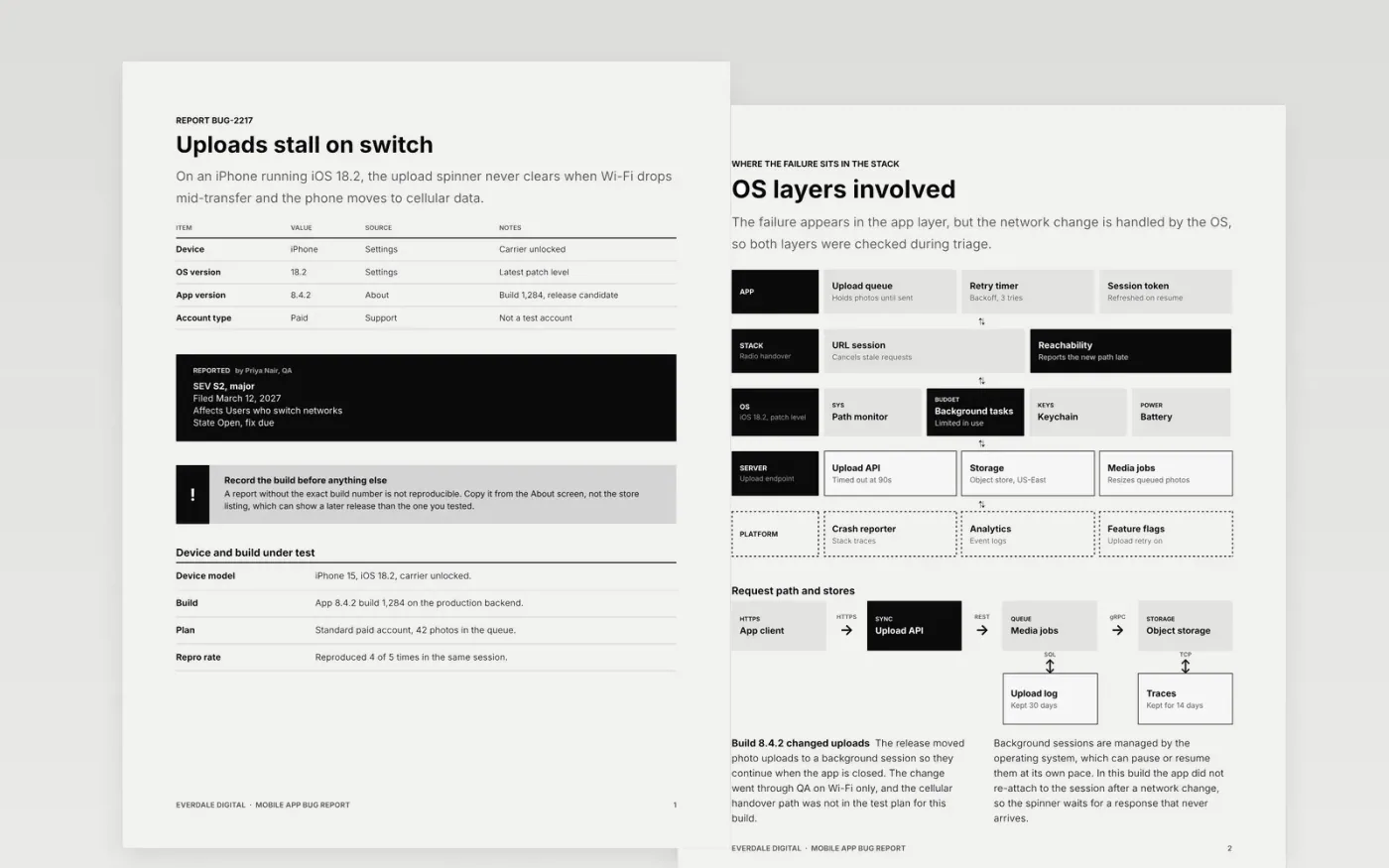
A vague bug report costs a developer a day of questions. This template keeps one defect per document and asks for the same details every time: the device, the operating system, the app build, the network path, the steps and the logs. Each section answers one question a developer will ask, so the report can be triaged the moment it is filed.
The sample documents a stall in photo uploads on an iPhone running iOS 18.2 after a switch from Wi-Fi to cellular, using build 8.4.2 (1,284) of the fictional Tidewell app from Everdale Digital. It compares two builds, lists the steps with expected and actual results, and shows how the attachments were scrubbed. Replace the device, build, steps and attachments with your own before you file the report.
Click Make a copy in Google Docs, then confirm on the Google page. The copy is saved to your own Google Drive.
Replace the summary, device table and build details with the defect you are reporting.
Rewrite the steps so a developer can reproduce the failure on a clean install in one attempt.
Attach the log excerpt and recording after removing names, emails and account IDs.
Delete the guide page, then share the report with the triage lead or present it in the meeting.
No. Everdale Digital, the Tidewell app, the QA and triage staff named here and every build number are fictional sample data, so replace them with your own before filing.
No. Keep one defect per report so that each can be closed, reassigned and tracked on its own. If two symptoms share a cause, link the reports rather than merging them.
Only the evidence needed to reproduce the failure: a log excerpt, a short recording and, if needed, a HAR file. Strip names, emails, tokens and account numbers first, because attachments are copied into the tracker.
More Google Docs templatesMore developer workflows templates
Docs + Word7 pages
Free
Docs + Word8 pages
Free
Docs + Word9 pages
Free
Slides + PowerPoint12 slides
Free
Slides + PowerPoint11 slides
Free
Docs + Word7 pages
Free
Docs + Word9 pages
Free
Sheets + Excel3 tabs
Free










