Azure Hub-Spoke Network Architecture
Slides + PowerPoint5 slides
Free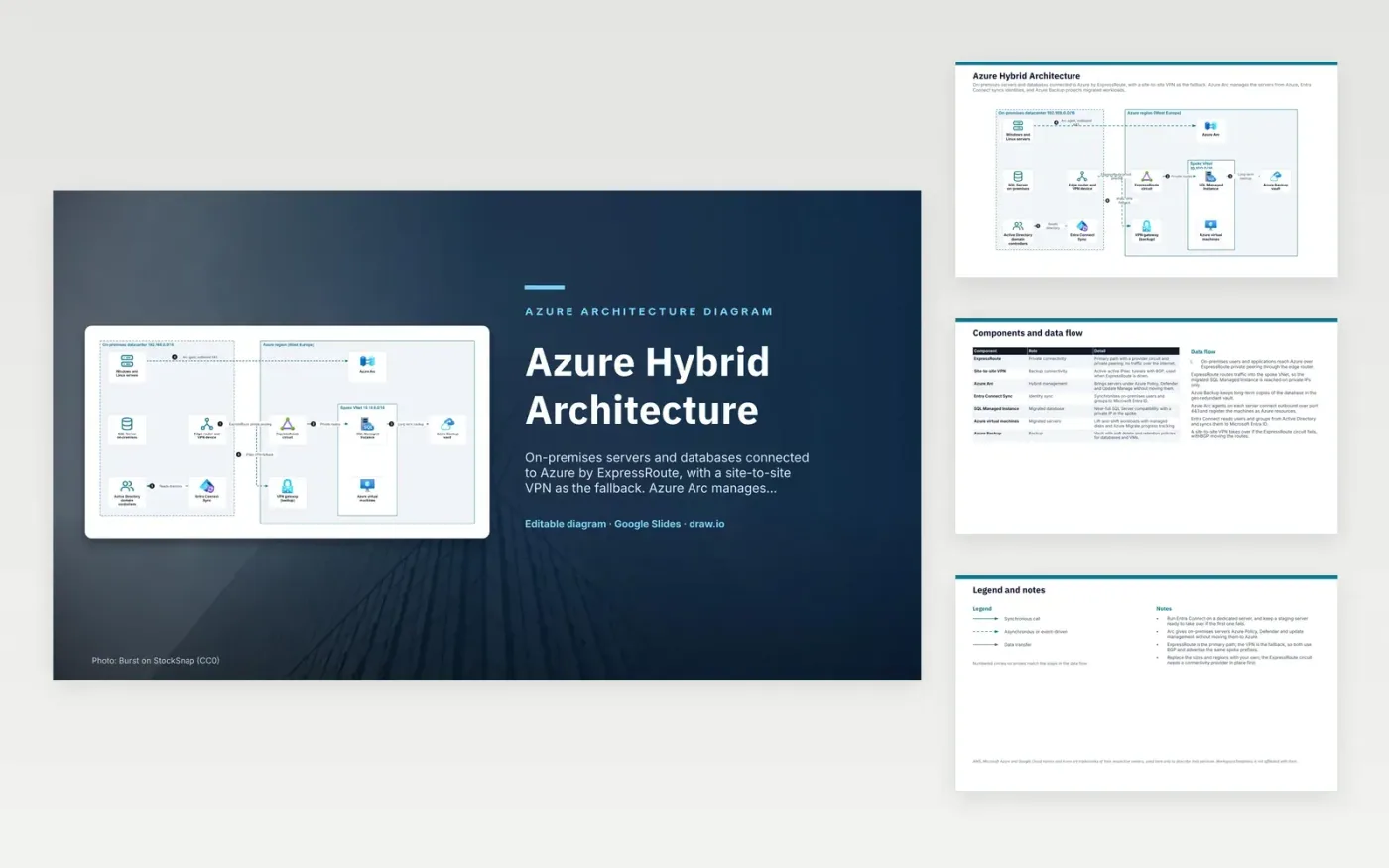
On-premises users reach Azure over ExpressRoute private peering through the edge router. Routes carry traffic into the spoke network, where the migrated SQL Managed Instance is reached on private IP addresses only. Azure Backup keeps long-term copies of the database in a geo-redundant vault. Azure Arc agents on each server connect outbound on port 443 and register the machines as Azure resources. Entra Connect reads users and groups from Active Directory and syncs them to Microsoft Entra ID. If the circuit fails, a site-to-site VPN takes over with BGP.
Failover is the main design choice. ExpressRoute is the primary route and the VPN is the fallback, and both use BGP and advertise the same spoke prefixes, so routing moves without changing addresses. Entra Connect runs on one dedicated server, with a staging server ready to take over if it fails. To adapt it, size the circuit for your traffic, choose your own regions, and arrange a connectivity provider before ordering the circuit.
The diagram uses the official Microsoft Azure architecture icons, each labelled with its service name. AWS, Microsoft Azure and Google Cloud names and icons are trademarks of their respective owners, used here only to describe their services. WorkspaceTemplates is not affiliated with them.
Click Make a copy in Google Slides, then confirm on the Google page. The copy is saved to your own Google Drive.
Rename Windows and Linux servers, SQL Server on-premises, Active Directory domain controllers and the other boxes inside On-premises datacenter 192.168.0.0/16 to your own components, and delete the ones your system does not have.
Rewrite the 6-step data flow and the 7-row components table so they match the arrows you keep.
For the draw.io version, download azure-hybrid-architecture-diagram.drawio and open it at app.diagrams.net.
ExpressRoute is a private connection through a connectivity provider and does not use the public internet. A site-to-site VPN runs IPsec tunnels over the internet, so it is less predictable, but it is quick to set up and cheap.
Arc registers each server as an Azure resource, so Azure Policy, Defender and update management apply without moving the machine. The agent connects outbound over port 443.
Entra Connect holds the sync configuration and credentials for directory replication. Keeping it on its own server limits what else can affect it, and a staging server lets you recover quickly if the first one fails.
More Google Slides templatesMore developer workflows templates
Slides + PowerPoint5 slides
Free
Slides + PowerPoint5 slides
Free
Slides + PowerPoint5 slides
Free
Slides + PowerPoint5 slides
Free
Slides + PowerPoint5 slides
Free
Slides + PowerPoint5 slides
Free
Slides + PowerPoint5 slides
Free
Slides + PowerPoint5 slides
Free










