
Abandoned Cart Follow-up
n8n
Free4 templates
n8n
Free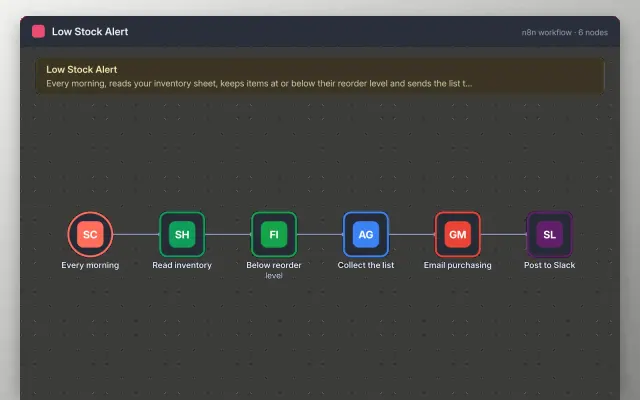
n8n
Free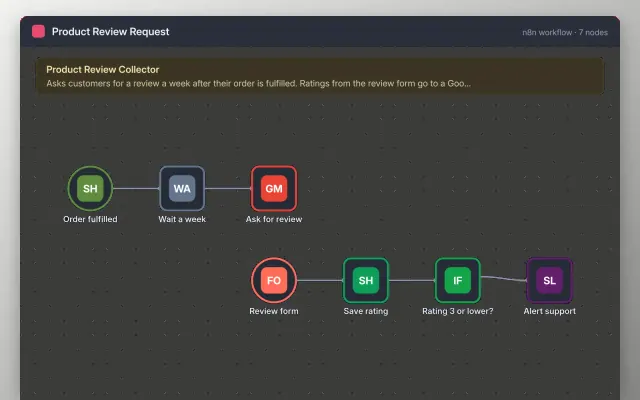
n8n
Free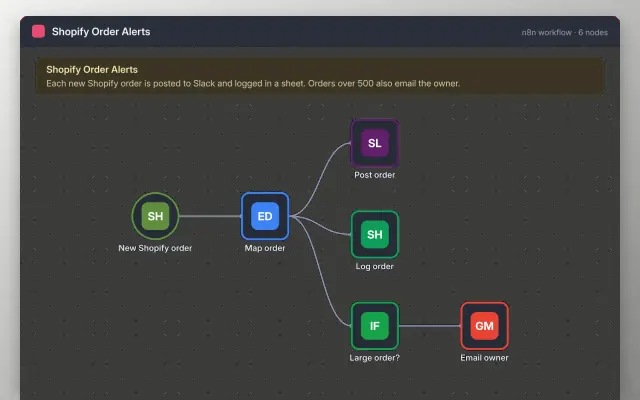
n8n
Free| Abandoned Cart Follow-up | Low Stock Alert | Product Review Request | Shopify Order Alerts | |
|---|---|---|---|---|
| Format | Automation workflow | Automation workflow | Automation workflow | Automation workflow |
| Works in | n8n | n8n | n8n | n8n |
| Length | Not listed | Not listed | Not listed | Not listed |
| Style | Not listed | Not listed | Not listed | Not listed |
An online store workflow reacts to orders, stock levels and customer activity without someone checking the shop by hand. Store owners use one to dispatch faster, avoid selling out unnoticed and follow up on carts that were left behind.
Cover a trigger for each order or stock change, a stock threshold, a message to the right person, a delay before follow-up messages, a check that the customer has not already bought, an opt-out check, and an error alert.
Check marketing consent before every message, and stop follow-ups as soon as the customer places an order.
Compare Abandoned Cart Follow-up, Low Stock Alert, and Product Review Request, then pick the closest match and replace the sample text with your own.
An online store workflow reacts to orders, stock levels and customer activity without someone checking the shop by hand. Store owners use one to dispatch faster, avoid selling out unnoticed and follow up on carts that were left behind.
Include a trigger for each order or stock change, a stock threshold, a message to the right person, a delay before follow-up messages, a check that the customer has not already bought, an opt-out check, and an error alert. Check marketing consent before every message, and stop follow-ups as soon as the customer places an order.
Add a Shopify trigger for new orders, then a Slack or email node that sends the order number, items and total. Test with a test order so you can see the data the trigger provides.
Yes, using a wait step. Wait a set time after a cart is left, check that no order was placed, then send one reminder. Respect each customer's marketing opt-in.
Store a flag or the record ID when a message is sent, and check it before sending again. A wait step is only a delay, so do not rely on it as the only protection.
Start with Abandoned Cart Follow-up: Send a cart reminder two hours after a shopper leaves, but only if they have not ordered. If that is not the right fit, compare it with Low Stock Alert.
Yes. These ecommerce automation templates work in n8n. All 4 templates are free, with no account or email needed.