
Acceptable Use Policy
Docs + Word7 pages
Free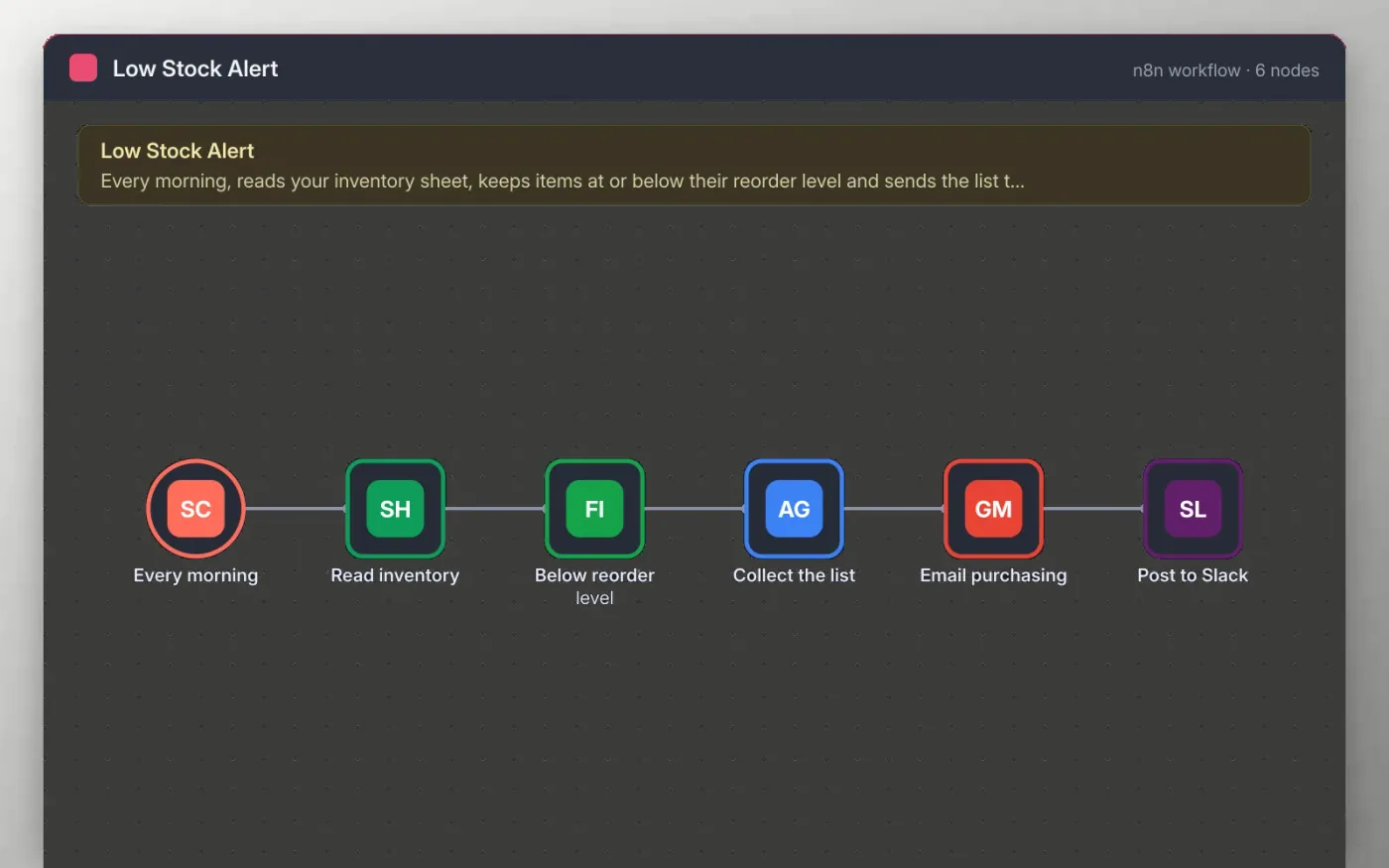
This workflow reads your inventory from a Google Sheet every morning. Each row needs an item name, a SKU, the quantity in stock and a reorder level. Rows at or below their reorder level are kept, and the rest are dropped.
The remaining items are collected into one list and emailed to your purchasing address, then a short note goes to a Slack channel. Sticky notes on the canvas name the nodes to connect, and nothing is sent until you add your own accounts.
Download the workflow JSON.
In n8n, create a workflow, open the … menu, choose Import from File and select the JSON.
Connect Google Sheets, Gmail and Slack on the nodes the sticky note names, and pick your inventory sheet.
Click Execute workflow, check the email and the Slack message, and adjust the recipient and channel.
Activate the workflow so it runs every morning at 8:00.
Yes. Download the JSON and import it into your own n8n. There is no sign-up and no cost.
No. The file has no keys or tokens. You connect your own Google, Gmail and Slack accounts after importing.
Yes. Open the Every morning node and change the hour, or switch to a weekly rule if you only reorder once a week.
Docs + Word7 pages
Free
Docs + Word8 pages
Free
n8n
Free
n8n
Free
n8n
Free
n8n
Free









