
Annual Report
Docs + Word6 pages
FeaturedFree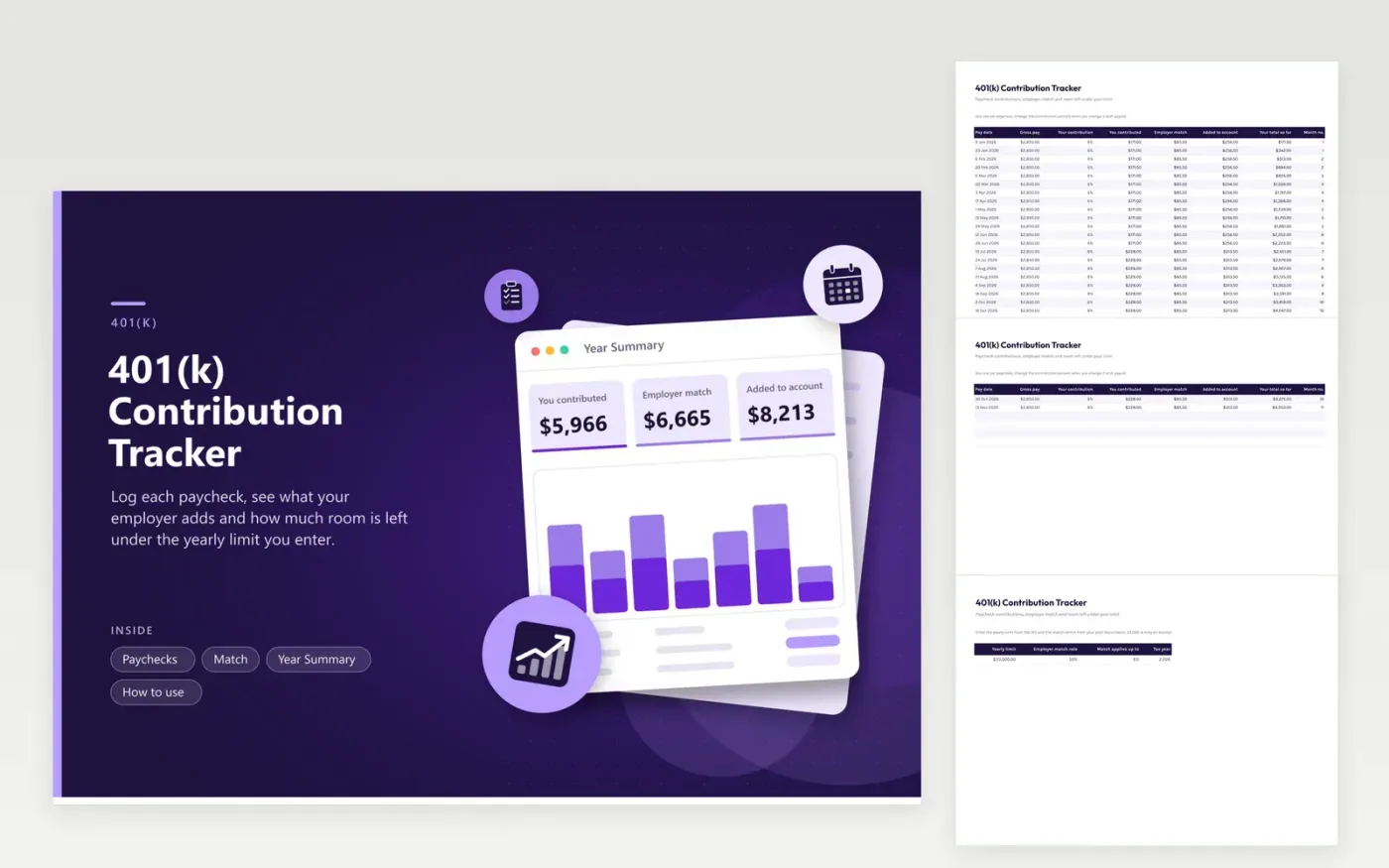
The Paychecks tab holds one row per pay date: gross pay, the percent you contribute, the dollars that comes to and the match your employer adds. The Match tab stores the terms from your plan, such as a 50 percent match on the first 6 percent of pay, and the yearly limit as a number you type in. Sample data runs through 23 biweekly paychecks, with a contribution raise in July.
Year Summary totals your contributions and the match, shows how much space remains below the cap and what share of it is used, then charts both by month. If you contribute less than the share your plan matches, the Match column shows money you are leaving behind. Update the limit each January from the IRS notice; the figure in the sample is only an example.
Click Make a copy in Google Sheets, then confirm on the Google page. The copy is saved to your own Google Drive.
Start on the Paychecks tab: replace the sample rows with your own.
Keep the formula columns as they are; they fill in as you type.
Read the How to use tab for tips. For Excel, download the .xlsx file instead.
Record each pay date with gross pay and the percent you contribute. Multiply the two for your contribution and add the employer match your plan states. Totals by month show how the year is going.
The plan states a match rate and a share of pay it applies to, for example 50 cents on each dollar up to 6 percent of pay. Contributing less than that share leaves part of the match unclaimed. The summary plan description has the exact terms.
The IRS publishes the limit each year, and your plan administrator can tell you if your plan sets a lower one. Type the current figure into the Match tab; this sheet does not assume a limit.
Docs + Word6 pages
FeaturedFree
Excel
FeaturedFree
Sheets + Excel5 tabs
Free
Sheets + Excel6 tabs
Free
Sheets + Excel5 tabs
Free
Sheets + Excel6 tabs
Free
Sheets + Excel6 tabs
Free
Sheets + Excel7 tabs
Free
Sheets + Excel5 tabs
Free
Sheets + Excel5 tabs
Free
Sheets + Excel5 tabs
Free
Sheets + Excel5 tabs
Free
Sheets + Excel6 tabs
Free
Sheets + Excel7 tabs
Free
Sheets + Excel5 tabs
Free








