
Bill Payment Tracker
Sheets + Excel4 slides
Free2 templates
Sheets + Excel4 slides
Free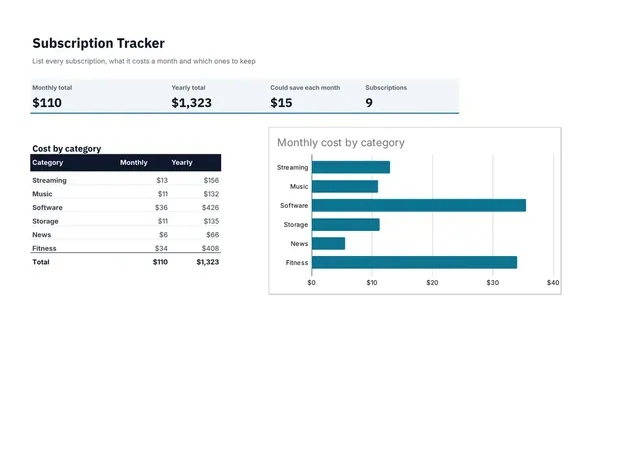
Sheets + Excel3 slides
Free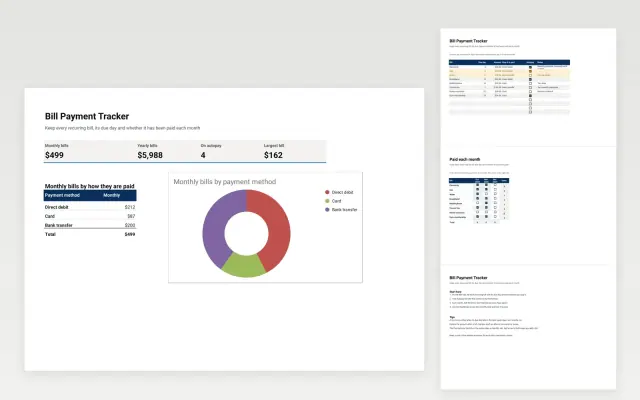 Bill Payment Tracker | 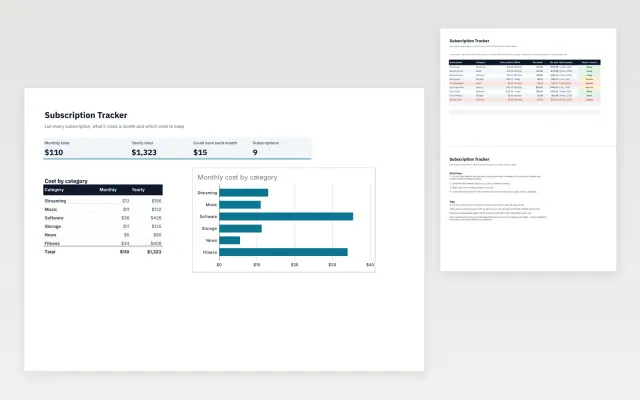 Subscription Tracker | |
|---|---|---|
| Format | Spreadsheet | Spreadsheet |
| Works in | Google Sheets and Excel | Google Sheets and Excel |
| Length | 4 slides | 3 slides |
| Style | Corporate | Modern |
A bill tracker lists your recurring bills and subscriptions with their due dates, amounts and payment status. It helps you avoid late fees and spot services you no longer use.
Cover bill or subscription name, amount, due date, how it is paid, paid or unpaid status, and renewal date.
Sort the list by due date, and review subscriptions every few months to cancel the ones you no longer use.
Compare Bill Payment Tracker and Subscription Tracker, all 3 to 4 pages long, then pick the closest match and replace the sample text with your own.
A bill tracker lists your recurring bills and subscriptions with their due dates, amounts and payment status. It helps you avoid late fees and spot services you no longer use.
Include bill or subscription name, amount, due date, how it is paid, paid or unpaid status, and renewal date. Sort the list by due date, and review subscriptions every few months to cancel the ones you no longer use.
List every recurring payment with its renewal date and amount, including those charged to a card or an app store. Review the list every quarter and cancel what you no longer use.
Set a reminder a few days before each due date and pay on or before it. If you expect to be late, contact the provider early, since many will move the date.
Automatic payments reduce missed bills, but review each one, because it is easy to keep paying for something you forgot about. Keep enough in the account on each due date.
Start with Bill Payment Tracker: Keep every recurring bill, its due day and a monthly paid tick, with the total you pay each month. If that is not the right fit, compare it with Subscription Tracker.
The templates here are 3 to 4 pages long. Cut any section you do not need; each template explains what its sections are for.
Yes. These bill tracker templates work in Google Sheets and Microsoft Excel. All 2 templates are free, with no account or email needed.