
Employer Branding Deck
Slides + PowerPoint12 slides
Free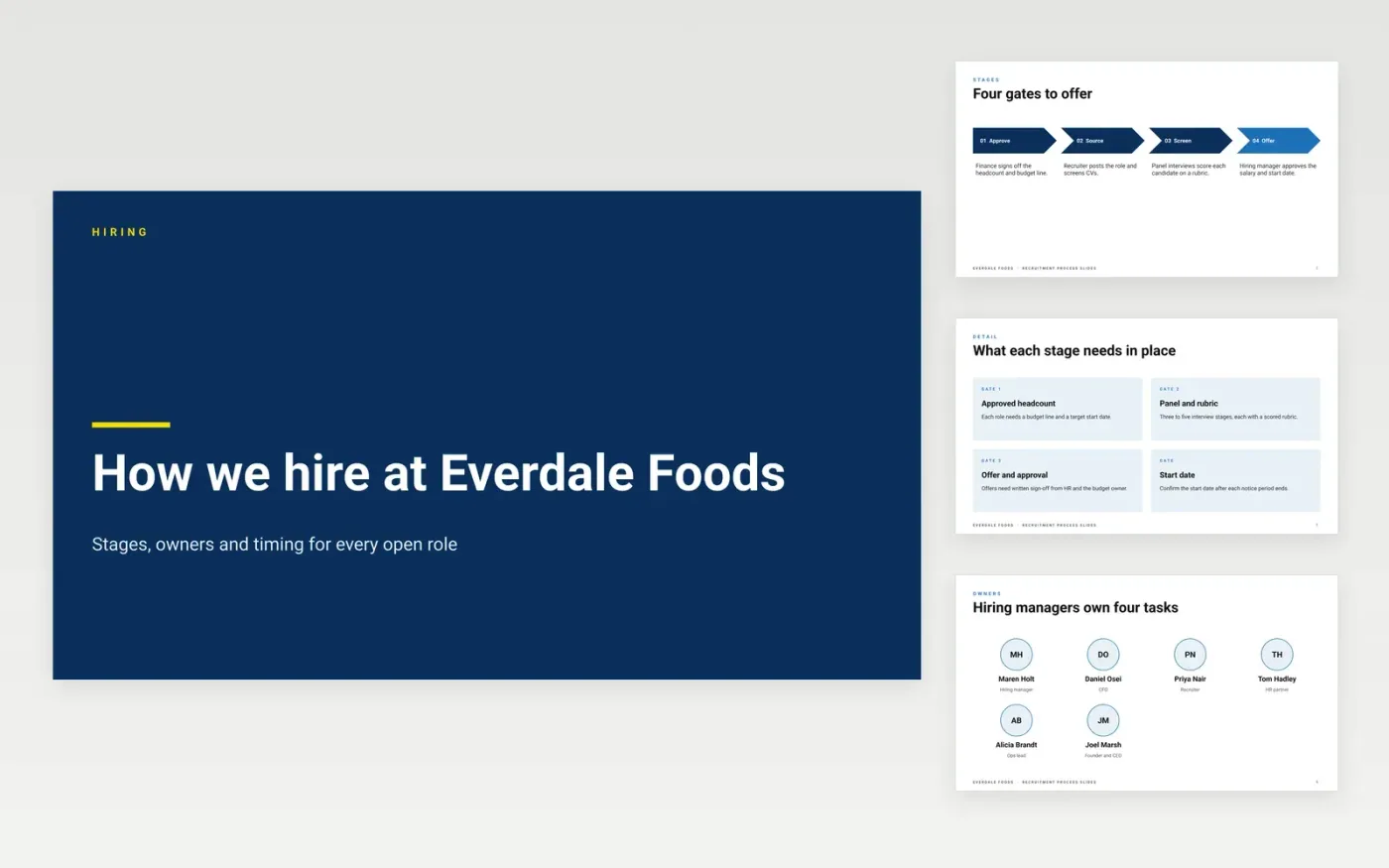
Hiring managers and recruiters often disagree about who does what, and roles stall in the gaps between stages. This deck sets the hiring process out as four gates, from approving the headcount to sending the offer, with the tasks for hiring managers and recruiters at each gate. It then shows the timeline a typical hire follows and the tools that keep every record in one place, so the team can see where a role is and who needs to act next.
The sample shows Everdale Foods filling roles in a window of 35 to 60 days, with a sourcing mix of referrals, direct approaches, job boards and agency support. Replace the stage names, owners and timings with your own figures from the last twelve months, and swap the sample tools for the ones your team already uses. Keep each gate's owner visible on every slide so that no stage waits for an answer nobody is responsible for.
Click Make a copy in Google Slides, then confirm on the Google page. The copy is saved to your own Google Drive.
Replace the four gate names and owners with your own hiring stages and the people who sign off each one.
Enter your approved headcount, budget lines and target start dates on the timeline and in the cards slide.
Swap the sample timings and tools for your own, then check every figure against your last twelve months.
Delete the guide slide, then share the deck with your hiring team or present it from Google Slides.
No. Everdale Foods, the people named in the deck and every figure are fictional sample data, written so you can see what a finished plan looks like. Replace them with your own records before you share the deck.
Yes. Add an intake slide for campus dates or seasonal waves, and move the timeline items to the months when your offers and start dates fall. The four gates stay the same, though seasonal roles usually need a shorter approval stage.
Use one number for each figure everywhere it appears, such as the 35 to 60 day time to fill and the sourcing mix. If you change one, update the timeline, cards and tools slides as well so the deck reads the same throughout.
Slides + PowerPoint12 slides
Free
Slides + PowerPoint11 slides
Free
Docs + Word7 pages
Free
Sheets + Excel5 tabs
Free
Sheets + Excel5 tabs
Free
Docs + Word7 pages
Free
Docs + Word8 pages
Free
Docs + Word7 pages
Free
Sheets + Excel3 tabs
Free
Docs + Word8 pages
Free










