Penetration Test Report
Docs + Word8 pages
Free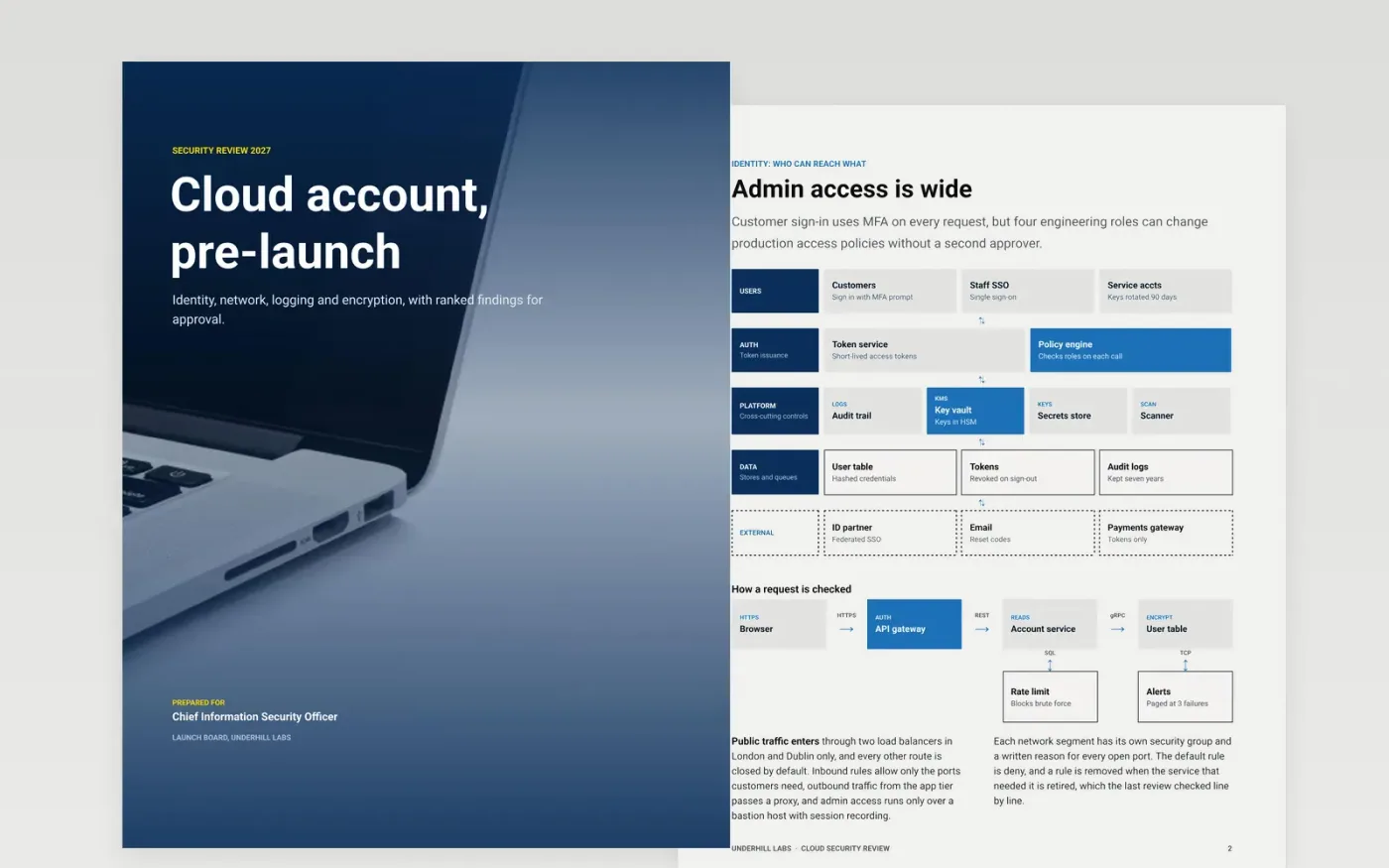
A security review is only useful if it shows how a system could be attacked, which controls stop that, and what risk remains before launch. This template works through identity, network, logging and encryption on one cloud account, then ranks the findings by severity with an owner and a date for each. It works as a security review template, a security assessment report template or a threat model template, and it gives a STRIDE threat model example to start from. It can also feed security posture board slides.
The sample reviews a cloud account at Underhill Labs, with 12 components across three trust boundaries, one critical and three high findings, and one residual risk that the CISO has accepted in writing. All names, scores and certifications are fictional. Replace the data-flow diagram, threats and findings with your own, rate each finding with its evidence, and give every high and critical item an owner and SLA date.
Click Make a copy in Google Docs, then confirm on the Google page. The copy is saved to your own Google Drive.
Redraw the data-flow diagram with your components, data stores and trust boundaries.
Replace the threats table with STRIDE threats for each boundary, and rate each finding on your own scale.
Assign an owner and an SLA date to every high and critical finding, and record who accepted any residual risk.
Delete the guide page, then share the review with the CISO or present it to the board.
Yes. Underhill Labs, its named people, the components, the CVSS scores and the certifications are fictional. Replace them with your own evidence before the review goes to approvers.
No. A threat model maps how the system could be attacked, while the security review checks which controls exist and what risk remains. Keep both current when the architecture changes.
Refresh it when the architecture changes, when a new data store or trust boundary is added, and at least once a year. Record the date and the reviewer on the cover each time.
More Google Docs templatesMore developer workflows templates
Docs + Word8 pages
Free
Docs + Word8 pages
Free
Docs + Word9 pages
Free
Slides + PowerPoint12 slides
Free
Slides + PowerPoint12 slides
Free
Docs + Word7 pages
Free
Slides + PowerPoint11 slides
Free
Docs + Word7 pages
Free










