
Acceptable Use Policy
Docs + Word7 pages
Free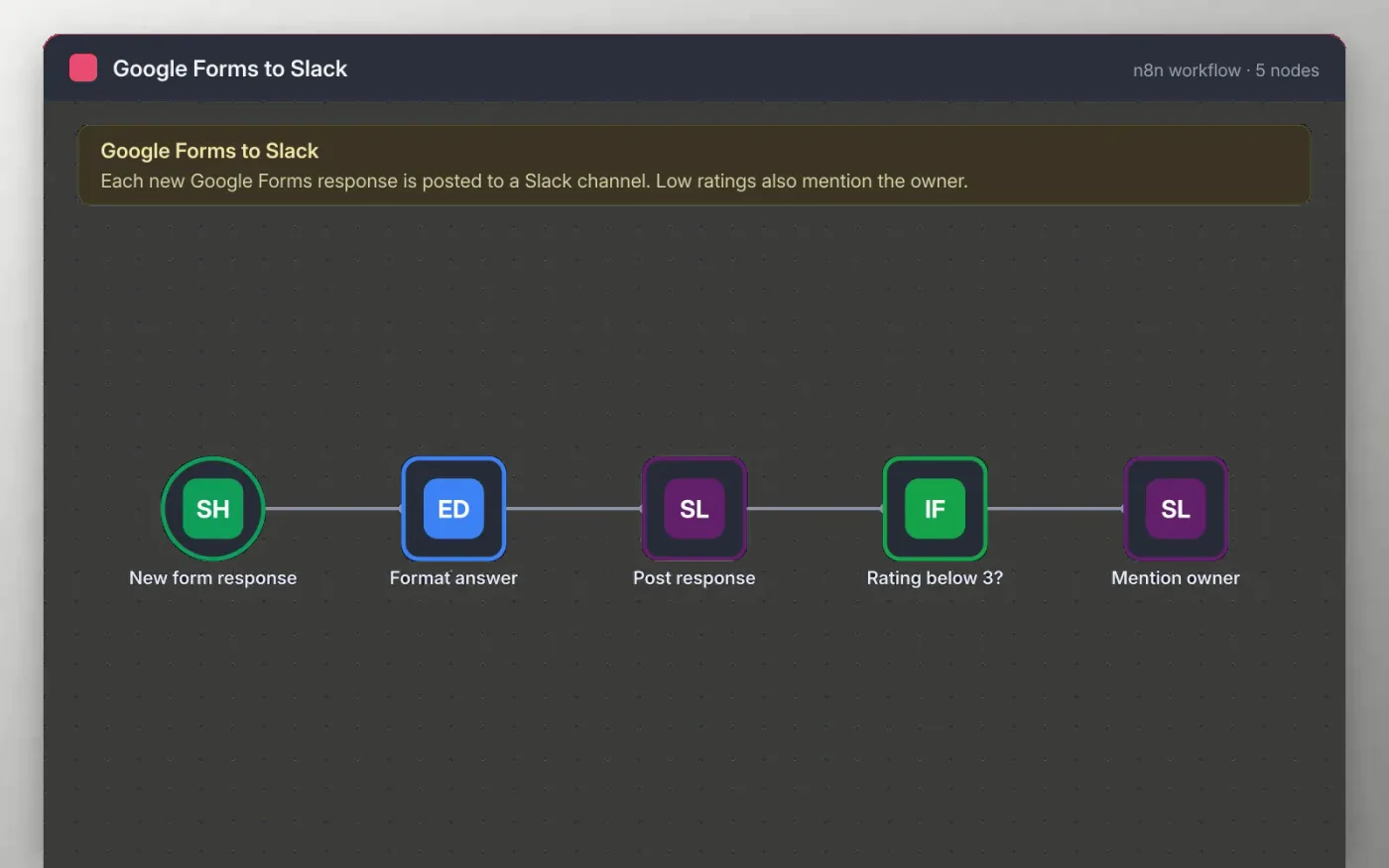
When a new row appears in the Google Sheet behind your form, the workflow tidies the answers: the name, team, rating and comment are picked out and the rating is read as a number.
Each response is posted to a Slack channel. If the rating is below three, a second message goes to the same channel and mentions the owner so they can follow up the same day.
Download the workflow JSON.
In n8n, create a workflow, open the … menu, choose Import from File and select the JSON.
Connect Google Sheets on New form response and pick the sheet that holds the form responses.
Connect Slack, pick the channel and replace the owner placeholder on Mention owner.
Submit a test response to the form, check the Slack posts, then activate the workflow.
Yes. Download the JSON and import it into your own n8n. There is no sign-up and no cost.
No. The file has no keys, tokens or real Slack IDs. You connect your own Google and Slack accounts after importing.
Yes. Change the 3 in the Rating below 3 node to any number from 1 to 5.
Docs + Word7 pages
Free
Docs + Word8 pages
Free
n8n
Free
n8n
Free
n8n
Free
n8n
Free
n8n
Free
n8n
Free









