
Project Proposal
Docs + Word5 pages
Free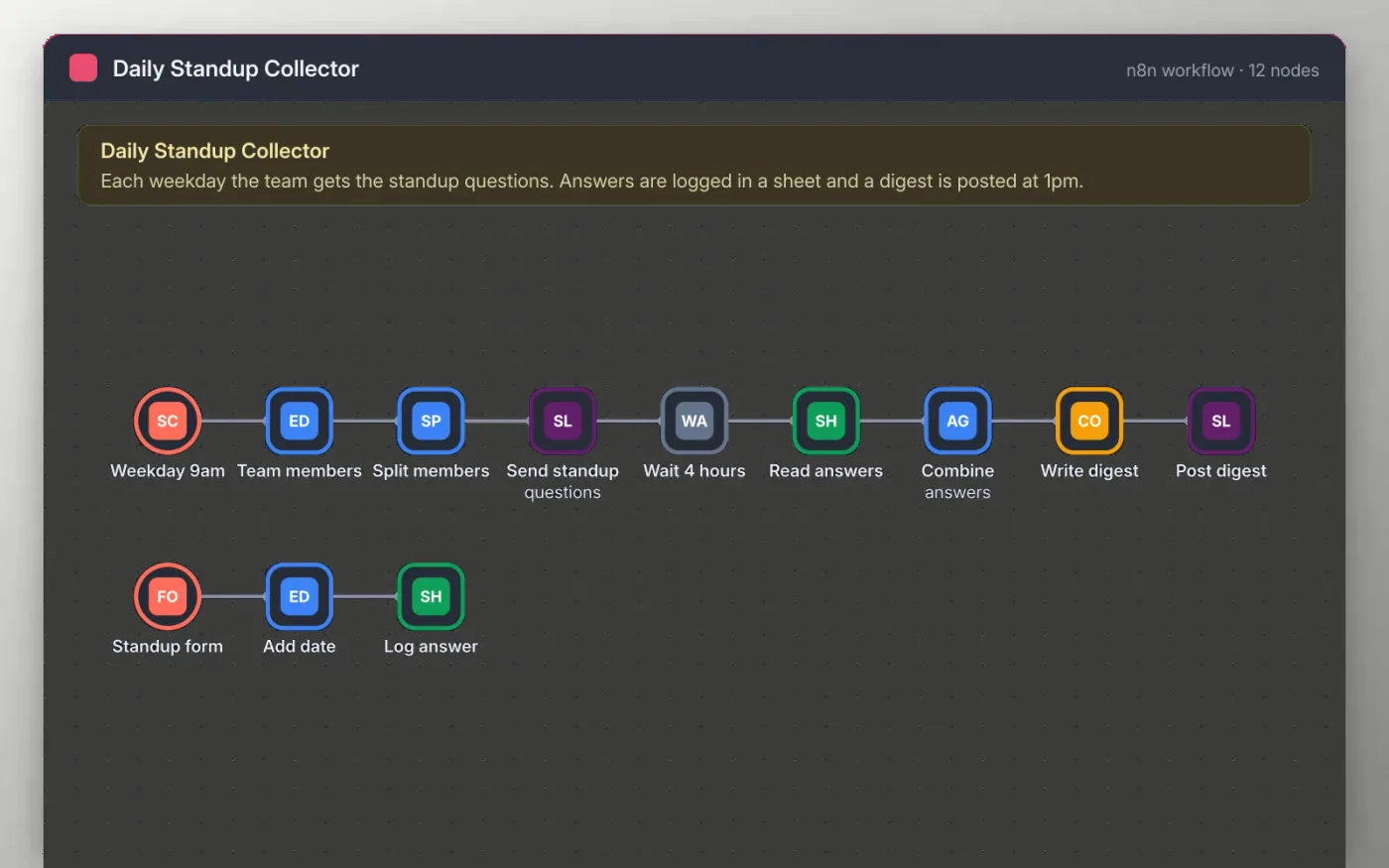
Every weekday at nine, the workflow sends each team member a Slack message with the standup questions and a link to a short form. Answers are saved as rows in a Google Sheet as people submit them, so nobody has to wait for a meeting.
Four hours later the workflow reads the sheet, keeps the answers for today, combines them and posts one digest to the team channel. People who have not answered are simply left out, and the digest is still posted.
Download the workflow JSON.
In n8n, create a workflow, open the … menu, choose Import from File and select the JSON.
Replace the placeholder member IDs on Team members and connect Slack on the two Slack nodes.
Connect Google Sheets on the two sheet nodes and create a sheet with the columns the sticky note lists.
Open the Standup form node, copy the test URL, send a test answer, then activate the workflow.
Yes. Download the JSON and import it into your own n8n. There is no sign-up and no cost.
No. The file has no keys, tokens or real Slack IDs. You connect your own accounts after importing.
Their answer is still logged in the sheet. Change the Wait 4 hours node to post the digest later in the day.
Docs + Word5 pages
Free
Slides + PowerPoint11 slides
Free
Docs + Word6 pages
Free
n8n
Free
n8n
Free
n8n
Free
n8n
Free
n8n
Free









