
Acceptable Use Policy
Docs + Word7 pages
Free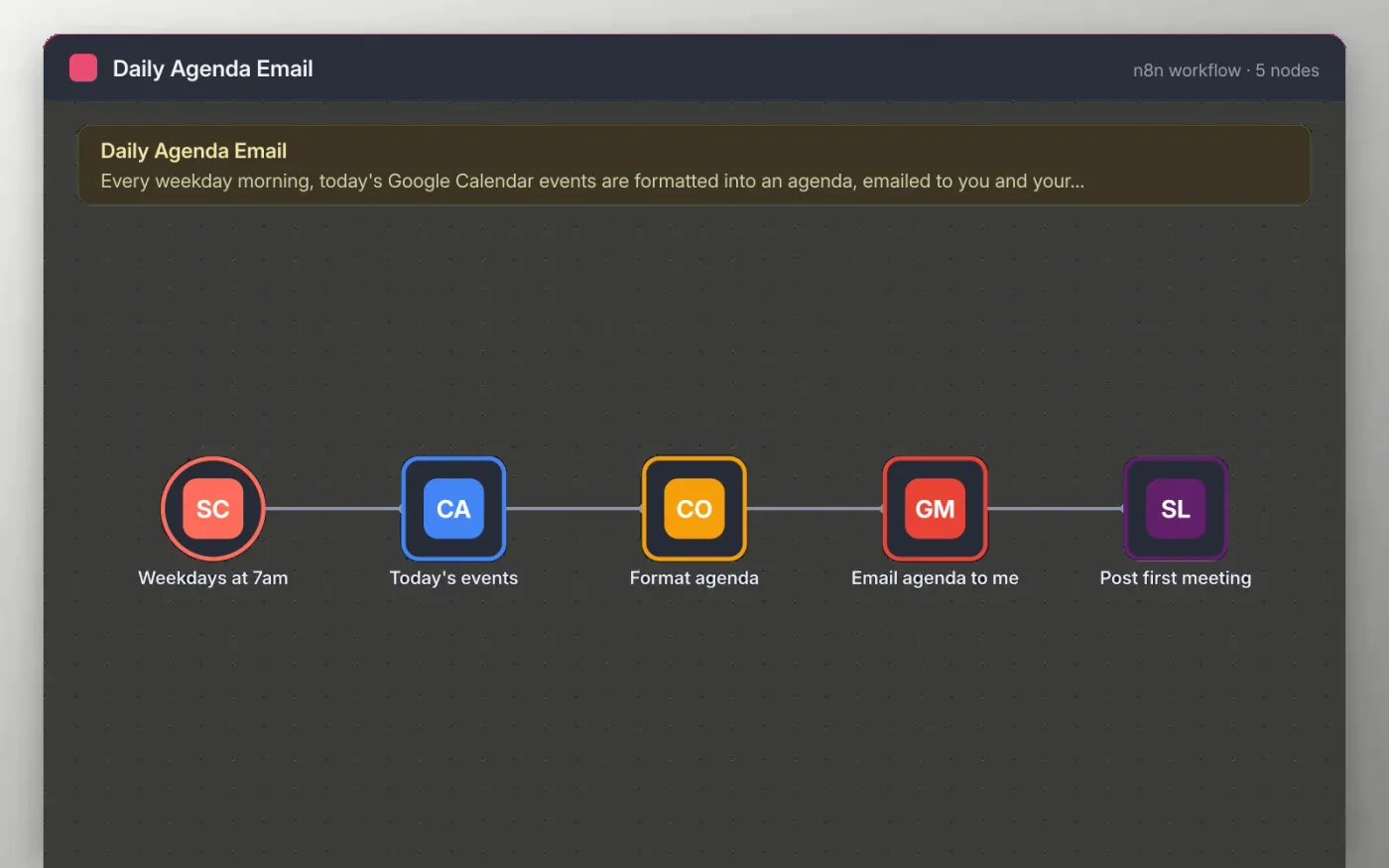
On weekdays at 7am the workflow reads today's events from Google Calendar, from start of day to end of day, in time order. A Code step turns them into a short list with times and titles, and all-day events are marked as such.
The list is emailed to you through Gmail, and the first item of the day is posted to a Slack channel or your own direct messages. Nothing leaves your accounts except those two messages.
Download the workflow JSON.
In n8n, create a workflow, open the … menu, choose Import from File and select the JSON.
Connect Google Calendar on the Today's events node and pick the calendar to read.
Replace you@example.com on the Email agenda node, connect Gmail and connect Slack on the Post first meeting node.
Run the workflow once to check the email, then activate it.
Yes. Download the JSON and import it into your own n8n. There is no sign-up and no cost.
No. The file has no keys or tokens. You connect your own Google and Slack accounts after importing.
Yes. Open the Weekdays at 7am node and change the hour. The days are set in the same node.
Docs + Word7 pages
Free
Docs + Word8 pages
Free
n8n
Free
n8n
Free
n8n
Free
n8n
Free
n8n
Free
n8n
Free









