
Acceptable Use Policy
Docs + Word7 pages
Free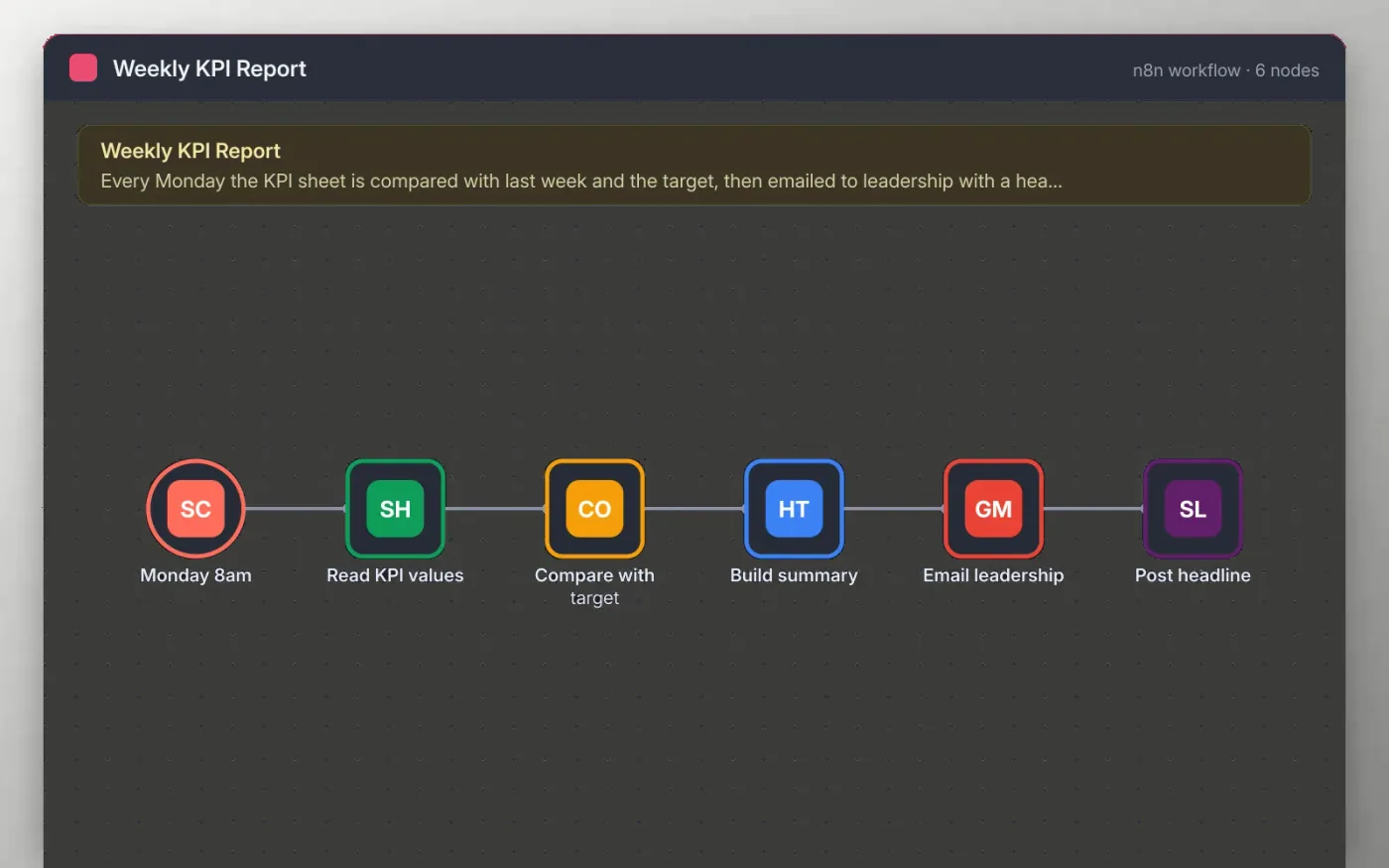
Each Monday morning the workflow reads the KPI values from a Google Sheet. A Code step works out the change against last week and whether each KPI meets its target, then counts how many are on track.
An HTML step builds a short summary from those results. It is emailed to leadership with the headline as the subject, and the same headline is posted to a Slack channel so the week starts with a clear picture.
Download the workflow JSON.
In n8n, create a workflow, open the … menu, choose Import from File and select the JSON.
Connect Google Sheets on Read KPI values and set up a sheet with the columns the sticky note lists.
Replace the recipient on Email leadership and connect Gmail, then connect Slack on Post headline.
Click Test workflow to check the summary, then activate it.
Yes. Download the JSON and import it into your own n8n. There is no sign-up and no cost.
No. The file has no keys or tokens. You connect your own Google, Gmail and Slack accounts after importing.
Yes. Put several addresses separated by commas in the To field of Email leadership.
Docs + Word7 pages
Free
Docs + Word8 pages
Free
n8n
Free
n8n
Free
n8n
Free
n8n
Free









