
Lead Intake Webhook
n8n
Free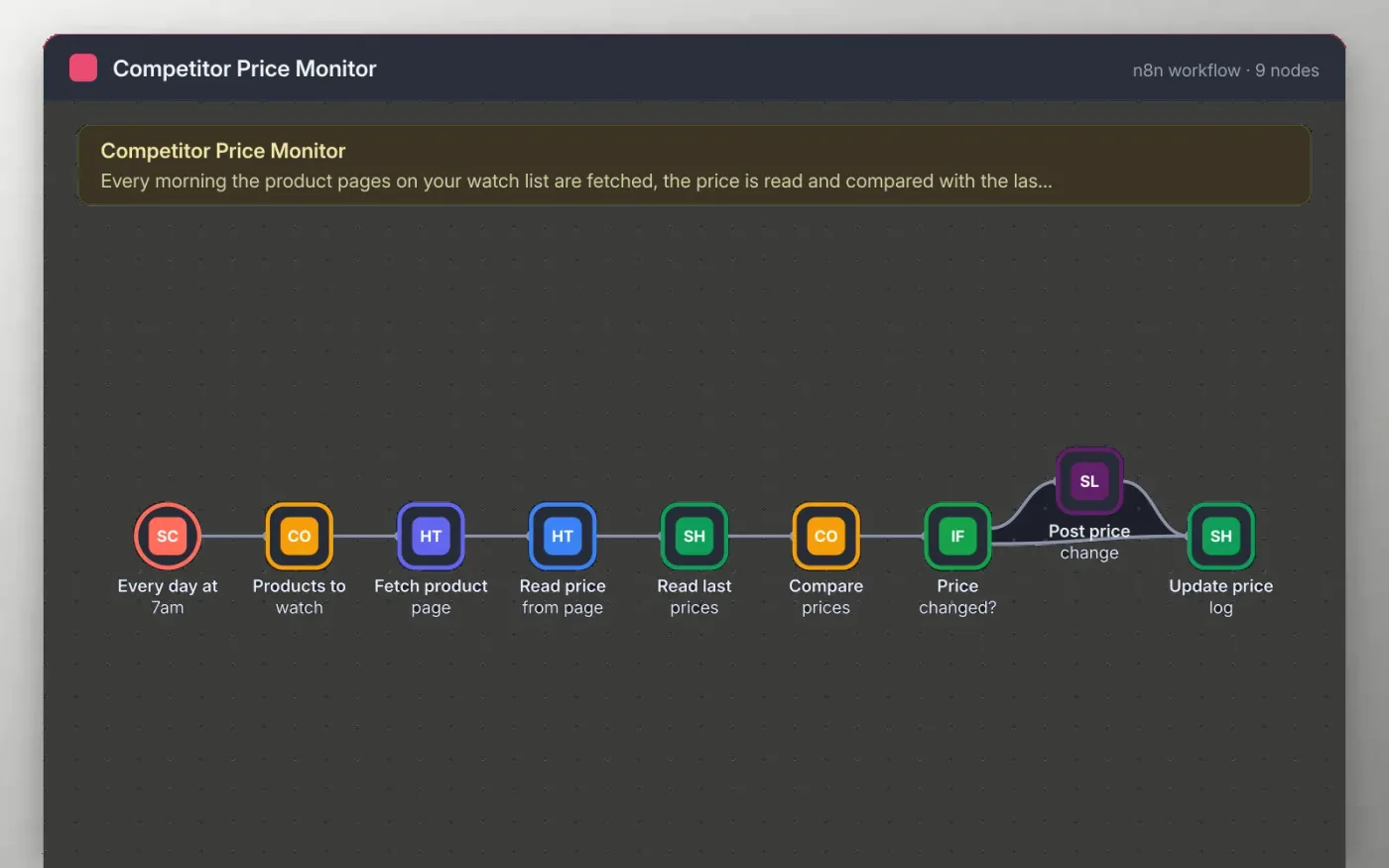
Each morning the workflow fetches the product pages on your watch list, reads the price from each page and compares it with the price logged the day before in a Google Sheet. The price is read from the first element with the price class, so you can change the selector for other sites.
When a price has changed, a message with the old and new price goes to your Slack channel. Every product is written back to the sheet with the time it was checked, so the log stays current whether or not the price moved.
Download the workflow JSON.
In n8n, create a workflow, open the … menu, choose Import from File and select the JSON.
Replace the example URLs on the Products to watch node with the pages you track, and check the .price selector on the Read price from page node.
Connect Google Sheets on the Read last prices and Update price log nodes and pick a sheet tab called Prices.
Connect Slack on the Post price change node, run once to test, then activate the workflow.
Yes. Download the JSON and import it into your own n8n. There is no sign-up and no cost.
No. The file has no keys or tokens. You connect your own Google and Slack accounts after importing.
Not always. Many shops load prices with scripts or block automated requests. Check the Read price from page node output on each page before you rely on it.
n8n
Free
Slides + PowerPoint12 slides
Free
Docs + Word3 pages
Free
n8n
Free
n8n
Free
n8n
Free








