Skip to content
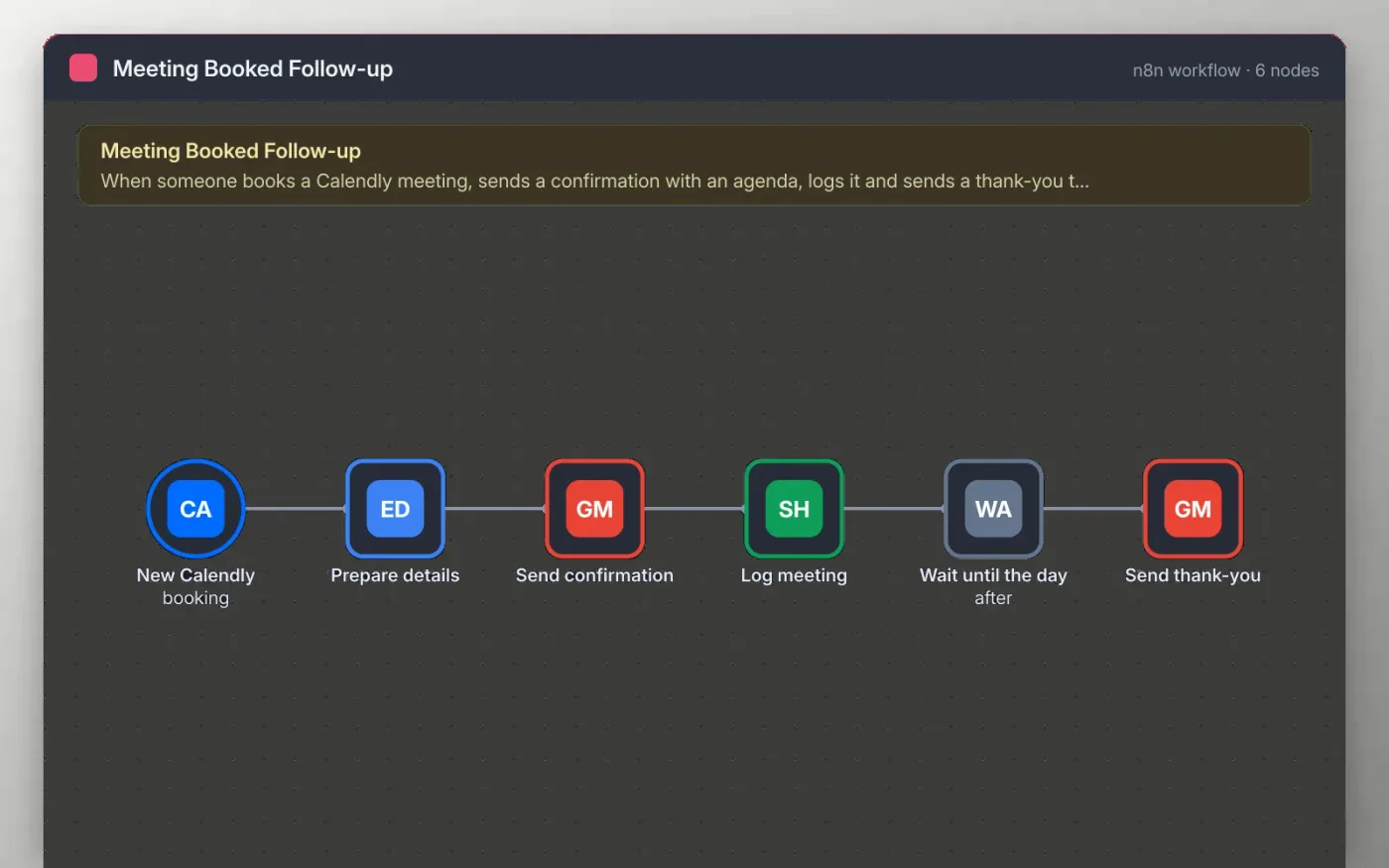
n8n canvas: Calendly trigger, detail fields, confirmation email, meeting log, one-day wait and thank-you email
Price
Free
Difficulty
Beginner
Updated
November 6, 2026

Overview

This workflow starts when someone books a meeting in Calendly. A Set node pulls out the name, email, meeting name and start time, and Gmail sends a confirmation with a short agenda you can edit.

The booking is added to a Google Sheet, then the workflow waits one day and sends a thank-you email. The wait is a single node, so you can change it to hours or a different day count.

Useful for

  • Send every discovery call a clear agenda before it starts
  • Keep a simple log of booked meetings for reporting
  • Follow up the day after without remembering to do it

What's included

  • An n8n workflow with 6 nodes, ready to import
  • Trigger: New Calendly booking
  • Connects Calendly, Gmail, Sheets
  • Sticky notes on the canvas that explain what to set up
  • No credentials inside: you connect your own accounts

How to use it

  1. 1

    Download the workflow JSON.

  2. 2

    In n8n, create a workflow, open the … menu, choose Import from File and select the JSON.

  3. 3

    Connect Calendly on the trigger, then Gmail on the two email nodes and Google Sheets on Log meeting.

  4. 4

    Edit the agenda and the thank-you text to match your calls.

  5. 5

    Book a test meeting, check both emails and the sheet row, then activate.

What you need

Requirements

  • An n8n instance (cloud or self-hosted, version 1.x) and a Calendly account
  • A Gmail account to send from and a Google Sheet with a header row

Works with

  • n8n 1.x (cloud or self-hosted)

Questions

Is this n8n workflow free?

Yes. Download the JSON and import it into your own n8n. There is no sign-up and no cost.

Does it include any credentials?

No. The file has no keys or tokens. You connect your own Calendly, Gmail and Google accounts after importing.

Can the thank-you go out after the meeting instead of the day after?

Yes. Change the Wait node to the number of hours or days you want, measured from the booking time.

  • #sales-automation
  • #meeting-booked-follow-up
  • #n8n
  • #automation
  • #workflow-template
  • #free-template

More sales automation templates

See all 5

Also in Sales

All sales templates
Get this template

Preparing your template…