
Lead Intake Webhook
n8n
Free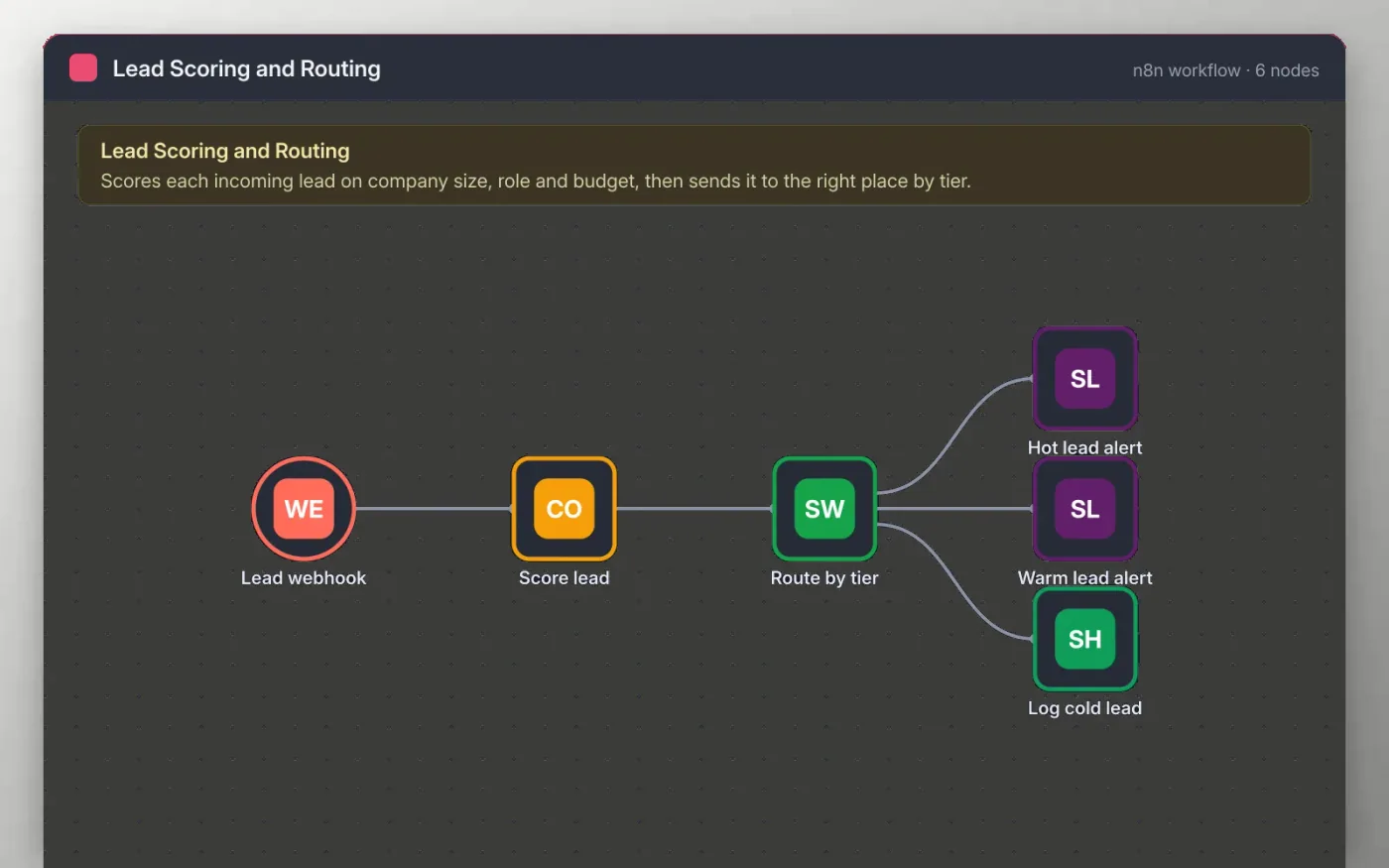
This workflow receives a lead from your website or a form tool through a webhook. A Code node adds points for company size, job role and budget, then sets a tier: hot, warm or cold. The points are plain rules you can change in one place.
A Switch node sends hot leads to a fast-response Slack channel, warm leads to the normal sales channel and cold leads to a Google Sheet for nurturing. Nothing is sent until you connect your own Slack and Google accounts.
Download the workflow JSON.
In n8n, create a workflow, open the … menu, choose Import from File and select the JSON.
Connect Slack on the two alert nodes and choose the channels, then connect Google Sheets on the cold lead node.
Open the Lead webhook node, copy the test URL and send a sample lead with a POST request.
Check that the score and tier look right, then activate the workflow.
Yes. Download the JSON and import it into your own n8n. There is no sign-up and no cost.
No. The file has no keys or tokens. You connect your own Slack and Google accounts after importing.
Edit the points and the thresholds in the Score lead Code node. The tier is set on the last line before the return.
n8n
Free
Slides + PowerPoint12 slides
Free
Docs + Word3 pages
Free
n8n
Free
n8n
Free
n8n
Free
n8n
Free







