
Lead Intake Webhook
n8n
Free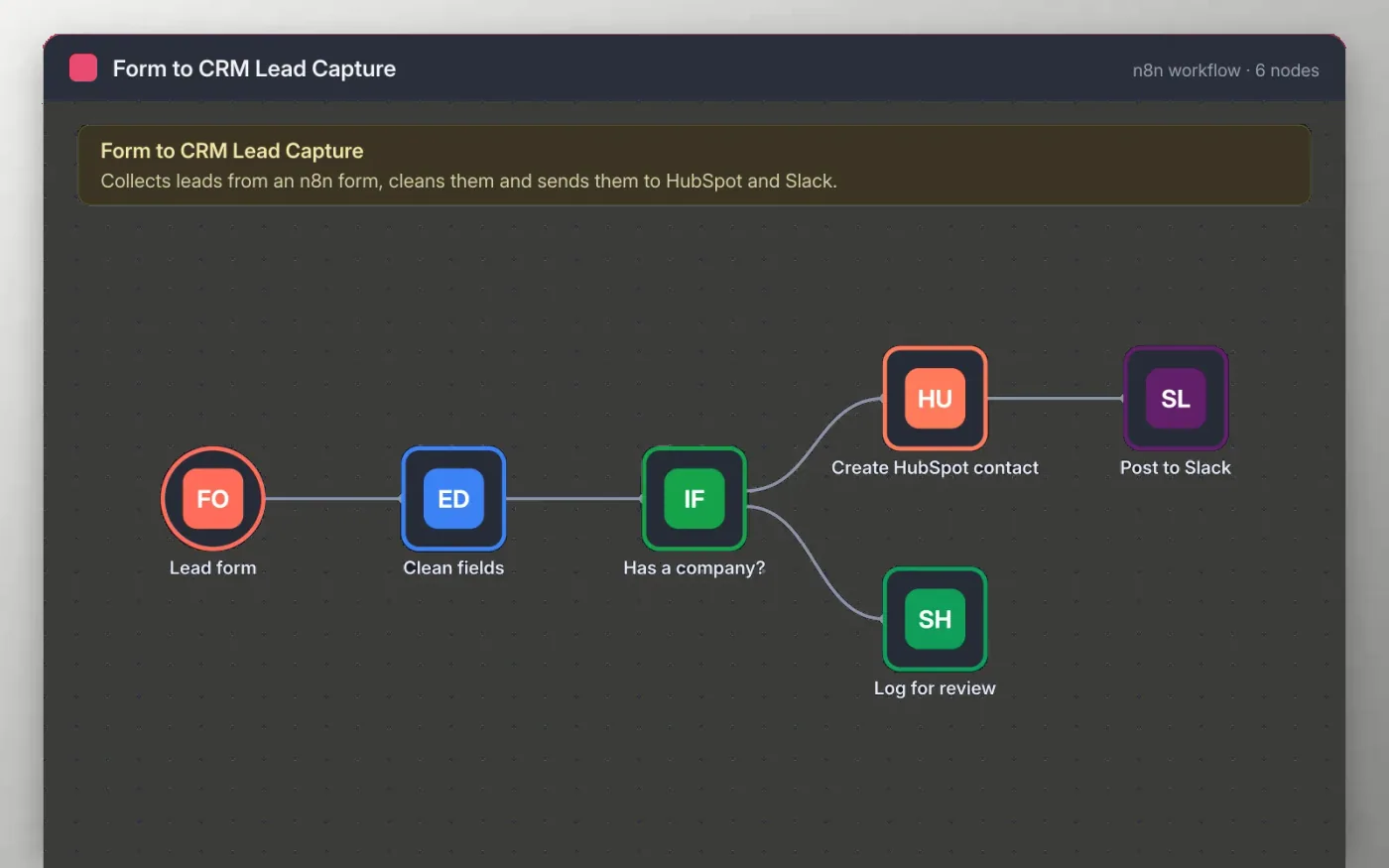
This workflow gives your website a lead form hosted by n8n. Each answer is cleaned (trimmed names, lowercase email, a timestamp), then checked for a company name. Leads with a company become HubSpot contacts and a message in your sales channel.
Leads without a company go to a Google Sheet so someone can follow up by hand instead of losing them. Sticky notes on the canvas list what to connect, and nothing is sent until you add your own accounts.
Download the workflow JSON.
In n8n, create a workflow, open the … menu, choose Import from File and select the JSON.
Connect HubSpot, Slack and Google Sheets on the nodes the sticky note names.
Open the Lead form node, copy the test URL and send yourself a test lead.
Activate the workflow and link the production form URL from your website.
Yes. Download the JSON and import it into your own n8n. There is no sign-up and no cost.
No. The file has no keys or tokens. You connect your own HubSpot, Slack and Google accounts after importing.
Yes. Replace the Lead form node with a Webhook node and post your form to its URL, keeping the same field names.
n8n
Free
Slides + PowerPoint12 slides
Free
Docs + Word3 pages
Free
n8n
Free
n8n
Free
n8n
Free
n8n
Free







