
Acceptable Use Policy
Docs + Word7 pages
Free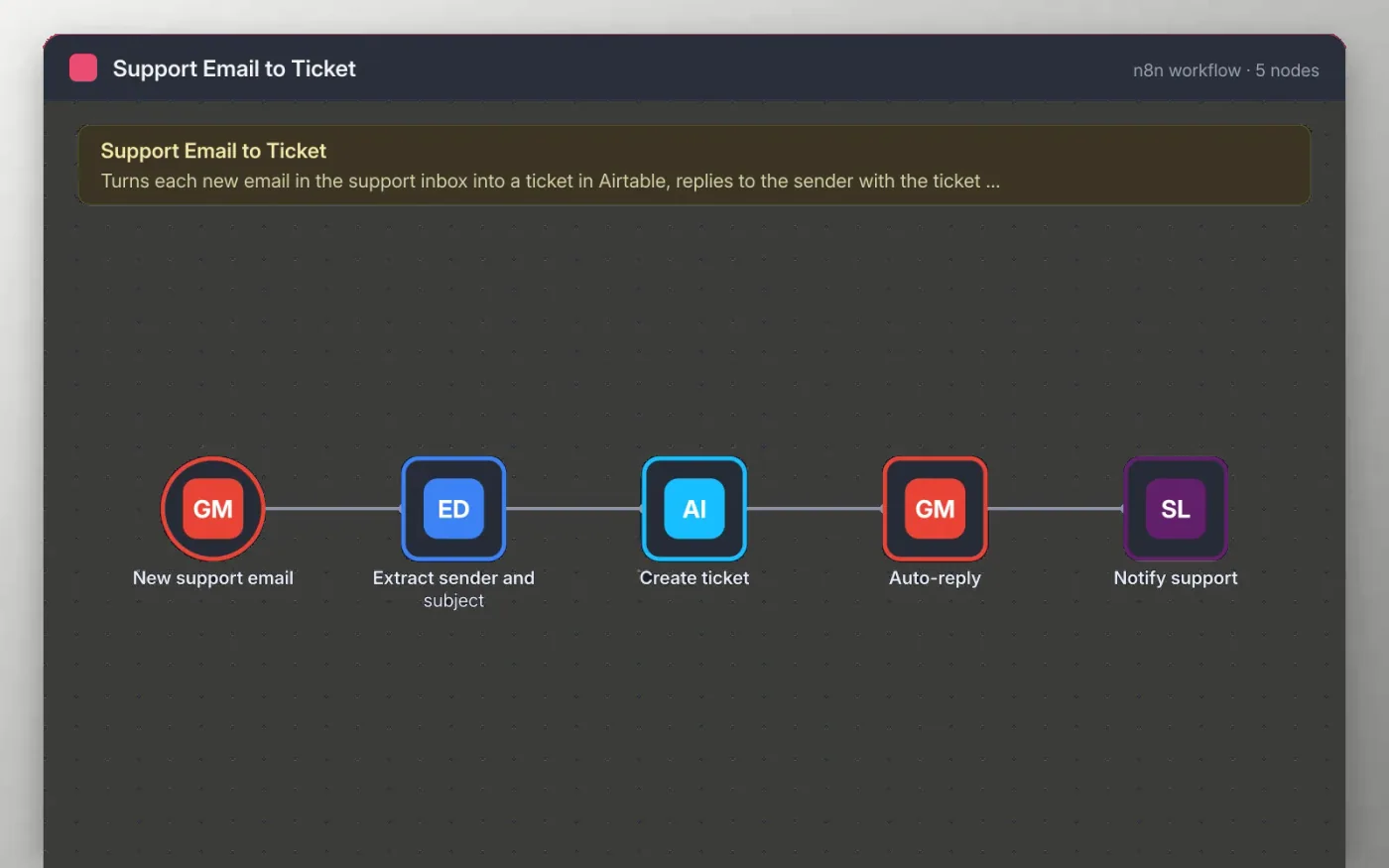
The workflow checks the support inbox every minute for unread emails. Each one is read for the sender, subject and text, then saved as an open ticket in Airtable with its status set to Open.
The sender gets an automatic reply quoting the ticket number, so they know it was received. A message in your Slack support channel names the sender and subject, so the team can pick it up.
Download the workflow JSON.
In n8n, create a workflow, open the … menu, choose Import from File and select the JSON.
Connect Gmail, Airtable and Slack on the nodes the sticky note names, and pick your base, table and channel.
Send a test email to the support inbox and check the ticket and the reply.
Activate the workflow.
Yes. Download the JSON and import it into your own n8n. There is no sign-up and no cost.
No. The file has no keys or tokens. Connect your own Gmail, Airtable and Slack accounts after importing.
Yes, to every unread email it finds. Add a filter on the New support email node to limit it to a label, such as Support.
Docs + Word7 pages
Free
Docs + Word8 pages
Free
n8n
Free
n8n
Free
n8n
Free
n8n
Free









