
Acceptable Use Policy
Docs + Word7 pages
Free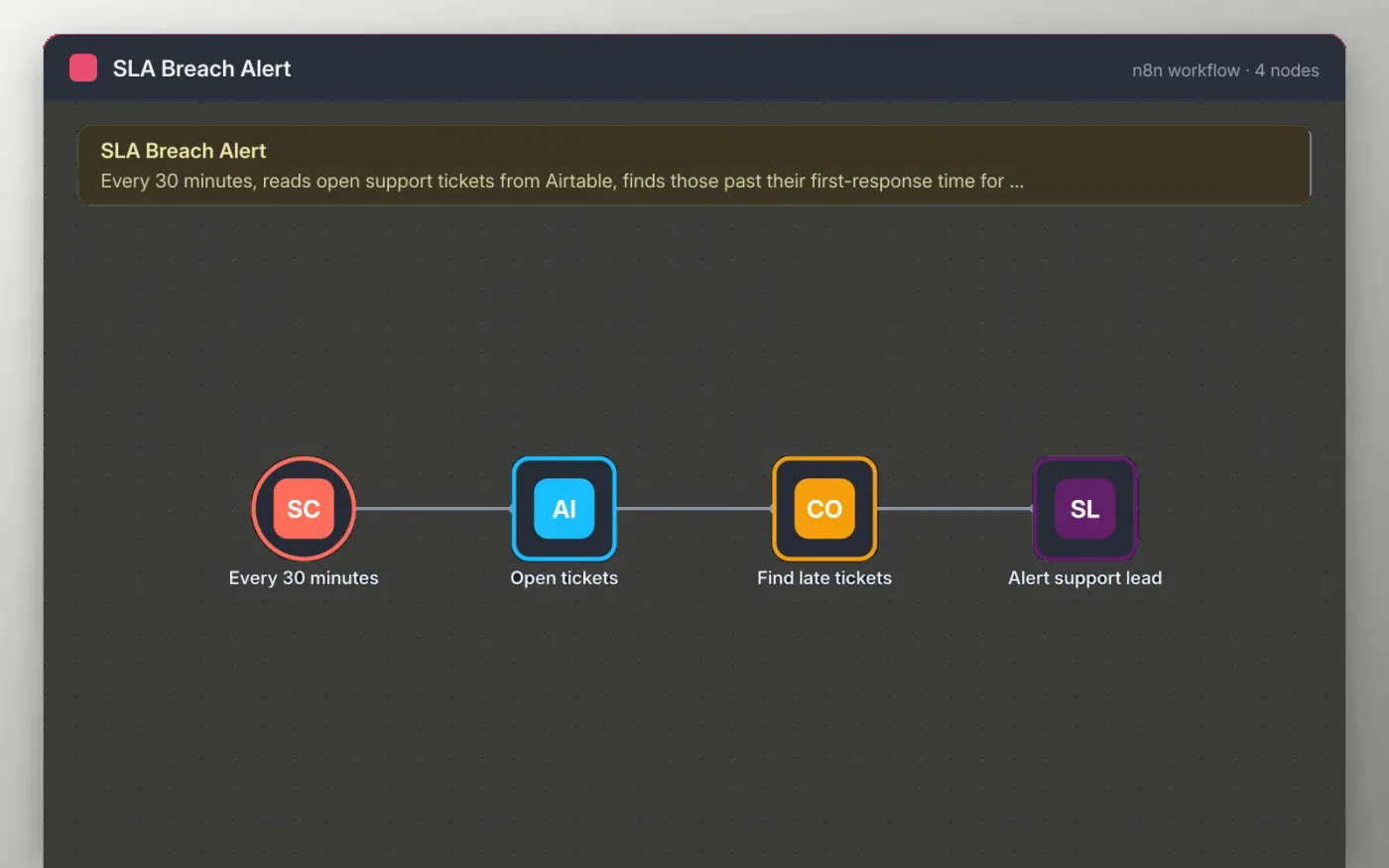
Every 30 minutes the workflow reads the open tickets from an Airtable table. A short code step compares each ticket's created time with the response limit for its priority: one hour for urgent, four for high, eight for normal and 24 for low.
Tickets past their limit are listed in one Slack message for the support lead. When nothing is late, the workflow stops quietly, so the channel only hears about real problems.
Download the workflow JSON.
In n8n, create a workflow, open the … menu, choose Import from File and select the JSON.
Connect Airtable and Slack, and pick your base, table and channel.
Check the response limits in the Find late tickets code and change them to your own.
Click Execute workflow to test, then activate.
Yes. Download the JSON and import it into your own n8n. There is no sign-up and no cost.
No. The file has no keys or tokens. Connect your own Airtable and Slack accounts after importing.
Yes. On Alert support lead, choose a direct message to the support lead instead of a channel.
Docs + Word7 pages
Free
Docs + Word8 pages
Free
n8n
Free
n8n
Free
n8n
Free
n8n
Free









