
Acceptable Use Policy
Docs + Word7 pages
Free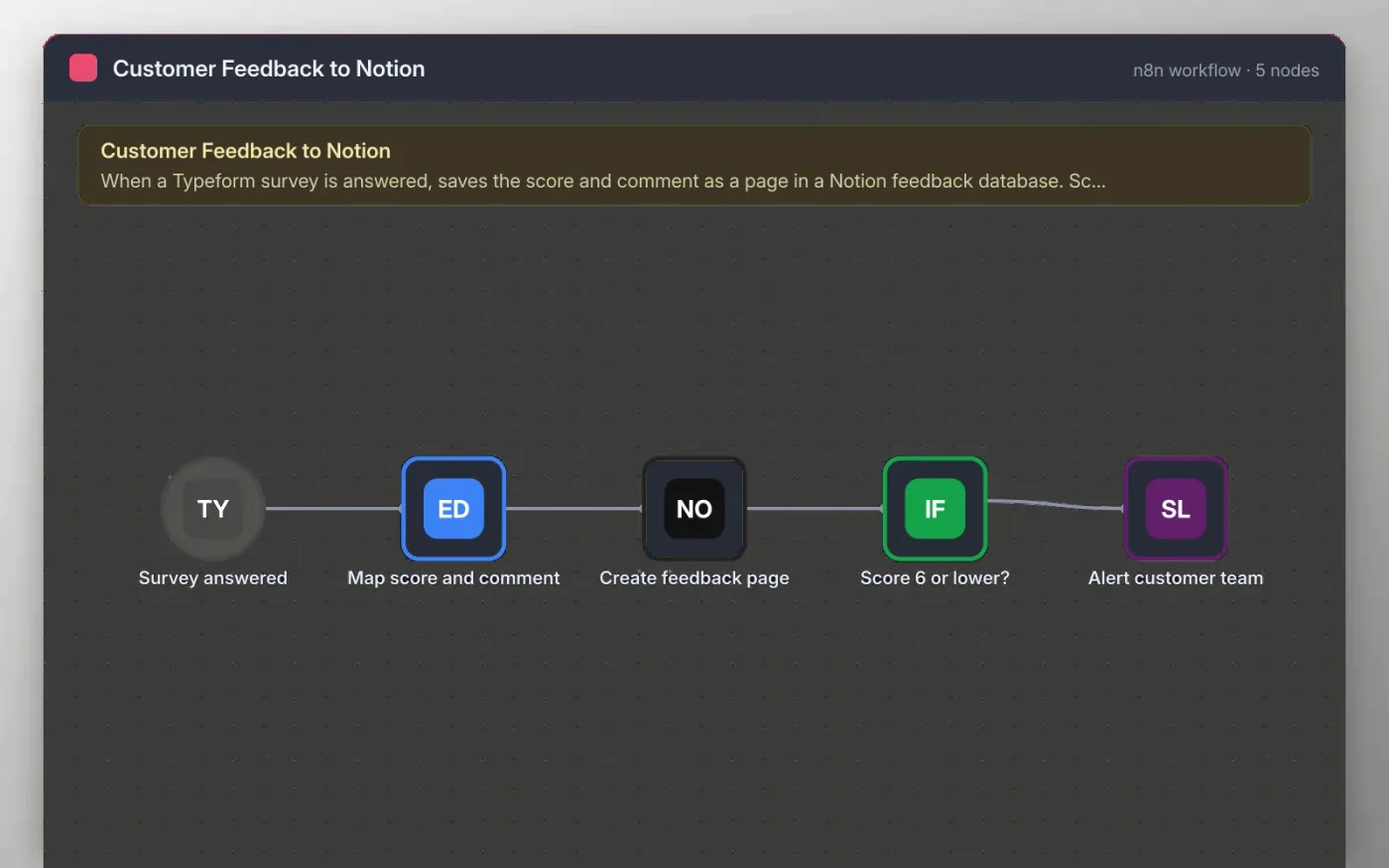
When someone answers your Typeform survey, the workflow cleans the score, comment and email. It then creates a page in your Notion feedback database with the score, the email and the date, so the whole team can filter and sort the answers.
Scores of 6 or lower also post the comment to a Slack channel for the customer team. Higher scores are saved to Notion only, so the channel stays focused on the answers that need a reply.
Download the workflow JSON.
In n8n, create a workflow, open the … menu, choose Import from File and select the JSON.
Set the question field names on Map score and comment to match your Typeform survey.
Connect Typeform, Notion and Slack, and pick your survey, database and channel.
Submit a test answer, check the Notion page, then activate.
Yes. Download the JSON and import it into your own n8n. There is no sign-up and no cost.
No. The file has no keys or tokens. Connect your own Typeform, Notion and Slack accounts after importing.
Yes. Open the Score 6 or lower node and change the number to match your scale.
Docs + Word7 pages
Free
Docs + Word8 pages
Free
n8n
Free
n8n
Free
n8n
Free
n8n
Free









