
C4 Model Diagram
Slides + PowerPoint5 slides
Free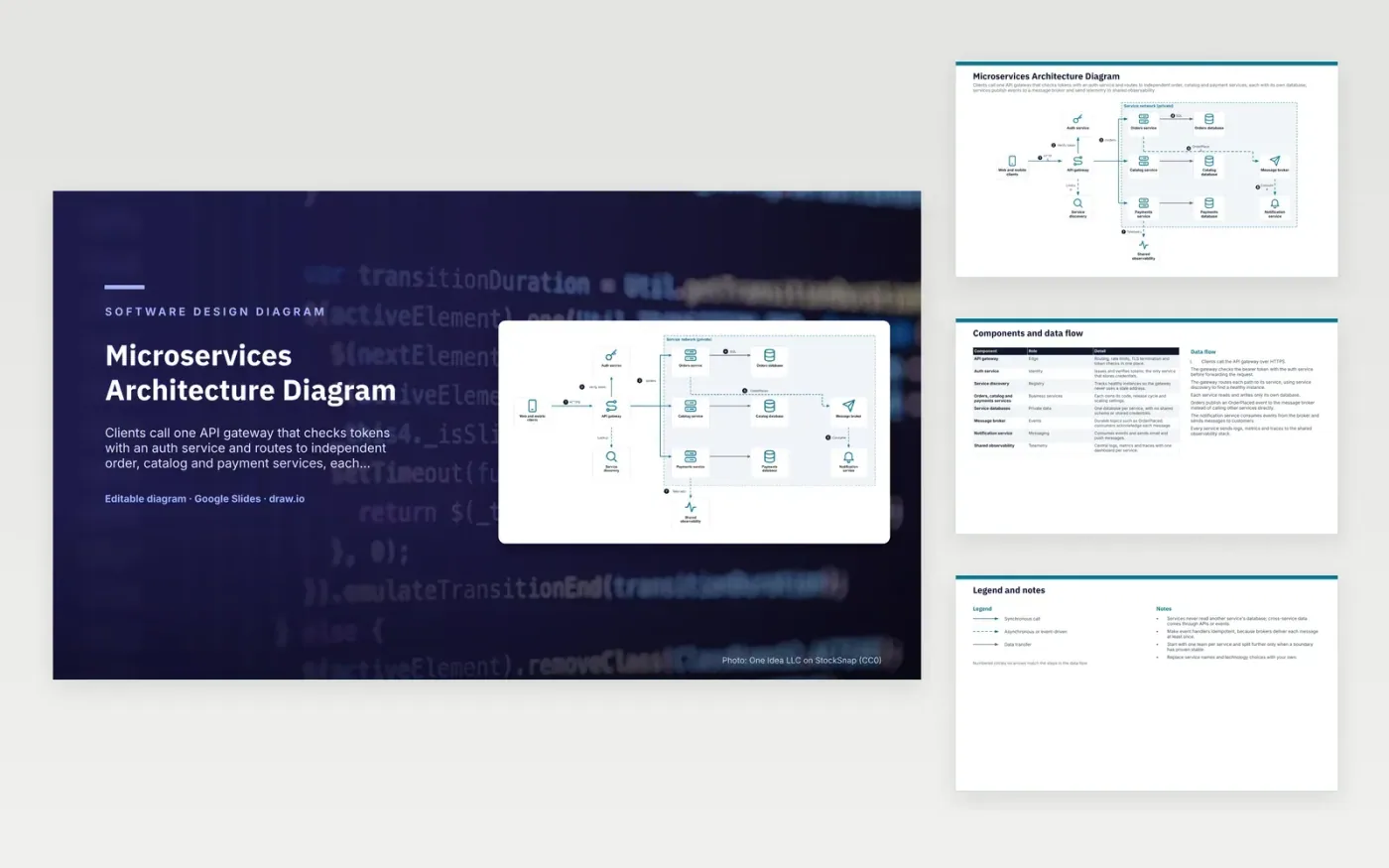
Clients call an API gateway over HTTPS. The gateway checks the bearer token with the auth service, then routes each path to the orders, catalog or payments service, using service discovery to find a healthy instance. Each service reads and writes only its own database. When an order is placed, the orders service publishes an OrderPlaced event to the message broker, and the notification service consumes it to send email and push messages. Every service sends logs, metrics and traces to shared observability.
The design point is that services share data only through APIs and events, never through another service's database. Each team can change its schema and release cycle freely, but data is eventually consistent across services. Event handlers must be idempotent because the broker delivers each message at least once. Start with one team per service and split further only when a boundary has proven stable. To adapt it, rename the services and choose the gateway and broker that suit your stack.
Click Make a copy in Google Slides, then confirm on the Google page. The copy is saved to your own Google Drive.
Rename Web and mobile clients, API gateway, Auth service and the other boxes inside Service network (private) to your own components, and delete the ones your system does not have.
Rewrite the 7-step data flow and the 8-row components table so they match the arrows you keep.
For the draw.io version, download microservices-architecture-diagram.drawio and open it at app.diagrams.net.
A separate database lets a service change its schema without coordinating with other teams. Services share data through APIs or events, so no other service depends on its internal tables.
The gateway is the single entry point. It terminates TLS, checks tokens, applies rate limits and routes each path to a service, so clients do not need the address of each service.
Most brokers deliver each message at least once, so a consumer can see the same event twice after a retry. An idempotent handler gives the same result on a repeat, so a duplicate OrderPlaced event does not send a second email.
More Google Slides templatesMore developer workflows templates
Slides + PowerPoint5 slides
Free
Slides + PowerPoint5 slides
Free
Slides + PowerPoint5 slides
Free










