Google Cloud Three-Tier Web Architecture
Slides + PowerPoint5 slides
Free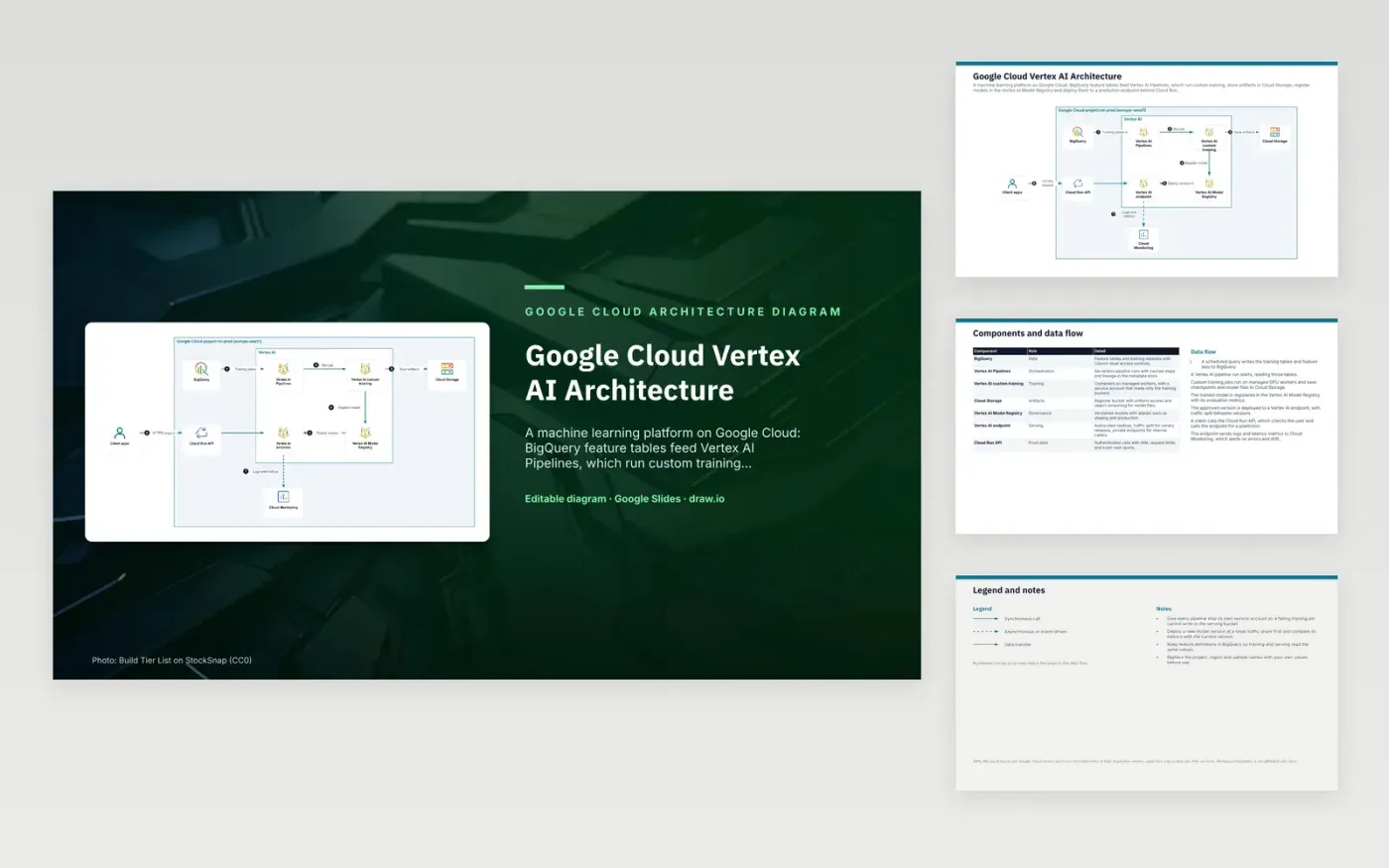
A scheduled query writes training tables to BigQuery, and a Vertex AI pipeline run reads them. Custom training jobs run on managed GPU workers and save checkpoints and model files to Cloud Storage. The trained model is registered in the Vertex AI Model Registry with its evaluation metrics. The approved version is deployed to a Vertex AI endpoint. A client calls the Cloud Run API, which checks the user and asks the endpoint for a prediction.
Each pipeline step gets its own service account, so a failing training job cannot write to the serving bucket. A new model version starts at a small traffic share, and its metrics are compared with the current version before it takes more. Keeping feature definitions in BigQuery means training and serving read the same values. To adapt it, set your own project, region and sample names, and keep the canary split and the per-step accounts.
The diagram uses the official Google Cloud architecture icons, each labelled with its service name. AWS, Microsoft Azure and Google Cloud names and icons are trademarks of their respective owners, used here only to describe their services. WorkspaceTemplates is not affiliated with them.
Click Make a copy in Google Slides, then confirm on the Google page. The copy is saved to your own Google Drive.
Rename BigQuery, Vertex AI Pipelines, Vertex AI custom training and the other boxes inside Google Cloud project ml-prod (europe-west1) to your own components, and delete the ones your system does not have.
Rewrite the 7-step data flow and the 7-row components table so they match the arrows you keep.
For the draw.io version, download gcp-vertex-ai-architecture-diagram.drawio and open it at app.diagrams.net.
Cloud Storage holds the raw model files, while the Model Registry tracks versions, aliases and evaluation metrics for each one. Deployments refer to a registered version, so you can see which files and results are live. Storage alone does not record that history.
It sends a chosen percentage of prediction requests to each deployed model version. A canary might get 5 or 10 percent of traffic while the rest stays on the current version. You can move the split to 100 percent once the new version performs well.
Cloud Run checks the caller's identity with IAM and applies request limits and per-user quotas before a prediction is made. This keeps authentication and quota rules in one place rather than in each client app.
More Google Slides templatesMore developer workflows templates
Slides + PowerPoint5 slides
Free
Slides + PowerPoint5 slides
Free
Slides + PowerPoint5 slides
Free










