
Admin Training Deck
Slides + PowerPoint11 slides
Free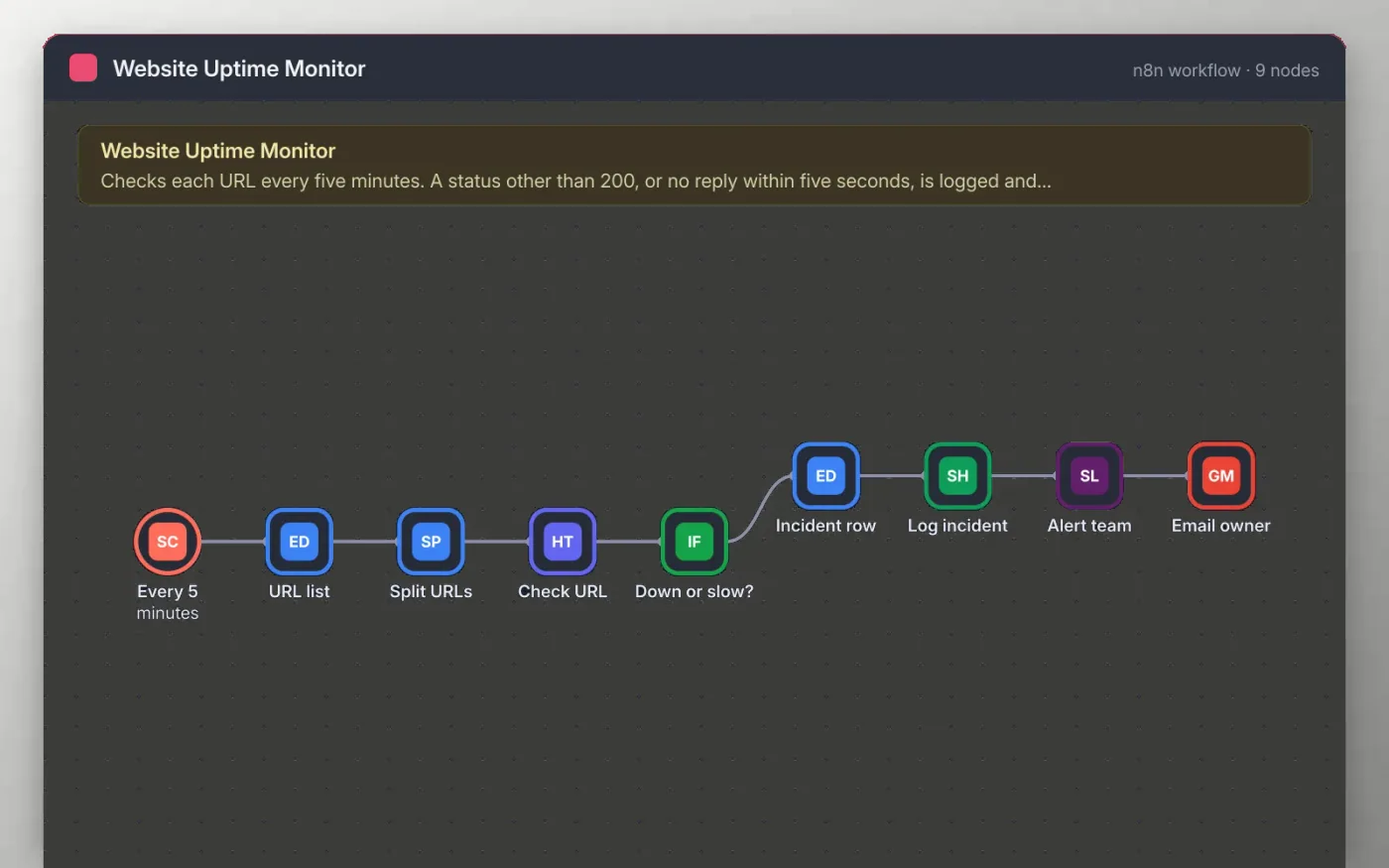
Every five minutes the workflow checks each URL in a list. A request that does not return status 200, or gets no reply within five seconds, counts as an incident.
Each incident is saved as a row in a Google Sheet with the time it was seen. The team is then alerted in Slack and the owner receives an email, so the page can be fixed before customers report it.
Download the workflow JSON.
In n8n, create a workflow, open the … menu, choose Import from File and select the JSON.
Replace the example URLs on URL list, and create the incident sheet with the columns the sticky note lists.
Connect Google Sheets, Slack and Gmail on the nodes the sticky note names.
Run Test workflow once to see a healthy check, then activate it.
Yes. Download the JSON and import it into your own n8n. There is no sign-up and no cost.
No. The file has no keys, tokens or real addresses. You connect your own accounts after importing.
Yes. Add more URLs to the list on URL list. Every URL gets its own check on each run.
Slides + PowerPoint11 slides
Free
Docs + Word7 pages
Free
Docs + Word7 pages
Free
n8n
Free
n8n
Free
n8n
Free
n8n
Free









