
Admin Training Deck
Slides + PowerPoint11 slides
Free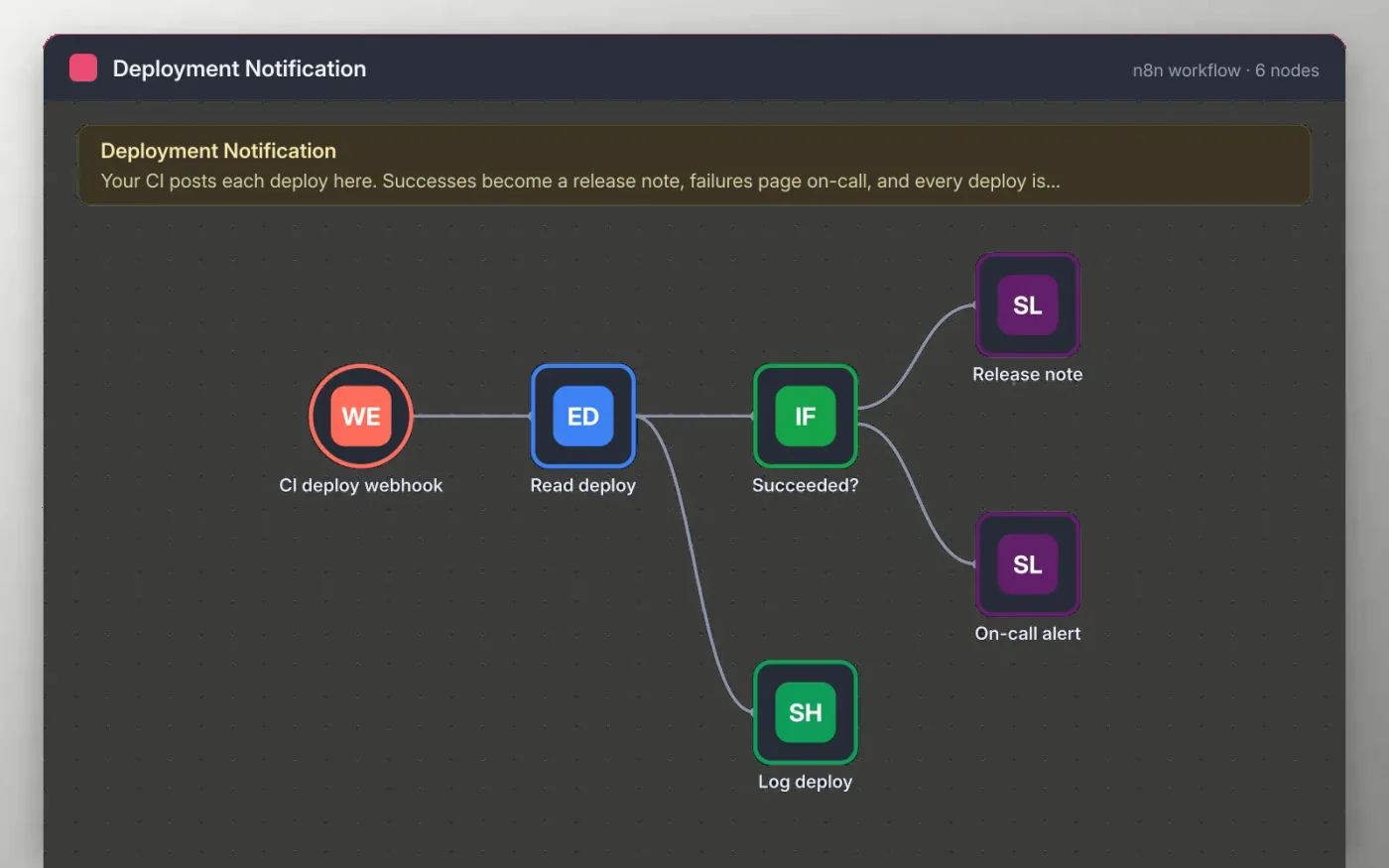
Your CI pipeline sends a short message to the webhook at the end of each deploy, with the service name, version, status and a link to the build log. The workflow reads those fields and checks whether the status is success.
Successful deploys become a release note in the releases channel. Failed deploys post to the on-call channel with the log link. Every deploy, either way, is added as a row in a sheet so you have a history.
Download the workflow JSON.
In n8n, create a workflow, open the … menu, choose Import from File and select the JSON.
Add the webhook URL to your CI pipeline as a final step, sending service, version, status and logUrl.
Connect Slack on the two channel nodes and Google Sheets on the log node.
Send a test request from your CI or with curl, check the messages and rows, then activate the workflow.
Yes. Download the JSON and import it into your own n8n. There is no sign-up and no cost.
No. The file has no keys, tokens or real webhook paths beyond a placeholder. You connect your own Slack and Google accounts after importing.
Yes. Any tool that can send an HTTP POST with JSON to the webhook URL will work.
Slides + PowerPoint11 slides
Free
Docs + Word7 pages
Free
Docs + Word7 pages
Free
n8n
Free
n8n
Free
n8n
Free
n8n
Free









