
Admin Training Deck
Slides + PowerPoint11 slides
Free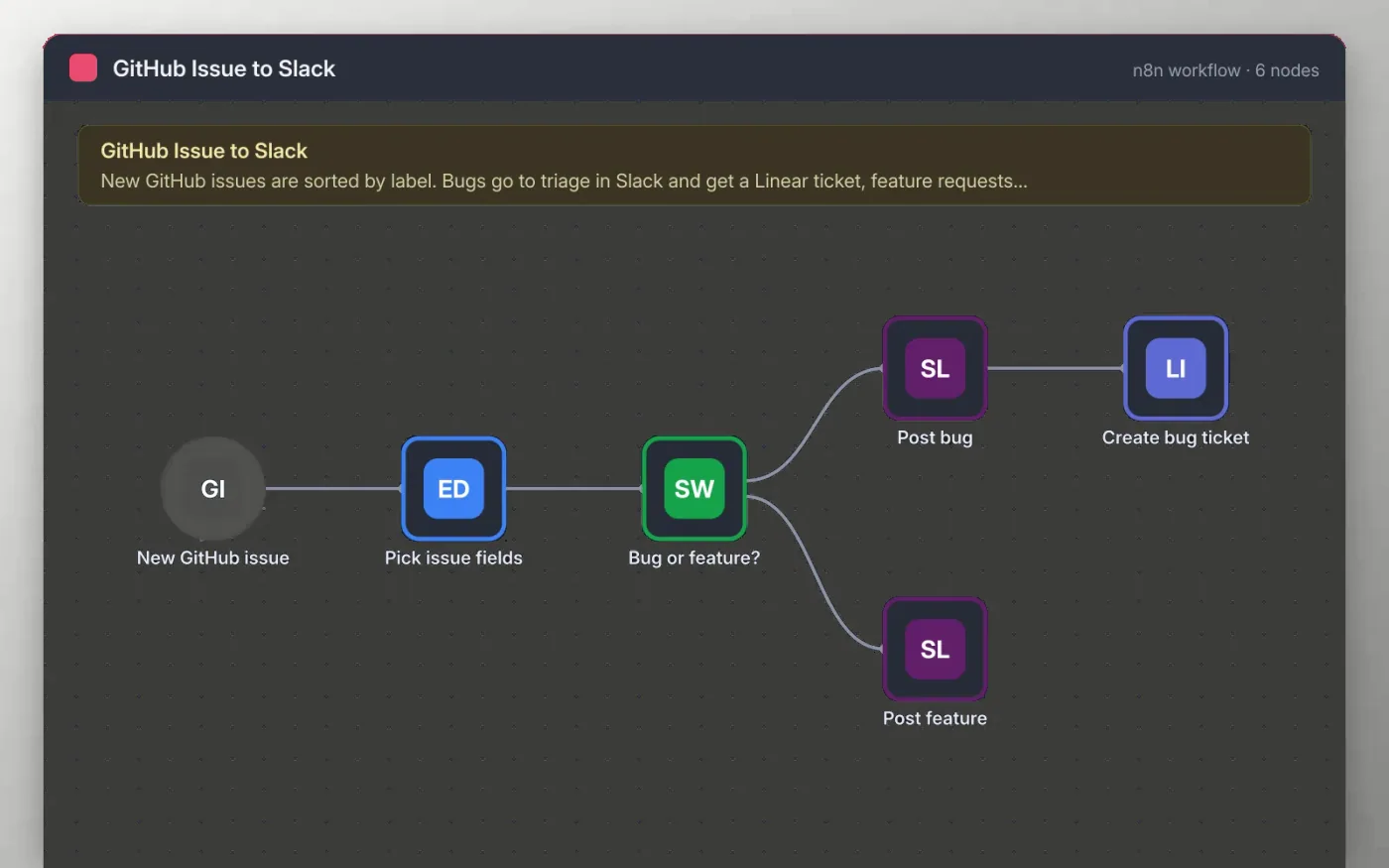
When an issue is opened or changed in your GitHub repository, the workflow picks out the title, link, author and labels. A Switch step then checks the labels: anything labelled bug goes to a triage channel and a Linear ticket, and anything labelled feature goes to the product channel.
The ticket links back to the GitHub issue, so the person who triages it can jump straight to the original report. Issues with neither label are not posted.
Download the workflow JSON.
In n8n, create a workflow, open the … menu, choose Import from File and select the JSON.
Replace your-org and your-repo on the GitHub trigger, then connect GitHub.
Connect Slack for the two channel nodes and Linear for the ticket node.
Create a test issue labelled bug, check the post and ticket, then activate the workflow.
Yes. Download the JSON and import it into your own n8n. There is no sign-up and no cost.
No. The file has no keys, tokens or real repository names. You connect your own GitHub, Slack and Linear accounts after importing.
The Switch step sends it to the first matching output, so it goes to the bug path. Change the order of the rules to change that.
Slides + PowerPoint11 slides
Free
Docs + Word7 pages
Free
Docs + Word7 pages
Free
n8n
Free
n8n
Free
n8n
Free
n8n
Free









