
Admin Training Deck
Slides + PowerPoint11 slides
Free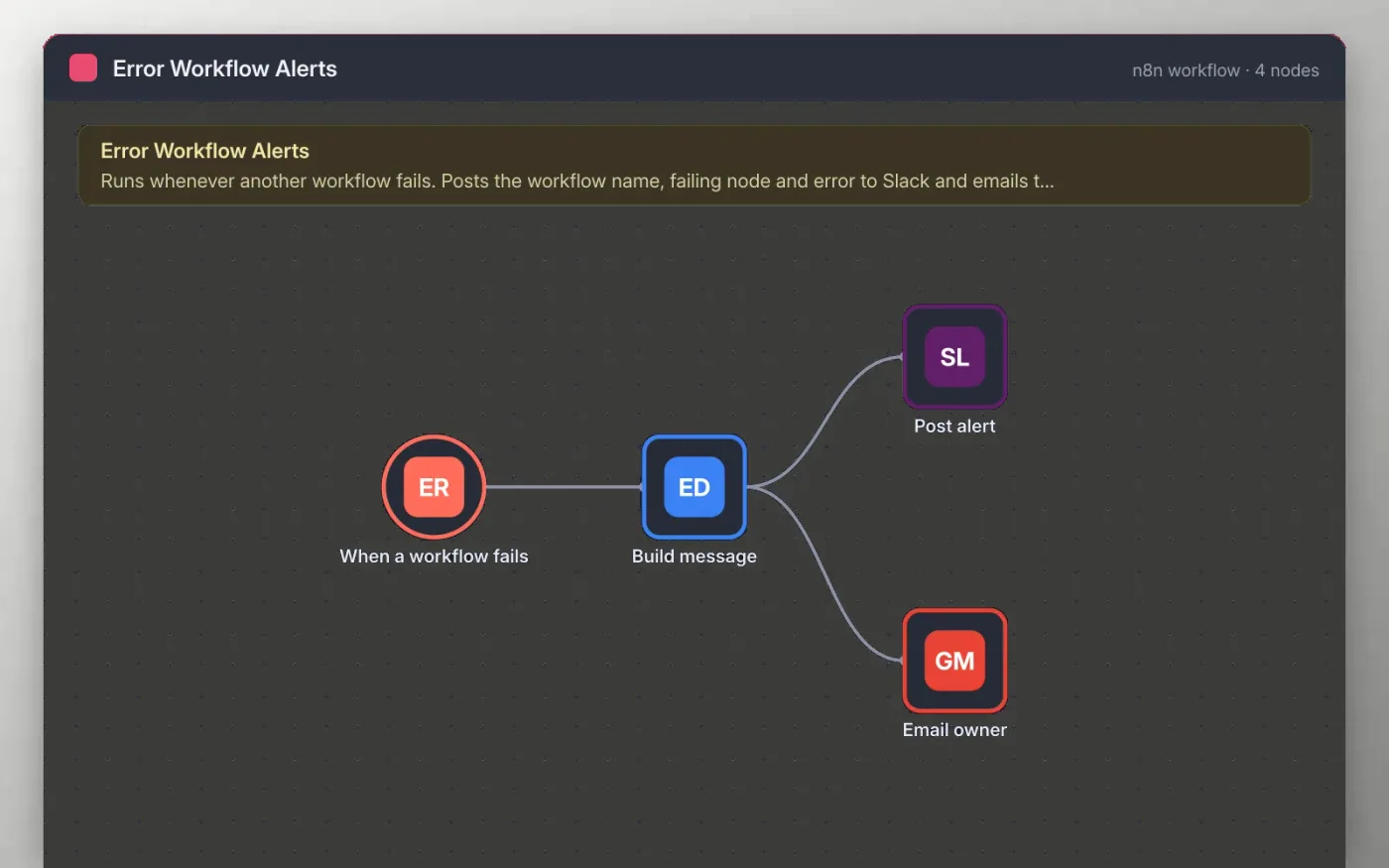
n8n can send every failed run to an error workflow. This template is that error workflow: it receives the workflow name, the last node that ran, the error message and a link to the execution.
The details are put into one short message. It is posted to an alerts channel in Slack and emailed to the owner, so a failed sync or invoice run does not stay hidden until someone checks by hand.
Download the workflow JSON.
In n8n, create a workflow, open the … menu, choose Import from File and select the JSON.
Connect Slack on Post alert and Gmail on Email owner, and replace the placeholder address.
In each workflow you want to watch, open Settings and choose this workflow under Error Workflow.
Activate this workflow and run a test failure to confirm the alert arrives.
Yes. Download the JSON and import it into your own n8n. There is no sign-up and no cost.
No. The file has no keys, tokens or real addresses. You connect your own Slack and Gmail accounts after importing.
Avoid that by leaving this workflow out of its own Error Workflow setting, so a failure here does not loop.
Slides + PowerPoint11 slides
Free
Docs + Word7 pages
Free
Docs + Word7 pages
Free
n8n
Free
n8n
Free
n8n
Free
n8n
Free









