
Customer Case Study
Docs + Word3 pages
Free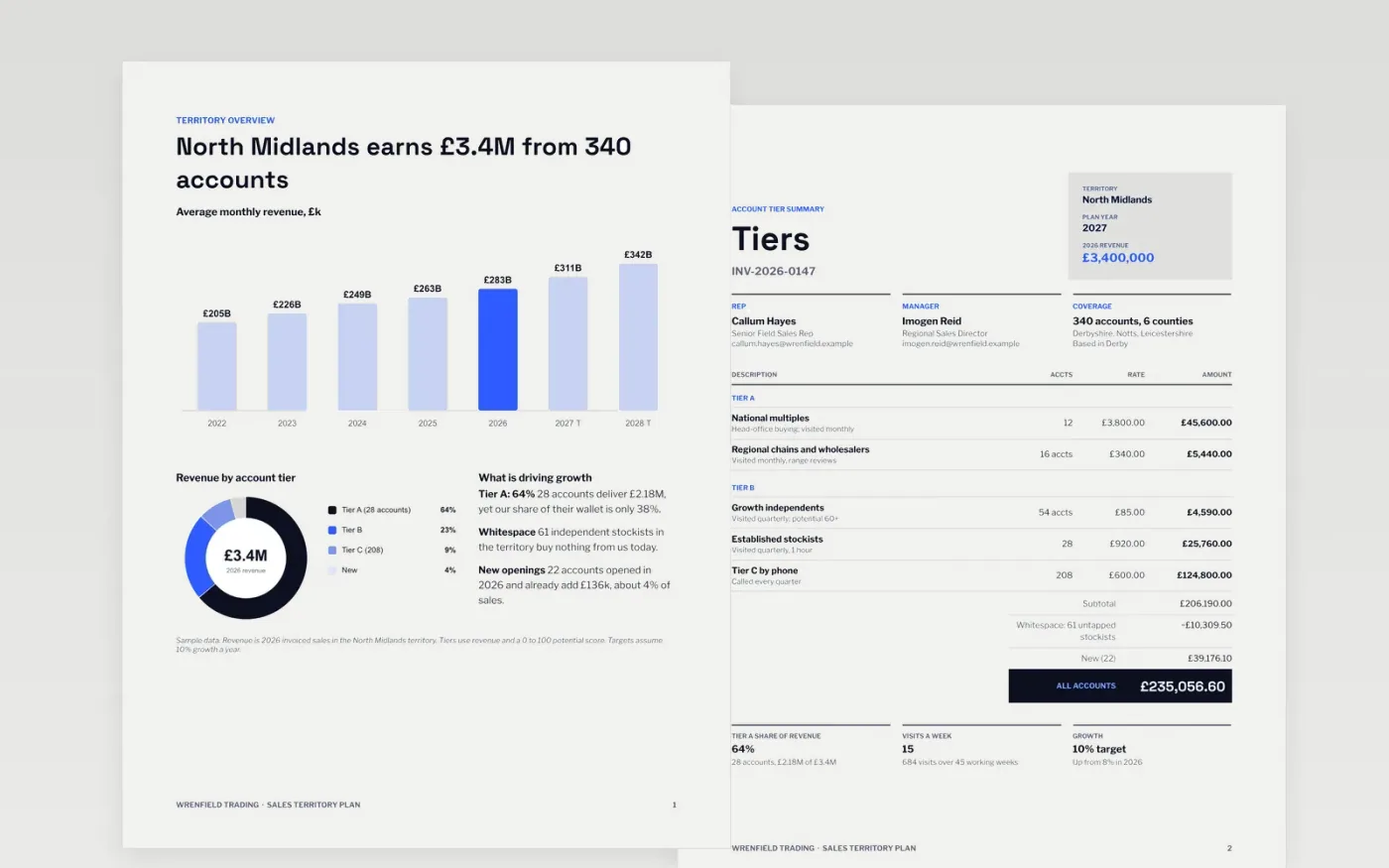
Field reps often treat every account alike, so the biggest accounts are under-visited and the calendar never adds up. This plan profiles the territory, splits accounts into tiers A, B and C, sets targets and a visit cadence that fits the working year, lists the activities that will move revenue and defines the measures that show it is working.
The sample follows a Wrenfield Trading rep covering 340 accounts in the North Midlands, with 28 tier A accounts delivering 64% of £3.4M revenue and a 10% growth target. Replace the account counts and revenue first, rebuild the visit calendar to your travel times, and swap the activities for the deals you will close.
Click Make a copy in Google Docs, then confirm on the Google page. The copy is saved to your own Google Drive.
Import your account list and recalculate tiers A, B and C by revenue and potential, then update the territory overview with your region, customer count, revenue and last year's growth.
Rebuild the visit calendar to your working days and travel times, and check that the total fits 45 weeks.
Replace the six activities with the opportunities you will close in the next two quarters, each with one owner and a date, and delete the compliance section if you are not in a regulated field.
Delete the guide page, then share the plan with your manager or present it at the territory review.
Rank accounts by revenue and a potential score from 0 to 100. In the sample, 28 tier A accounts deliver about two thirds of revenue and are visited monthly.
Most field reps manage 12 to 20 customer visits a week. Multiply visits by account count and check the total fits your 45 working weeks before you commit.
No. Wrenfield Trading, the people, the email addresses, the accounts and every figure in the sample are fictional. Replace them with your own details before sharing.
Docs + Word3 pages
Free
Google Sheets
Free
n8n
Free
Docs + Word7 pages
Free
Docs + Word7 pages
Free










