Business Plan Executive Summary
Docs + Word4 pages
Free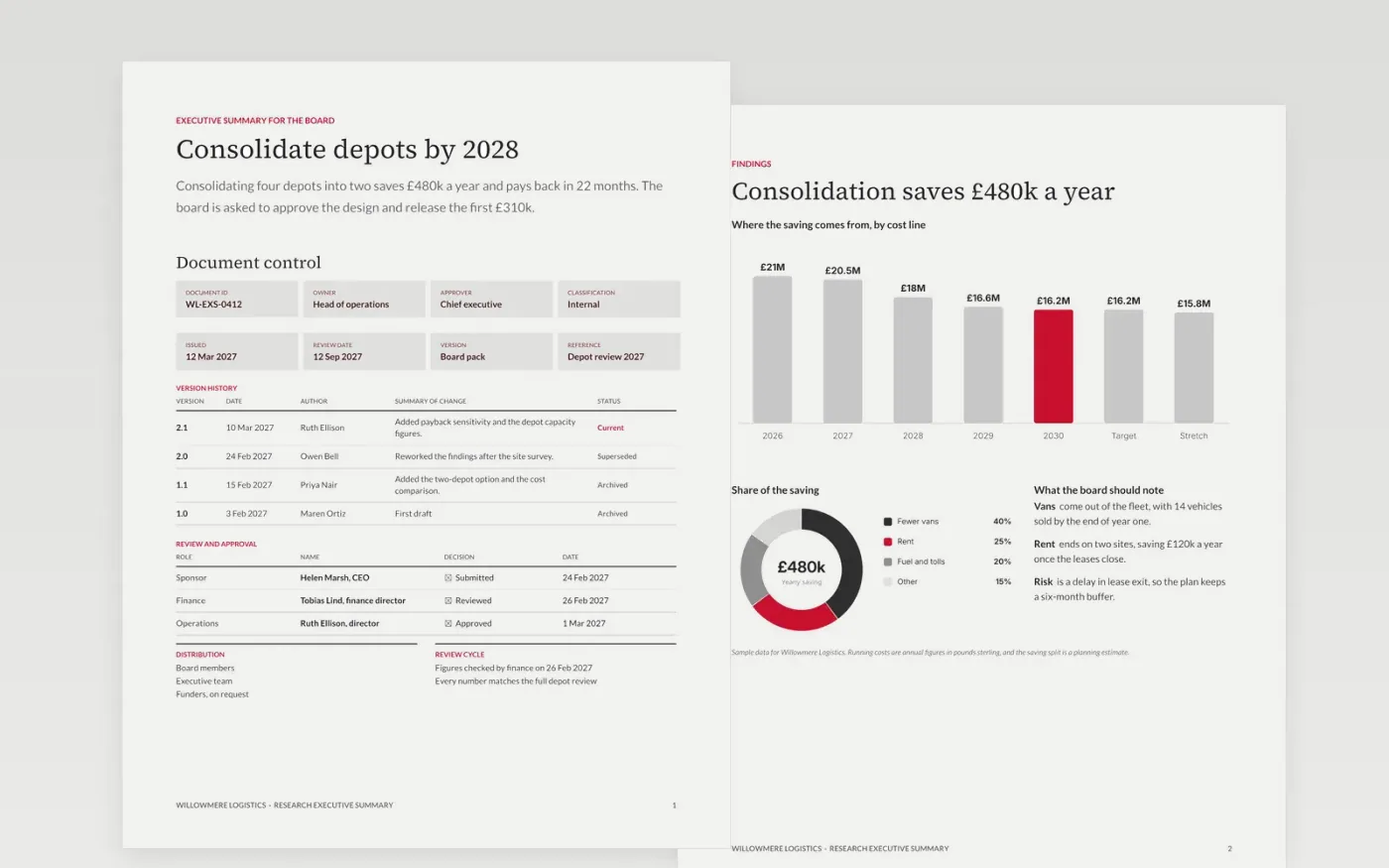
Board members and funders rarely read the full paper before a meeting, so the summary has to carry the decision on its own. This Google Docs template sets out a controlled-document cover page with version history and approvals, a findings page with a cost trend chart and a split of the saving, and a guide page for writing the text. The layout keeps the recommendation and the ask on the first page.
The sample is a fictional summary from Willowmere Logistics, a depot consolidation case in which four sites become two. It saves £480k a year and pays back in 22 months. The figures, approvers, document ID and dates are invented. Replace the purpose, the findings and the ask with your own, then check every number against the full paper before you circulate it.
Click Make a copy in Google Docs, then confirm on the Google page. The copy is saved to your own Google Drive.
Replace Willowmere Logistics and the sample names with your own organisation and approvers.
Write the full document first, then cut this summary to the decision, the findings and the ask.
Check every figure against the body, and update the version history each time it changes.
Delete the guide page, then circulate the summary with the full paper or present it from Google Docs.
Yes. It has to stand alone, so a board member who reads only this page knows the decision, the recommendation and the figures behind them without opening the full paper.
Yes. Willowmere Logistics, the approvers named on the cover, the findings and every figure are fictional sample content, so you can see the layout working before real numbers are added.
Aim for 350 to 500 words on a page, or three slide messages, and no more than a tenth of the full document. A reader should be able to read it aloud in under two minutes.
More Google Docs templatesMore business operations templates
Docs + Word4 pages
Free
Docs + Word4 pages
Free
Docs + Word3 pages
Free
Slides + PowerPoint11 slides
Free
Docs + Word3 pages
Free
Slides + PowerPoint10 slides
Free
Slides + PowerPoint11 slides
Free