Board Paper Cover Sheet
Docs + Word4 pages
Free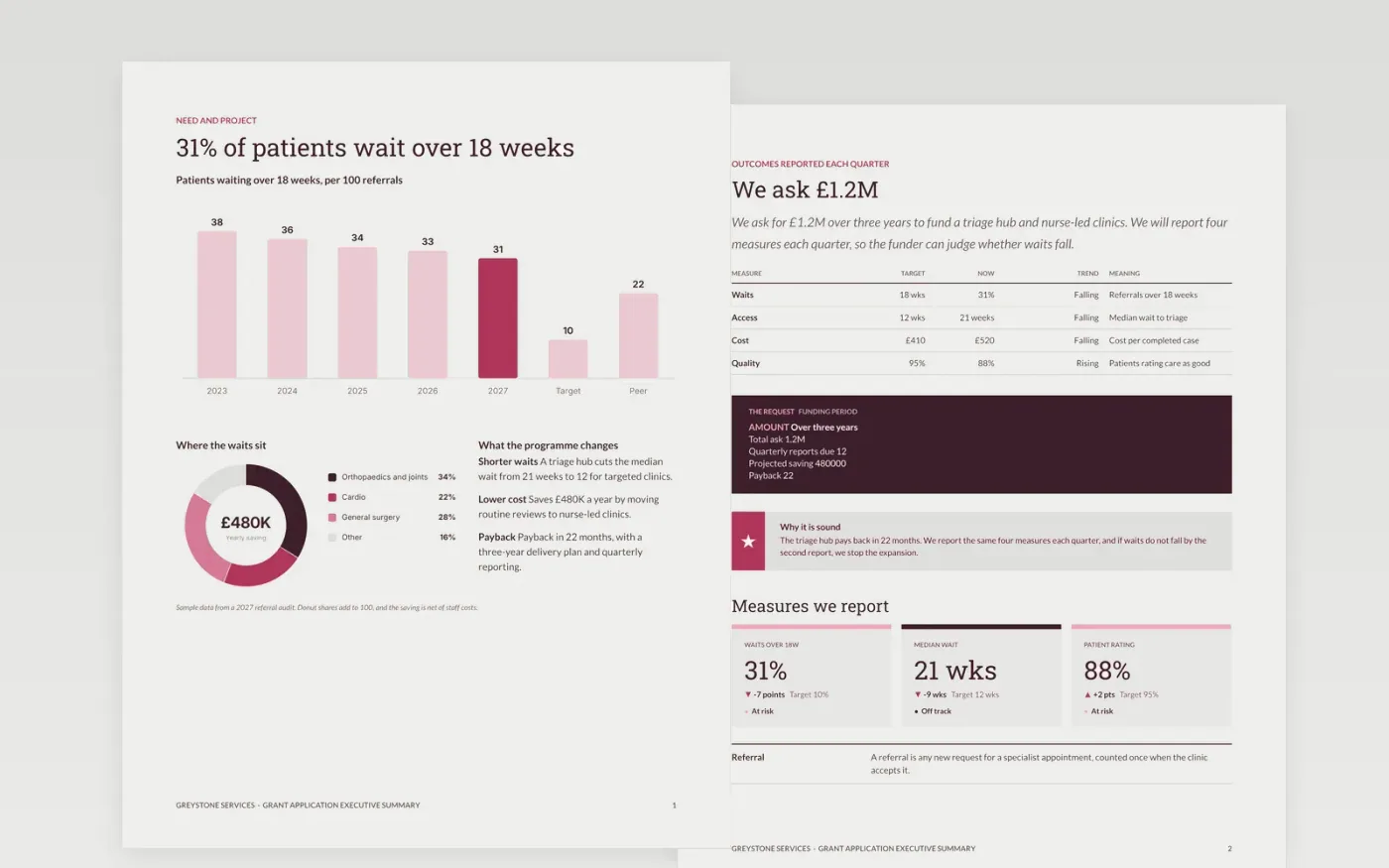
A funder reads the executive summary first and decides from it whether to open the full application. This template gives that reader the need, the project, the measures the charity will report and the amount requested, in a page a board member can read in two minutes. It runs across three pages: the need and the project with a trend chart, the outcomes with a service-level scorecard and the request band, and a guide page. It stands alone without the full document behind it.
The sample shows Greystone Services asking for £1.2M over three years to fund a triage hub and nurse-led clinics, with 31% of referrals waiting over 18 weeks against a target of 10%. Replace the need and the figures with your own audited data, set the measures you will report each quarter, and check that every number matches the full application. Every clinic, figure and name in this sample is fictional.
Click Make a copy in Google Docs, then confirm on the Google page. The copy is saved to your own Google Drive.
Replace the need heading and the trend figures on page one with your own audited data and the date they cover.
Set the measures, targets and the amount requested on page two, and check each one against the full application.
Read the summary aloud in under two minutes, then cut any sentence that the full application does not support.
Delete the guide page, then send the summary to the funder as a cover sheet or present it to the board.
Keep it to one page, roughly 350 to 500 words, with three or four key numbers. A funder should be able to decide from it whether to read the full application.
No. Greystone Services, its clinics, the patient figures and the request are fictional sample data, written to show what a finished grant executive summary looks like.
Yes. Every number in the summary must appear in the full application with the same value and date. Check them together before you send either document, because a mismatch undermines the whole request.
More Google Docs templatesMore business operations templates
Docs + Word4 pages
Free
Docs + Word4 pages
Free
Docs + Word3 pages
Free
Slides + PowerPoint11 slides
Free
Slides + PowerPoint10 slides
Free
Docs + Word3 pages
Free
Slides + PowerPoint11 slides
Free