Company Magazine
Docs + Word7 pages
Free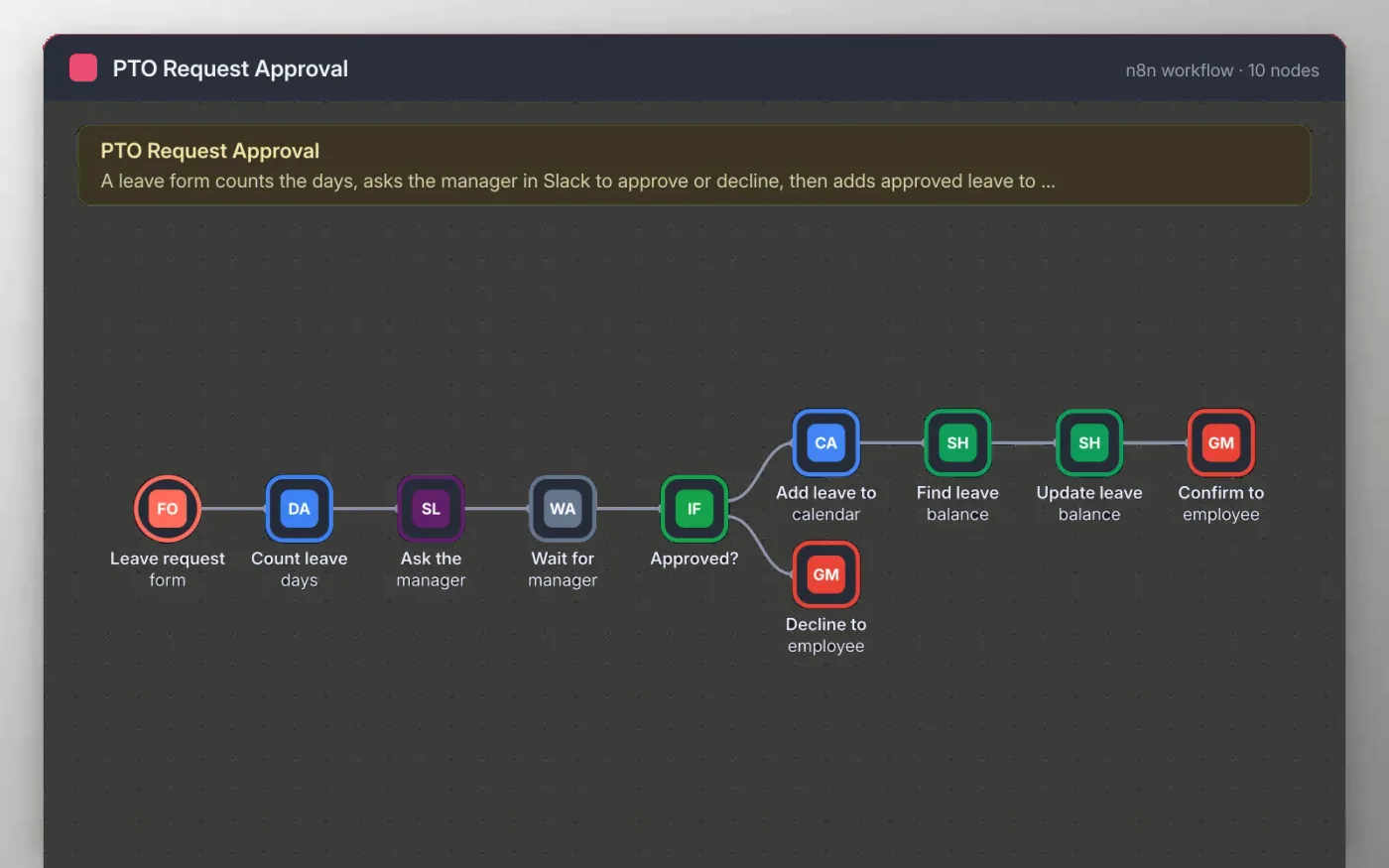
An employee submits a leave form with the type and dates. The workflow counts the days, including both ends, and posts the request to a Slack channel with Approve and Decline links for the manager.
When the manager clicks a link, approved leave is added to the calendar and the days are added to the employee balance in a sheet. The employee receives an email either way. Connect your own accounts before testing.
Download the workflow JSON.
In n8n, choose Import from File and select the JSON.
Connect Slack, Google Calendar, Google Sheets and Gmail on the nodes the sticky note names.
Submit a test request and approve it from the Slack message.
Activate the workflow and share the leave form with your team.
Yes. Download the JSON and import it into your own n8n. There is no sign-up and no cost for the template.
No. The file has no keys or tokens. You connect your own Slack, Google and Gmail accounts after importing.
Yes. On Ask the manager, change the destination from a channel to a direct message to the manager, using the manager email field from the form.
Docs + Word7 pages
Free
Docs + Word21 pages
Free
Slides + PowerPoint16 slides
Free
n8n
Free
n8n
Free
n8n
Free