
Company Magazine
Docs + Word7 pages
Free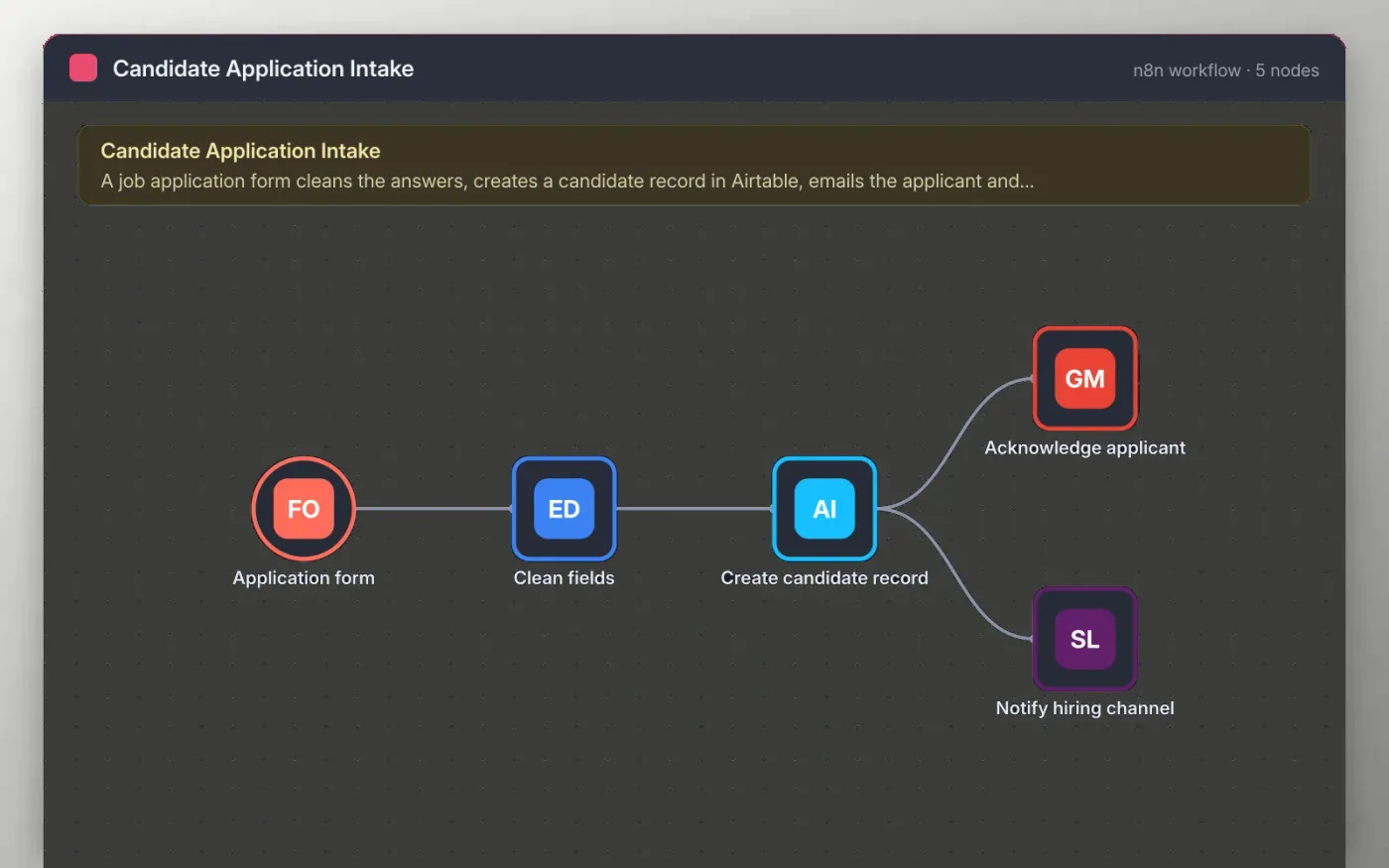
Candidates fill in a short application form with their name, email, the role they want and a CV link. The workflow trims the name, lowercases the email and stamps the time the application arrived.
The cleaned record is saved as a new candidate in Airtable. The applicant gets an acknowledgement email and the hiring channel gets a Slack message with the role and CV link. Connect your own accounts before you test it.
Download the workflow JSON.
In n8n, choose Import from File and select the JSON.
Connect Airtable, Gmail and Slack, and pick your base, table and channel.
Submit a test application from the Application form.
Activate the workflow and link the production form from your careers page.
Yes. Download the JSON and import it into your own n8n. There is no sign-up and no cost for the template.
No. The file has no keys or tokens. You connect your own Airtable, Gmail and Slack accounts after importing.
Yes. Change the CV link field to a file upload type and map the file URL to the Airtable attachment field.
Docs + Word7 pages
Free
Docs + Word21 pages
Free
Slides + PowerPoint16 slides
Free
n8n
Free
n8n
Free
n8n
Free








