
Access Card Request Letter
Docs + Word2 pages
Free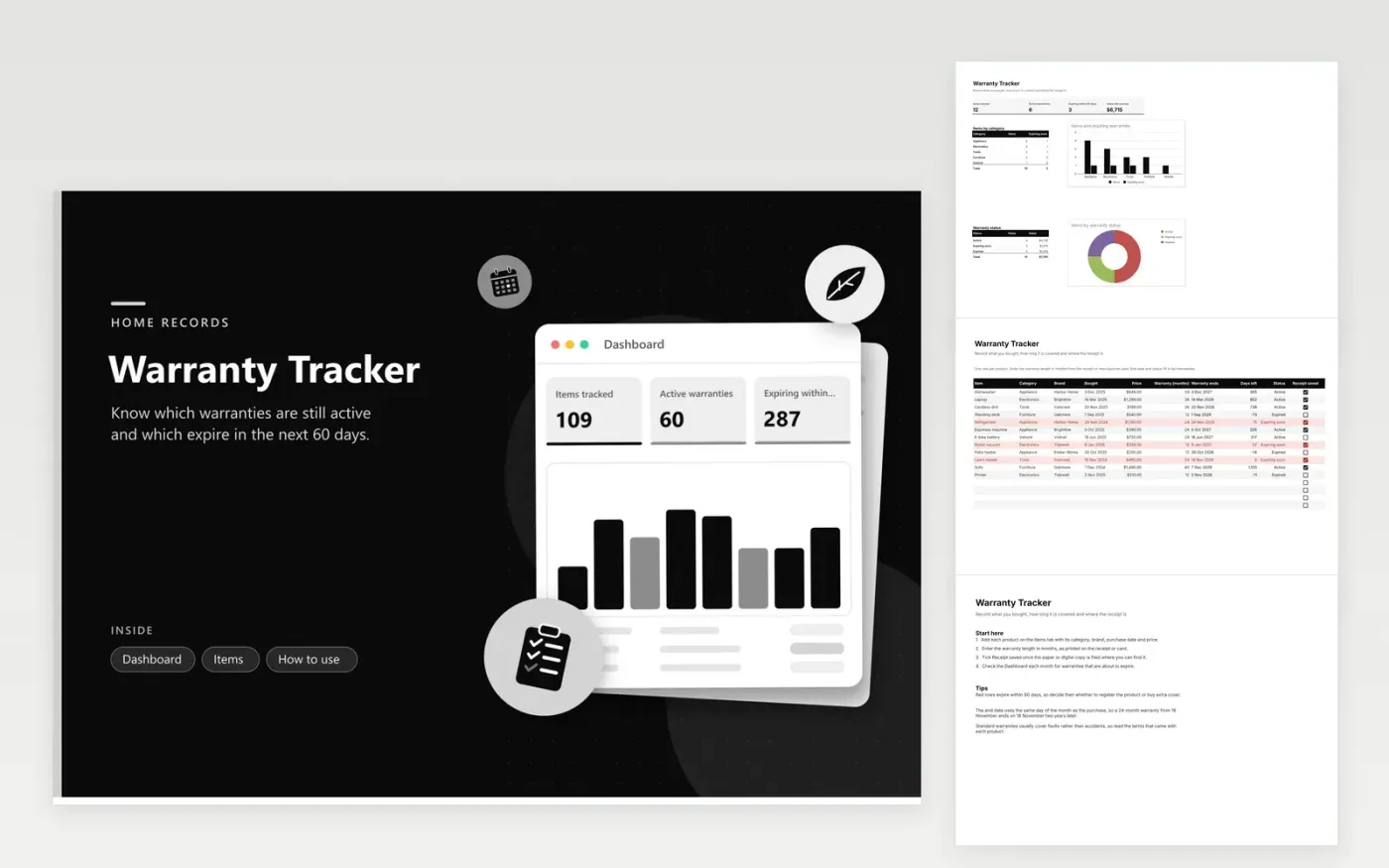
Households, landlords and small offices that keep track of appliances, electronics, tools, furniture and vehicle parts can use this register. The Dashboard shows items tracked, active warranties, warranties expiring within 60 days and the value still covered, with a column chart by category and a doughnut chart of status. The Items tab records the purchase date, price, warranty length in months, the calculated end date, days left, status and a receipt checkbox for each product.
Enter the warranty length exactly as the receipt or the manufacturer card states it. Tick Receipt saved once a copy is stored where you can retrieve it quickly. Rows that expire within 60 days turn red, so review them every month and decide whether to register the product or buy extra cover. Consumer protection rules in your area can apply beyond the written warranty, so check them before you assume a claim is refused.
Click Make a copy in Google Sheets, then confirm on the Google page. The copy is saved to your own Google Drive.
Start on the Items tab: replace the sample rows with your own.
Keep the formula columns as they are; they fill in as you type.
Read the How to use tab for tips. For Excel, download the .xlsx file instead.
The end date adds the warranty months to the purchase date, landing on the same calendar day. A purchase on 18 November with a 24-month warranty ends on 18 November two years later. Days left subtracts today's date from that end date.
Any warranty with 60 days or fewer left shows Expiring soon, and the Dashboard counts it. To change the window, edit the 60 in the status formula on the Items tab, for example to 90 days for longer-lead planning.
Usually not. A manufacturer warranty normally covers faults in materials and workmanship, while accidental damage often needs a separate protection plan. Read the terms that came with the product, since each one sets its own rules.
More Google Sheets templatesMore business operations templates
Docs + Word2 pages
Free
Docs + Word2 pages
Free
Docs + Word2 pages
Free
Sheets + Excel4 tabs
Free
Sheets + Excel4 tabs
Free
Sheets + Excel5 tabs
Free
Sheets + Excel5 tabs
Free
Docs + Word2 pages
Free
Docs + Word2 pages
Free
Docs + Word2 pages
Free
Docs + Word2 pages
Free
Docs + Word2 pages
Free
Docs + Word2 pages
Free
Docs + Word2 pages
Free
Docs + Word2 pages
Free










