
Annual Report
Docs + Word6 pages
Free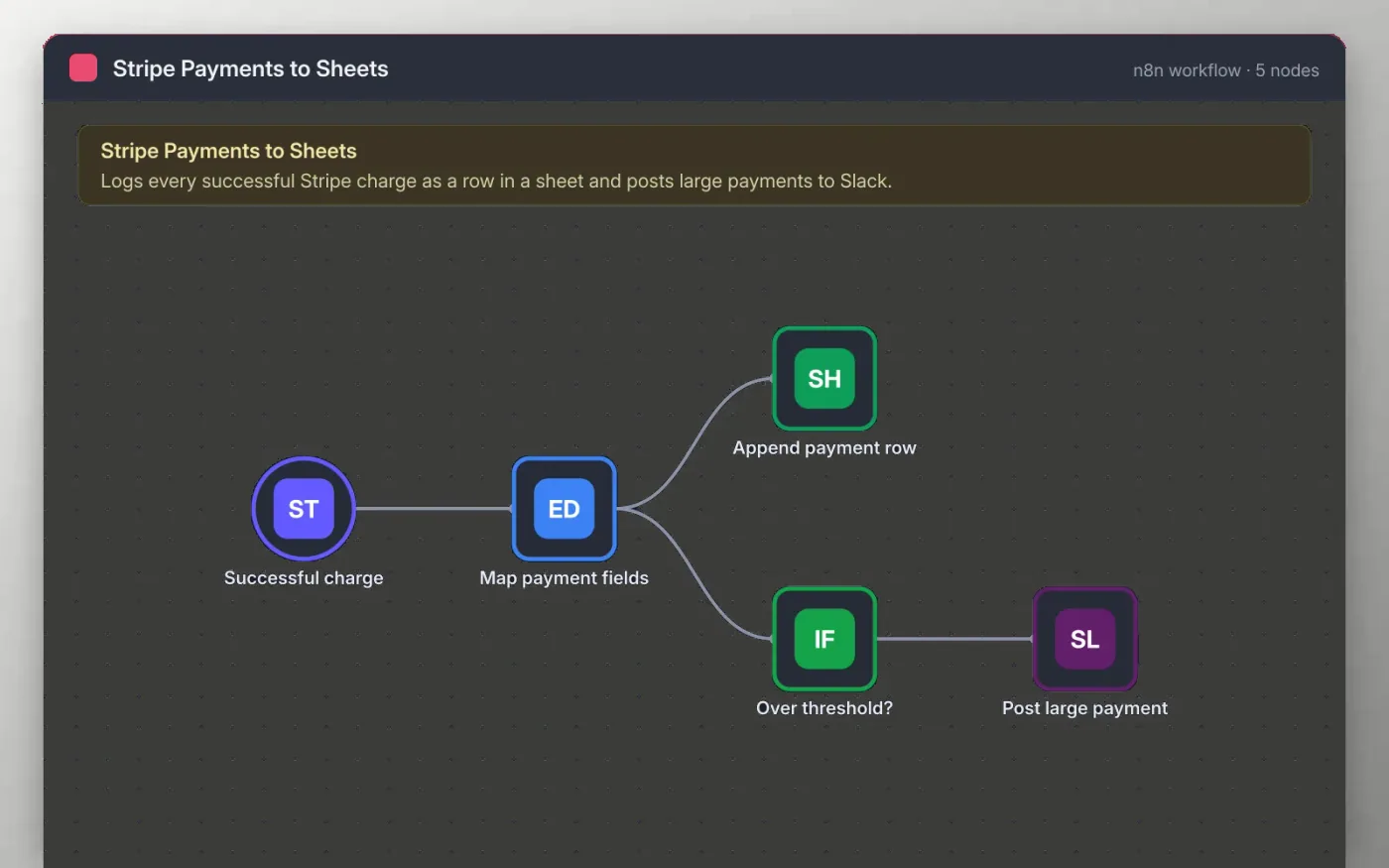
This workflow listens for successful charges in Stripe. Each one is tidied into a simple record with the amount in whole currency units, the currency code, the customer email, the date and the charge ID.
Every record is added as a new row in your sheet. Payments above the threshold you set are also posted to Slack, so the team sees large sales as they happen. Connect your own accounts to start; the file contains no keys.
Download the workflow JSON.
In n8n, choose Import from File and select the JSON.
Connect Stripe on Successful charge and copy the webhook URL into your Stripe webhook settings.
Connect Google Sheets and Slack on the nodes the sticky note names, and set the threshold.
Make a test charge in Stripe test mode, check the new row, then activate the workflow.
Yes. Download the JSON and import it into your own n8n. The template itself has no cost.
No. You connect your own Stripe, Google and Slack accounts after importing.
Yes. Add a second Stripe trigger for charge.refunded and connect it to the same Append payment row node.
Docs + Word6 pages
Free
Excel
Free
Sheets + Excel4 slides
Free
n8n
Free
n8n
Free
n8n
Free
n8n
Free
n8n
Free







